
Phased Cabling Upgrade: How to Plan It for an Occupied Office

A phased cabling upgrade breaks one large network infrastructure project into smaller, separately accepted stages. Each stage is surveyed, installed, tested, documented and cut over before the next begins. For an office that cannot stop working, this is usually the safest way to replace aging cable. Your staff keep their connections while the new plant is built beside the old one, one area at a time.
This guide is for IT directors, facilities managers, property managers and general contractors in New York City and the surrounding region. It covers how to divide the work, in what order, how to schedule cutovers, and what to test and document at the end of every phase.
TL;DR
- Survey and test the existing cabling first. You cannot split a project sensibly until you know what is in the walls, risers and closets.
- Build in layers: pathways and rooms, then backbone, then horizontal cabling, then terminations, testing and handover.
- Treat every phase as a deliverable that is inspected, certified, corrected and documented before the area is declared complete.
- Schedule disruptive cutovers after hours or on weekends, with written notice to the people affected and the old system kept live until the new one passes.
- Bring cabling into design coordination early, so pathways, penetrations and equipment rooms are not fighting other trades later.
What a phased cabling upgrade actually is
A phased upgrade divides the cabling scope by floor, department, building zone or system layer. Each part has its own schedule, test results and sign-off. The alternative, a single cutover of the whole office, concentrates risk in one weekend. If something fails, everyone is down.
Phasing works because of how structured cabling is built. Structured cabling is a standards-based infrastructure that organizes network cabling in buildings, across campuses and in data centers, and its layered, modular design supports growth without a complete redesign. Its modular subsystems also mean many changes can happen in only part of the system instead of requiring everything to be replaced at once. That property is what lets you upgrade the fourth floor this quarter and the sixth floor next quarter.
If you want a refresher on the components involved, our IT professional’s guide to structured cabling and our guide to structured cabling system components cover the terms used below.
When phasing makes sense, and when it does not
Phasing is the right call when:
- The office stays occupied during the work.
- The budget is released in stages, or the headcount is growing in stages.
- Different floors or departments have different business-critical windows.
- The existing plant is mixed: some runs are healthy and can be reused, others need to be pulled.
- Security or compliance areas must stay operational throughout.
A single-pass approach can be better for a vacant floor, a gut renovation or a new buildout where nobody is working in the space. In that case there is no live network to protect, and a short, compressed schedule is cheaper than staging. Our guide on planning a structured cabling office buildout covers that scenario.
Step 1: Assess what you already have
The most common mistake in a phased upgrade is scoping it from the ceiling tiles you can see. Start with a baseline.
The University of Idaho’s structured cabling standard asks contractors to establish a baseline of existing structured cabling and test it before working on new cables or relocating or modifying existing ones. The same standard requires existing cable damaged by the work to be repaired, unless its pre-existing failure was identified and accepted before construction began. That is a useful discipline for any office: a documented baseline protects you from arguments about who broke what.
What a baseline survey should record
- Telecom rooms and closets (MDF and IDF). Rack space, patch panel capacity, power, cooling, grounding, and the condition of cable management.
- Backbone. Riser pathways, fiber or copper type, and available spare capacity between rooms.
- Horizontal cabling. Cable category, jacket type, run length, termination quality, and whether each outlet and port is labeled.
- Pathways. Conduit, trays, J-hooks and sleeves: what is full, what has room, what is blocked by other trades.
- Abandoned cable. Runs that no longer connect to anything and are occupying pathway space.
- Test results. Pass and fail data for the runs you intend to keep.
- Firestopping. Penetrations that are sealed, open or undocumented. See our guides to firestopping for cables and NYC firestopping rules.
Our checklist for documenting existing cabling before renovation goes through this in more detail, and the office renovation cabling planning checklist shows how it feeds the project plan.
Sorting runs into keep, reinforce or replace
Once you have test results, sort each run into one of three groups:
- Keep: The run passes testing for the application you need, is labeled and sits in a sound pathway.
- Reinforce: The cable is fine, but the pathway, support, labeling or patching is not. Cleanup and re-termination may be enough.
- Replace: The run fails, is the wrong category for the planned load, or sits in a pathway that must be rebuilt.
This sorting is what makes phases possible. The replace group defines the physical work, the reinforce group is the lower-cost cleanup, and the keep group is the part you can leave alone. If you are planning for newer wireless gear, our article on WiFi 6E cabling explains why testing existing runs comes before choosing Cat6A.
Step 2: Choose a phasing strategy
There are three common ways to divide the work. Many projects blend them.
| Strategy | How it divides the work | Best for | Main risk |
|---|---|---|---|
| By layer | Rooms and pathways first, then backbone, then horizontal | Projects replacing most of the plant | Little visible benefit to users until later phases |
| By area | One floor, suite or department at a time | Occupied multi-floor offices | Backbone must be sized for the finished state from day one |
| By system | Data first, then WiFi, then security, then A/V | Staged budgets and mixed-use upgrades | Pathway congestion if later systems are not planned for |
Phasing by layer
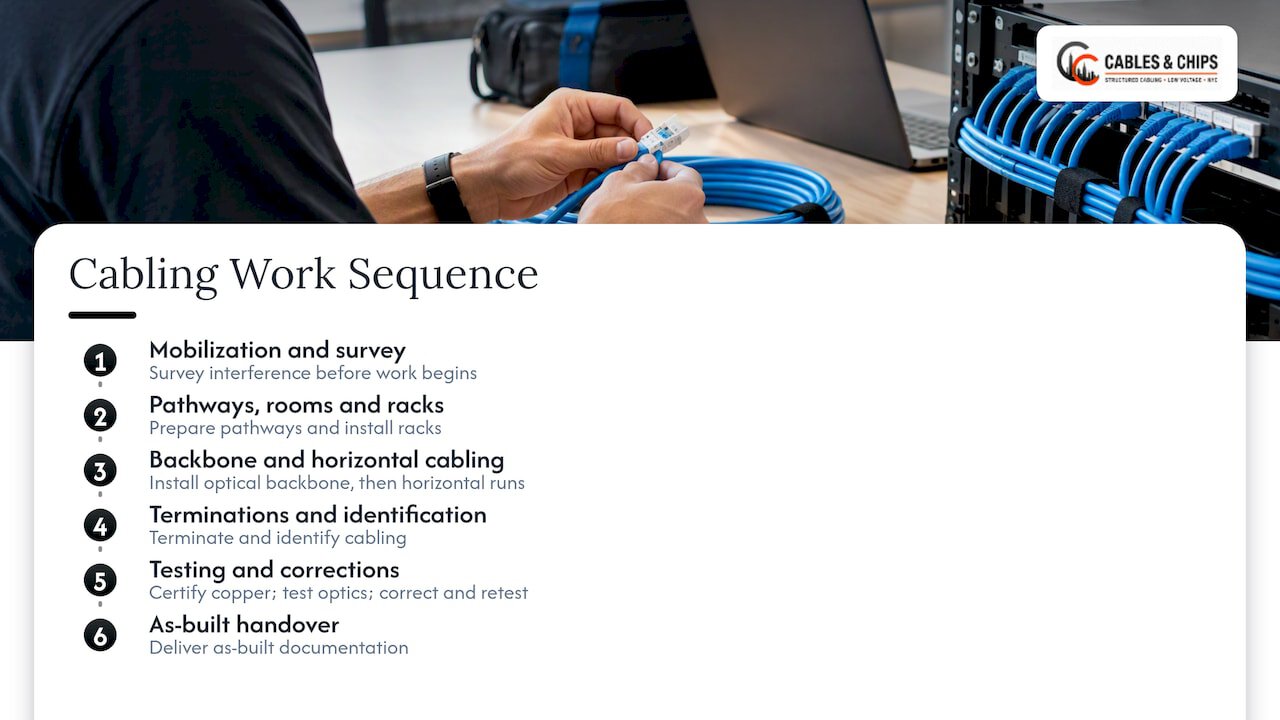
A useful work breakdown for structured cabling is the sequence of mobilization and interference survey, pathways, rooms and racks, optical backbone, horizontal cabling, terminations and identification, copper certification, optical tests, corrections and retests, and as-built handover. That order is logical because each step depends on the previous one: you cannot terminate in a rack that is not installed, and you cannot certify runs that are not terminated.
Phasing by area
The BICSI headquarters refresh is a published example of area phasing. The first phase installed the backbone between two telecom rooms and upgraded office connectivity, and a second phase handled a separate learning academy facility. The plan used a systematic cutover so daily business was not disrupted.
Note what happened first: the backbone. When you phase by area, install the backbone and telecom room work early and size it for the finished building. Otherwise you will revisit the risers every time a new area comes online.
Phasing by system
Some offices upgrade data cabling first, then add access points, then cameras and card readers. This is practical when budgets arrive in stages, but plan the pathways for every system up front. Adding CCTV cable to a tray that WiFi and data have already filled is the kind of surprise a survey prevents. See our guides on WiFi access point cabling plans, CCTV cabling for secure facilities and access control cabling requirements.
Step 3: Sequence the work with other trades
Cabling is rarely the only work in the space. Phase boundaries have to line up with demolition, electrical, mechanical, ceiling and finish work.
For renovations, one published checklist puts the cable-pull phase after demolition and rough mechanical and electrical work, but before drywall closure. Inspection happens before drywall closes, while terminations and equipment installation follow the finishes. Whatever your building’s specifics, the principle holds: pull cable while the pathways are open, terminate once the dust is gone.
Bring cabling into design coordination early
Wisconsin’s state telecommunications guidelines require that communications design coordinate with structural, civil, architectural, electrical and mechanical plans. That includes sleeves, openings, clearances, telecom room ventilation, cooling, power and lighting. It is a state facilities document, not a New York rule, but the logic applies anywhere: a telecom room without cooling or a riser without a sleeve cannot be fixed by the cabling contractor alone.
NIST’s Federal Information Processing Standard 174 makes a related point for federal office buildings. It says wiring design should be incorporated during preliminary architectural design, because installation during construction or major renovation is less disruptive and less expensive than after occupancy. It also states that the ANSI/EIA/TIA-568 standard applies to upgrading existing plant as well as new wiring. If your phased project overlaps with a renovation, that is the argument for bringing your cabling contractor to the first coordination meeting rather than the last.
Pathway responsibility
Pinellas County’s Division 27 specification makes the structured cabling installer responsible for verifying and advising the raceway installer on pathway routing and coordination. In practice, this means the cabling contractor should walk the pathways with the electrical and general contractors before conduit is set. Define who owns each sleeve, tray and penetration in writing.
Schedule discipline matters just as much as pathway discipline. If you manage several trades against a shared calendar, the principles of coordinating trades on schedule apply directly: each trade needs a defined handoff, an inspection point and a person who signs off before the next crew arrives.
Step 4: Plan the cutovers
A cutover is the moment users move from old cabling to new. It is where phased projects either prove their value or cause an outage. Plan it as its own task, not as the last hour of an installation.
Keep the old system live
A good rule is to leave existing systems operating outside the project area. Virginia Tech’s Division 27 specification requires exactly this, along with coordination with the project manager and other trades. The same document requires consent and seven working days’ advance warning before interruptions, and says critical-service disruptions should be done after hours or on weekends with preparations to minimize downtime. That is a university specification, so your building or tenant may set a different notice period, but it is a sound model to adopt.
A practical cutover sequence
- Build in parallel. Install and terminate new runs while the old ones remain in service.
- Certify before cutover. Never move users to a run that has not passed testing.
- Label both sides. Old and new ports should be clearly marked so patching mistakes are obvious.
- Notify early. Tell affected departments in writing what will change, when, and who to call.
- Cut over in a defined window. After hours or weekend, with a rollback plan and the old patching intact.
- Verify with users. Have someone from each affected team confirm phones, WiFi, printers, badge readers and cameras on the morning after.
- Retire the old cable later. Remove abandoned runs once the area is accepted, not during the cutover itself.
Voice and security systems deserve special care. Phones, door controllers and cameras are the first things people notice when they stop working. If VoIP is part of your upgrade, see our notes on VoIP installation and VoIP infrastructure cabling options.
Fiber backbone timing
If the plan includes a new fiber backbone, install and test it early in the project. It is the shared dependency for every later phase. Our fiber optic backbone office design guide and CAT6A vs fiber decision guide help decide what goes in the risers.
Step 5: Test, correct and document every phase
A phase is not finished when the last cable is pulled. It is finished when it is accepted. Research on structured cabling project management treats each phase as a verifiable deliverable, so progress is measured by accepted work packages rather than by cable length or labor hours. That is a better way to report to a stakeholder than “70% of the cable is pulled.”
A close-out routine for each phase
The University of Idaho standard describes a thorough sequence that works well as a template:
- Inspect before anything is concealed.
- Perform the required copper and fiber certification.
- Correct failures and retest.
- Submit electronic test data, including methods, settings, equipment and calibration details.
- Update labels, administration records, marked-up or as-built drawings, rack and port information and firestopping records.
- Obtain acceptance documentation before declaring the area complete.
All of that is from the University of Idaho structured cabling standard, which also requires post-work test results for structured cabling in the work area.
Virginia Tech’s specification adds a few hard rules. It requires pre-testing before final inspection, prohibits covering overhead work before inspection, and requires deficient work to be corrected and retested before final results are submitted. It also asks for a project schedule that covers installation, inspection and testing for each project area, so interim inspections can happen as work progresses. In a phased project, that is the schedule format to ask your contractor for.
Standards worth naming in the contract
ANSI/BICSI N1-2019 sets minimum installation requirements for telecommunications and ICT cabling infrastructure, including cabling supports, pulling cable, firestopping, terminations and installation verification. BICSI’s ITSIMM, now in its eighth edition, covers retrofits and upgrades, site surveys, coordination with other trades and cutover procedures, among other topics. Naming the standards you expect in the scope of work gives you a clear basis for acceptance.
For more on how certification works and what your IT team should receive, read our guides on cable testing certification and as-built documentation.
Acceptance checklist per phase
| Item | What you should receive |
|---|---|
| Test results | Electronic copper and fiber certification data for every run in the phase |
| Retest record | Evidence that failures were corrected and retested |
| Labels | Consistent labeling at outlet, patch panel and rack |
| Drawings | Marked-up or as-built floor plans and rack elevations |
| Port records | Updated patch panel and switch port mapping |
| Firestopping | Records of each penetration sealed |
| Sign-off | Written acceptance from you or your representative |
A sample phased plan for a multi-floor office
Here is how these pieces can fit together for a three-floor office that stays open throughout. This is an illustration of the method, not a client case or a quoted schedule.
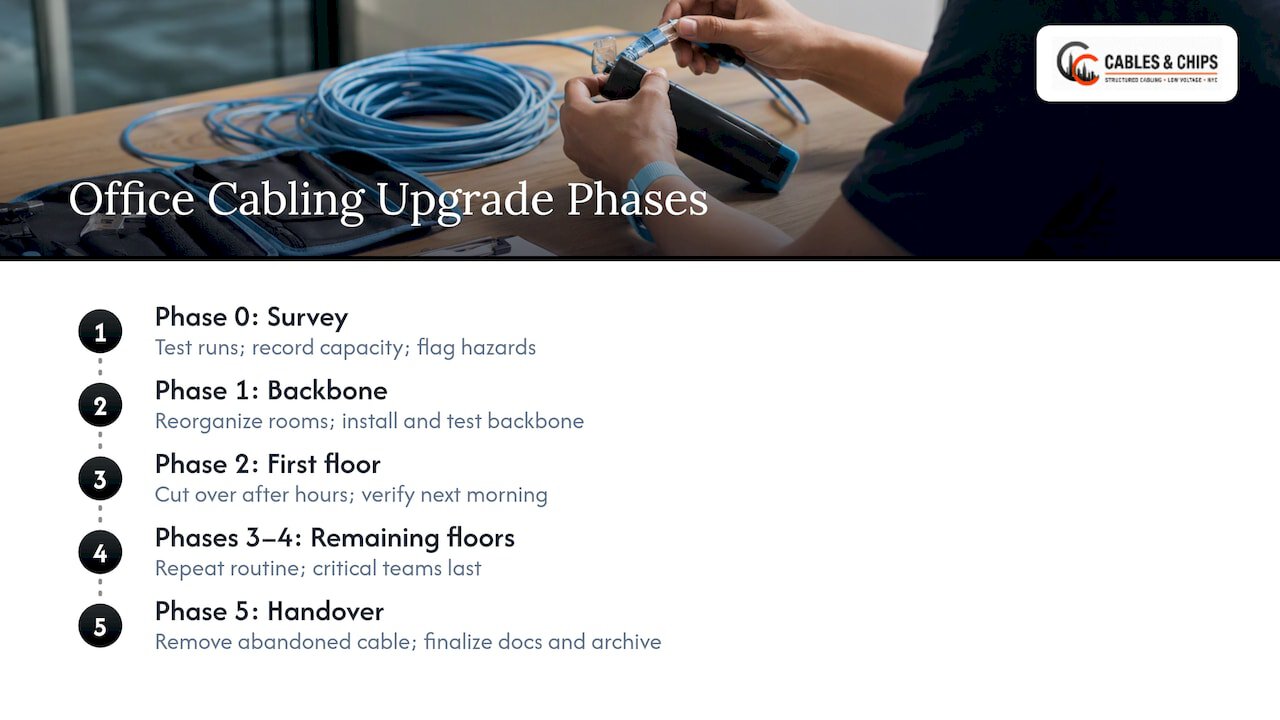
Phase 0: Survey and baseline. Walk every floor and the telecom rooms. Test the existing runs, record pathway capacity, flag abandoned cable and open firestop penetrations. Produce a keep, reinforce and replace list.
Phase 1: Rooms, pathways and backbone. Clean up and reorganize the MDF and IDFs, add racks and cable management where needed, repair or add pathways, and install and test the new backbone. Nothing changes for users yet.
Phase 2: First floor. Pull, terminate and certify horizontal runs for the least critical department. Cut over in an after-hours window. Verify the next morning. Use what you learn to refine the process.
Phase 3 and 4: Remaining floors. Repeat the same routine, with the most business-critical teams last, once the process is proven.
Phase 5: Cleanup and handover. Remove abandoned cable from accepted areas, finalize drawings and documentation, and deliver the complete test archive.
Starting with the least critical area is a judgment call, not a rule, but it gives the team a low-stakes rehearsal for the cutover steps.
Common mistakes in phased upgrades
- Skipping the baseline. Without pre-work test data, a failing legacy run becomes a dispute.
- Undersizing the backbone. If phase 1 is sized for today’s floor only, phase 4 means reopening the risers.
- Closing ceilings before inspection. Concealed work that has not been inspected is costly to open back up.
- Mixing old and new labeling. Two schemes in one rack leads to patching errors and slow troubleshooting.
- Leaving documentation to the end. Update records at the close of each phase, while the details are fresh.
- Ignoring firestopping. Every new penetration needs to be sealed and recorded. See our guide on preventing inspection failures.
- Cutting over untested runs. If a run has not been certified, it does not go live.
Perspective: what we have learned doing this in New York offices
Our view is simple: a phased upgrade succeeds or fails on the first two weeks, before any new cable is pulled. We have more than 40 years of experience in commercial environments in New York City, and the projects that run cleanly are the ones where the existing plant was surveyed, tested and documented up front.
We also hold firm that no phase is finished until it is tested and documented. Clean, labeled, certified work is easier for your IT team to support, easier for the next contractor to extend, and easier for building management to inspect. That is why we treat the as-built package as part of the work, not as an extra.
In Manhattan buildings, access, freight elevators and after-hours rules often shape the schedule as much as the technical plan. We recommend you raise them with your building management early and build them into the phase boundaries. Your network is only as strong as the infrastructure behind it, and a phased plan lets you strengthen that infrastructure without stopping the business.
— Ken
How we can help with a phased upgrade
Cables & Chips is a licensed and insured low voltage contractor at 20 Vesey Street in Lower Manhattan. We design, install, test and document structured CAT6 and CAT6A cabling, fiber, WiFi cabling, CCTV and access control cabling, and we clean up MDF and IDF rooms and remove abandoned cable. We start with a no-obligation site survey, which gives you the baseline that a phased plan depends on.
See the full list on our services page, look at NYC project examples, or read about our corporate headquarters network infrastructure project. For the broader renovation picture, our network infrastructure renovation best practices and top cabling solutions for office renovation are good next reads. When you are ready, schedule a site survey and we will help you define the phases.
FAQ
Can a network cabling upgrade be done while people are working?
Yes, in most offices. New runs are installed and certified in parallel with the live network, and only the cutover needs a short window, usually after hours or on a weekend. Keeping existing systems running outside the work area is a standard requirement in published specifications.
How many phases should a cabling upgrade have?
There is no fixed number. A common pattern is a survey phase, a rooms and backbone phase, one or more floor or department phases, and a cleanup and handover phase. Let the number of floors, the criticality of each team and your budget release dates decide the count.
What should be tested after each phase?
Every new copper and fiber run in the phase should be certified, with failures corrected and retested. You should also receive the electronic test data, updated labels, drawings, port records and firestopping records before the area is accepted.
Should old cabling be removed during the upgrade?
Usually not during the cutover. Keep the old runs available until the new ones are certified and users are confirmed working, then remove abandoned cable once the area is accepted. That keeps a fallback in place and frees pathway space afterward.
What is structured cabling and why does it help phasing?
Structured cabling is a standards-based, modular cabling system that organizes network connections across a building. Because its subsystems are modular, changes can be made in one part without replacing the whole system, which is what allows an upgrade to proceed in stages.
Sources
- Structured Cabling Project Management: Scope, Quality and Delivery
- Telecommunications Guidelines, State of Wisconsin
- Division 27 Section 27 10 00, Pinellas County
- BICSI ITSIMM, 8th Edition
- BICSI Project Refresh case study
- Office Renovation Cable Install Checklist
- Virginia Tech Division 27 Specifications
- NIST FIPS Publication 174
- University of Idaho Structured Cabling Standard
- ANSI/BICSI N1-2019
- CommScope: Enterprise Networks Structured Cabling
- CommScope: Structured Cabling Systems Fact File