
WiFi 6E Cabling: Test Existing Runs Before Choosing Cat6A
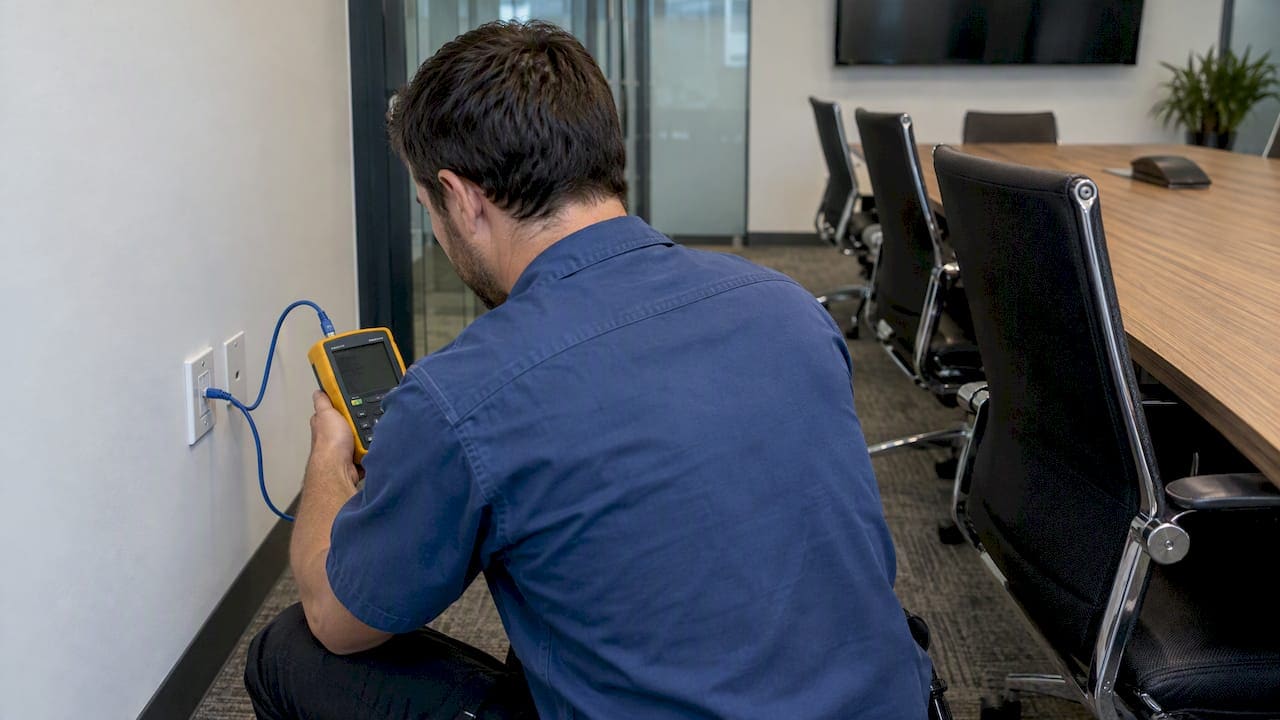
Most Cat5e cabling will pass a basic 1 Gbps link but cannot reliably guarantee the multi-gig speeds or high PoE loads that Wi-Fi 6E access points often need. Cat6 can sometimes reach 2.5G or 5G on short runs, but it is not a dependable choice for consistent 10G performance. Cat6A is the professional standard we recommend for full Wi-Fi 6E throughput and power delivery, and the first move for any facility or IT team should be to test existing links and check AP uplink and PoE specs before assuming the cabling already in the walls will do the job.
TL;DR:
- Keep existing Cat5e or Cat6 only when the AP needs 1 Gbps and standard PoE, and certified testing confirms the link meets requirements.
- Short Cat6 runs may negotiate 2.5G or 5G through multi gig Ethernet, but certify them because length and termination affect reliability.
- Install at least two Cat6A runs per AP, with up to four for high density or future spectrum partitioning, because later ceiling access costs more.
- For high draw APs, match switch multi gig ports and total power budget to the datasheet’s PoE class, using Type 4 draw figures when budgeting.
- Links shorter than 10 meters need special test adapters and careful termination, or certification may falsely flag Cat6A runs near access points.
Immediate checklist: what to check on your existing cabling and APs
Before scheduling an upgrade or a full recable, a short inspection tells you most of what you need to know. These checks take an afternoon and prevent a costly guessing game later.
- Confirm the cable category printed on the jacket, since mixed installations from different years are common in older office buildings.
- Inspect patch cords and terminations at both ends: a Cat6A run can underperform if it ends in Cat5e patch cables or poorly terminated jacks.
- Measure the end-to-end channel length, including any long patch cord runs in the telecom closet that count toward the 100 meter limit.
- Check the AP datasheet for required uplink speed and PoE class, then test the existing link’s negotiated speed and confirm PoE is actually available at that port.
Many Wi-Fi 6E access points are built to require multi-gigabit uplinks of 2.5G or 5G and higher PoE budgets to hit their rated throughput, according to Wi-Fi 6E guidance from TP-Link. That single fact drives most of the decision tree below.
The decision generally splits three ways. If an AP only needs 1 Gbps and standard PoE+, existing Cat5e or Cat6 may be enough once tested. If you are seeing 2.5G or 5G negotiate successfully on short Cat6 runs, you can often patch and certify rather than replace. If the AP calls for 5G or 10G uplinks with PoE++ power classes, plan on Cat6A.
How Cat5e, Cat6, and Cat6A perform for Wi-Fi 6E: speeds, distances, and noise immunity
The category differences matter more with Wi-Fi 6E than with earlier Wi-Fi generations, because 6E opens roughly 1,200 MHz of additional spectrum in the 6 GHz band, which IEEE’s overview of Wi-Fi 6 Extended explains is intended to reduce interference and raise throughput in dense deployments. More channels and higher spatial stream counts on the radio side translate into heavier demands on the wired side.
Each category has a practical ceiling:
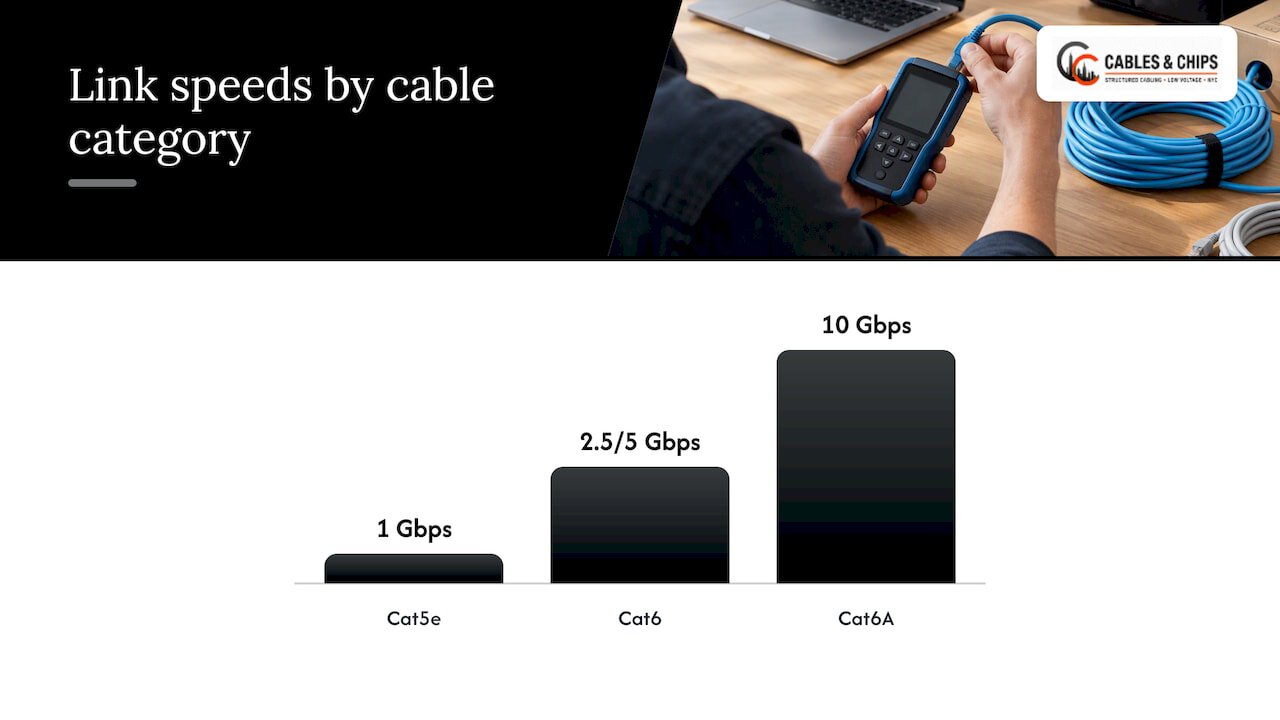
- Cat5e reliably carries 1 Gbps and can sometimes negotiate NBASE-T speeds, but performance is inconsistent and length-sensitive.
- Cat6 often supports 2.5G or 5G on shorter runs, generally under moderate distances, but cannot guarantee 10G across a full 100 meter channel.
- Cat6A is rated for 10GBASE-T across the full standard channel length and is built with tighter twist rates and better shielding to control alien crosstalk.
Bandwidth headroom is part of the story. Cat6A is rated to higher bandwidth than Cat6, and that extra margin helps control alien crosstalk between adjacent cables, something that matters more as APs use wider 6 GHz channels and more spatial streams simultaneously. The NBASE-T Alliance’s best-practice guidance for wireless access points confirms that Category 6A supports NBASE-T speeds and 10GBASE-T to 100 meters, and the same guidance recommends running multiple Cat6A links per AP specifically to support high-speed backhaul and PoE together.
Heat matters as much as signal integrity. Cat6A’s construction, including thicker conductors and often better separation between pairs, helps dissipate the heat generated when many PoE circuits run through a bundled cable tray. Thermal derating is a real concern at higher PoE classes: bundling and ambient heat reduce current-carrying capacity, which can push a marginal Cat5e or Cat6 installation beyond safe operating limits under heavy PoE load.
| Scenario | Likely cable fit |
|---|---|
| Single AP, 1G uplink, standard PoE+ | Cat5e or Cat6, test to confirm |
| Moderate density, 2.5G/5G uplink, short runs | Cat6, test and certify before relying on it |
| High density or PoE++ power needs, 10G uplink | Cat6A, standard recommendation |
| Enterprise remodel with long-term growth plans | Cat6A, two or more runs per AP |
What the switch and power side must deliver (NBASE-T, multi-gig ports, and PoE++)
Cabling only tells half the story. The switch on the other end has to speak the same language and deliver enough power, or a perfect Cat6A run will still underperform.
NBASE-T is the technology that lets a 2.5G or 5G link negotiate over existing Cat5e or Cat6 cabling instead of requiring a full 10G-rated channel. It is a useful bridge, but the NBASE-T Alliance’s wireless access point white paper notes that the reliability of those negotiated speeds depends heavily on cable quality, termination, and run length. A marginal cable will often fall back to 1G rather than fail outright, which can mask a problem until the AP underperforms under load.
A few things to confirm on the switch side:
- Read the AP datasheet for both required link speed and PoE class (802.3at versus the newer 802.3bt Type 3 or Type 4).
- Choose switches with enough multi-gig ports to match your AP uplinks, not just a handful of 10G uplinks shared across dozens of 1G access ports.
- Calculate the switch’s total power budget against the number of high-draw APs you plan to power, with margin for growth.
- Consider dual uplinks for critical AP locations if the switch and cabling plan support redundancy.
Pro Tip: When budgeting PoE, use the IEEE 802.3bt Type 4 draw figures from the AP’s datasheet, not the lower Type 3 numbers, even if the AP currently ships configured for Type 3.
Routing and bundling choices on the power side effect the cabling choice too. Large bundles of cables all carrying high PoE loads generate more collective heat than the same cables run with air space between them, which is one more reason Cat6A’s thermal margin matters for commercial deployments.
Installer best practice: how many runs and which cable to install per AP
For new construction, the standard professional recommendation is straightforward and worth following even when it feels like overbuilding.
- Run a minimum of two Cat6A drops to every AP location to support link aggregation, redundancy, or a future second radio.
- Consider four drops per AP location in high-density deployments or where future spectrum partitioning across more radios is likely.
- For retrofits with available budget, replace existing runs with Cat6A rather than patching around a marginal Cat6 link.
- Where budget is tight, test existing cabling first and upgrade selectively in the highest-density zones rather than the whole floor.
- Route cable in dedicated pathways separated from power conduit and avoid tight bundling where multiple high-PoE runs share a tray.
Industry guidance backs the two-drop minimum directly. Panduit’s white paper on Wi-Fi 6E’s impact on cabling design recommends at least two Category 6A cables per AP for new installs, with up to four when extreme density or spectrum partitioning is expected, and makes the cost case plainly: pulling additional cable at construction time costs far less than coming back later to open walls and ceilings for a second run.
Pro Tip: Label and document every drop at the time of installation, including which jack feeds which AP location, so a future upgrade or troubleshooting call does not start with tracing cable by hand.
Our structured Cat6 cabling installation projects follow this same logic: plan for the AP the building will have in three years, not just the one going up this quarter. For guidance on where to place those drops in the first place, our AP cabling plan guide for IT managers walks through outlet placement and drop counts in more detail.
Field testing: what to test, which tools to use, and pitfalls to avoid
A cable that looks right and tests right are two different things, and only testing settles the question. Certification measures several parameters together because a failure in any one of them can degrade a multi-gig or PoE link.
- Wire map confirms every pair is terminated to the correct pin, catching split pairs that pass a quick continuity check but fail under load.
- Insertion loss measures how much signal strength the cable loses over its length, which matters more as speed increases.
- NEXT and PS ANEXT measure crosstalk between pairs in the same cable and between adjacent cables, both of which affect multi-gig reliability.
- Return loss and resistance unbalance catch impedance mismatches and termination quality issues that other tests can miss.
Certified field testers such as the Fluke Networks DSX, DTX, or Versiv series are the standard tools for proving a link meets Cat6A or 10GBASE-T limits, and Fluke’s own guidance on short Category 6A permanent links flags a specific pitfall: links shorter than 10 meters need special test adapters and careful termination technique, or they can produce marginal or failing results that do not reflect the cable’s actual performance. This comes up constantly in AP cabling, where a jack sits just above a ceiling tile a few feet from the AP itself.
A certified test report, not a jacket label or a visual inspection, is the only reliable proof that a channel will carry multi-gig traffic and support PoE under real load. Our Cat6 testing guide walks through the full testing sequence we run on every installation.
Practical decision flow: reuse, partial upgrade, or full recable
Weigh four factors before committing to a path: the performance you actually need from the AP, how hard it is to access the space above ceilings or inside walls, how much service life is left in the existing cabling, and your tolerance for downtime and budget.
- If APs only need 1G and standard PoE, keep existing cabling and confirm with a certified test.
- If some locations need 2.5G or 5G, test first and supplement with NBASE-T capable switches before pulling new cable.
- If density is high or PoE++ is required in specific zones, target Cat6A upgrades there rather than the whole floor.
- If the building is undergoing a larger remodel or the existing plant is near end of life, a full recable in Cat6A avoids repeating this decision in a few years.
Whatever path you choose, commission the work with certified test reports and keep documented as-built records. Our commercial Wi-Fi cabling best practices guide covers how to structure that documentation so the next technician who touches the closet isn’t starting from zero.
How we approach Wi-Fi 6E cabling projects
A typical Wi-Fi 6E cabling project process starts with a site survey and ends with a certified, documented network.
- Walk the space to inspect jacket markings, measure channel lengths, and test existing patch cords against the AP locations the design calls for.
- Certify every channel with field test reports covering wire map, insertion loss, NEXT, PS ANEXT, and return loss.
- Document results and propose the number of drops per AP based on density, PoE class, and growth plans.
- Deliver as-built records so facilities and IT teams have a clear map of what was installed and tested.
Your network is only as strong as the infrastructure behind it.
Clients get certified runs, documentation they can hand to an auditor or a future contractor, and a cabling plan built around the AP performance the space actually needs, not a generic assumption about what “should” work. With more than 40 years of combined experience in commercial New York City environments, our team treats the test report as the deliverable, not an afterthought.
Maintenance and troubleshooting tips for Wi-Fi 6E cabling in commercial offices
Cabling that passes certification at installation can still develop problems over time, especially in offices where ceiling work, furniture moves, or other trades disturb cable trays.
Watch for AP uplinks that intermittently fall back from 2.5G or 5G to 1G, which often points to a marginal termination or a patch cord swapped in during other maintenance work. Re-test the channel rather than assuming the AP itself is at fault. Keep a spare set of properly rated patch cords on hand, since a Cat5e patch cable plugged into a Cat6A run is a common and easily overlooked cause of degraded performance.
Review PoE draw periodically as APs get firmware updates or additional radios activated, since power needs can increase after initial installation. A switch port that delivered adequate power at commissioning may be undersized a year later if the AP’s configuration changed.
Keep the as-built documentation current. When a cable gets moved, relabeled, or replaced, update the record immediately rather than relying on memory. For coordinating these changes with other site teams during a larger fit-out, a tool like BRCKS’s site management platform can help keep cabling changes logged alongside other trade work. Finally, schedule periodic re-certification in high-traffic zones, particularly conference rooms and open work areas where cable disturbance is more frequent.
Why Cat6A is usually the right call for commercial sites
Cabling is the part of a network nobody thinks about until it fails, and by then the fix means opening walls or ceilings a second time. That is the real argument for Cat6A on commercial Wi-Fi 6E projects: it is not that Cat5e or Cat6 never works, it is that the cost of being wrong compounds. A marginal link that falls back to 1G under PoE load does not announce itself, it just quietly underperforms until someone investigates.
Testing settles arguments that guessing cannot. I have seen plenty of cable that looked fine, was labeled correctly, and still failed a certified test once the right adapter was used on a short run. Skipping that step to save a service call usually costs more later, in a return trip, a disrupted office, or an AP that never performs the way its datasheet promised.
— Ken
Get a certified cabling plan built for Wi-Fi 6E
If this checklist raised more questions than it answered, that is usually a sign it is worth having a site survey rather than guessing. We handle structured CAT6 and Cat6A cabling, testing and certification, and documentation for commercial offices, server rooms, and secure facilities across New York City, and we design each cabling plan around the AP density and PoE load the space actually needs rather than a one-size answer.
A typical engagement starts with a walkthrough of your telecom rooms and AP locations, followed by a written recommendation on how many drops per AP and which category fits your performance goals. From there we install, certify every channel with a test report, and hand over as-built documentation your team can use for years.
- Site surveys to assess existing cabling against your AP plan
- Cat6A installation sized to your density and PoE requirements
- Certified testing and documentation on every channel we install
Visit our services page to see the full range of structured cabling, testing, and network infrastructure work we handle, and request a site survey to get a cabling plan built around your actual Wi-Fi 6E requirements.
FAQ
What is the difference between Wi-Fi 6 and Wi-Fi 6E?
Wi-Fi 6E is an extension of Wi-Fi 6 (802.11ax) into the 6 GHz band, adding roughly 1,200 MHz of additional spectrum, according to TP-Link’s explanation of Wi-Fi 6E. That extra spectrum means less-congested channels and higher throughput potential in dense deployments, which is also why 6E access points tend to demand more from the wired network behind them.
Is all Cat6 cable 23 AWG?
Cat6 cable conductors can vary in gauge by manufacturer. Checking the manufacturer’s specification sheet for the specific cable on hand is the reliable way to confirm gauge rather than assuming it from the category label alone.
Is Cat6 cable faster than Wi-Fi?
A properly tested Cat6 link can support 2.5G or 5G speeds on shorter runs, which generally exceeds what most consumer Wi-Fi connections achieve in real-world conditions, though Wi-Fi 6E itself is designed for higher throughput in dense environments as explained in IEEE’s coverage of Wi-Fi 6E. The practical comparison matters less than making sure the cable backing the access point can carry whatever speed that AP needs to deliver.
Are Cat6 and LAN cable the same thing?
“LAN cable” is a general term for any Ethernet cable used to connect devices on a local network, while Cat6 refers to a specific category with defined performance standards. Cat6 is one type of LAN cable, alongside Cat5e and Cat6A, each with different speed and distance ratings.
Can my existing cabling support a Wi-Fi 6E access point?
It depends on the category, the termination quality, and the AP’s specific uplink and PoE requirements, which is why testing the existing link before installing a Wi-Fi 6E AP matters more than reading the cable’s jacket label. Cat6A is the cabling category we recommend when an AP requires multi-gig uplinks or higher PoE classes, since it is rated for 10GBASE-T across a full 100 meter channel.