
Intermittent Cabling Faults: How to Find and Fix Them
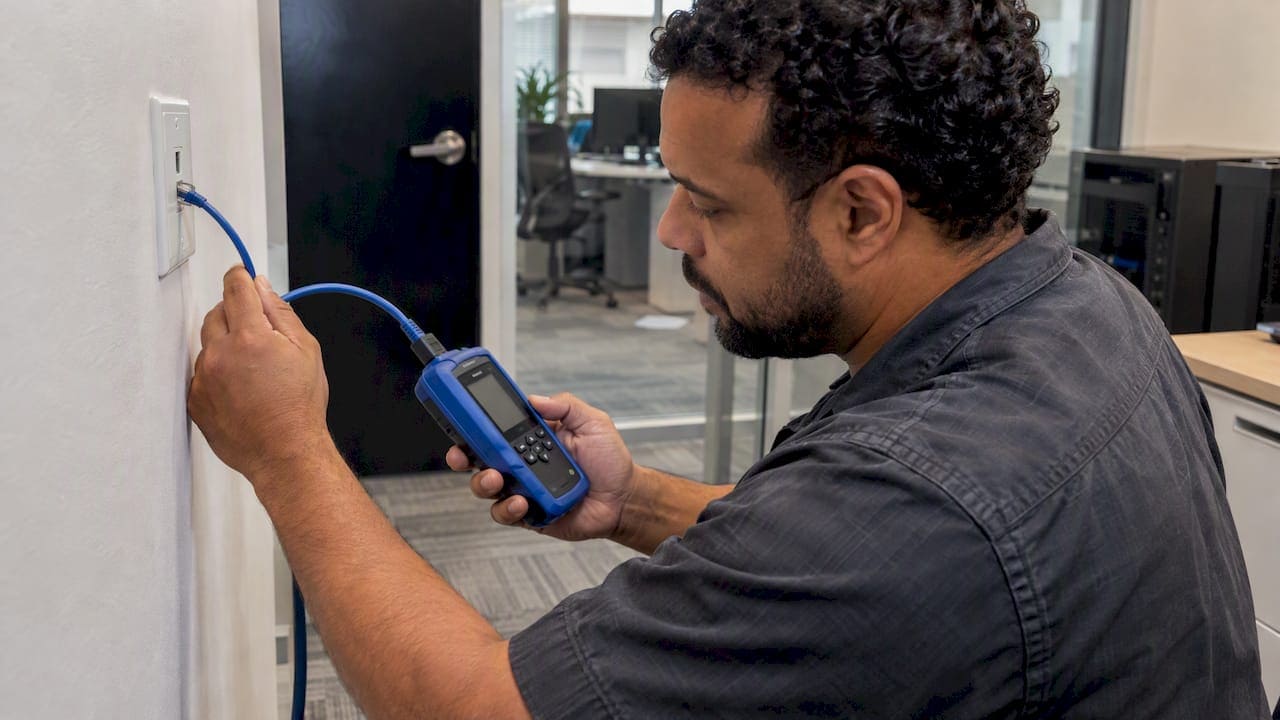
An intermittent cabling fault is a physical defect that shows up only under certain conditions: a door slams, a rack warms up, a cable gets nudged. It is the hardest kind of network problem to catch because the link looks healthy whenever you test it. The fix is rarely a reboot or a firmware update. You isolate the failing segment with switch data, test the fixed cabling separately from the patch cords, and repair or re-run what fails.
This guide is written for IT directors, facilities managers and office managers in commercial buildings. It covers what causes these faults, how to track them down, and when a repair stops making sense.
TL;DR
- Intermittent faults are open, short or ground faults that appear only under movement, vibration or temperature change, so a one-time test can pass.
- Switch syslog and interface counters (CRC errors, runts, giants, link flaps) tell you which port to investigate before anyone pulls a ceiling tile.
- Test the permanent link (the fixed cabling) on its own, and test patch cords separately. Patch cords are the most likely failure point.
- Never fix a failing link by forcing it to a lower speed. Re-terminate it or re-run it.
- Document every result so the next fault takes hours to find, not weeks.
What an intermittent cabling fault actually is
Physical wire failures fall into three categories: open circuits (a break in the conductor), short circuits (conductors touching that should not) and ground faults. When these happen sporadically, they are intermittent faults, and mechanical movement, vibration or thermal expansion often trigger them. The error state disappears once the stress is removed, which is exactly why the cable passes when someone finally tests it.
In a commercial office, that stress is everywhere. Raised floors flex. Cables in a ceiling plenum expand and contract with the building’s heating cycle. A desk is moved on Friday and a patch cord is tugged. A technician works in the telecom room and brushes a bundle. Each of these can move a marginal connection just far enough to break contact for a second.
The same fault can look like very different problems depending on what is running over the link:
- A video call that freezes for a few seconds, then recovers.
- A VoIP phone that reboots or drops registration at random.
- A wireless access point that disappears from the controller and comes back.
- A security camera feed with gaps in the recording.
- A file transfer that slows to a crawl, then speeds up again.
Performance complaints like laggy calls, slow transfers and unstable Wi-Fi are rarely just software problems. Cisco’s Ethernet troubleshooting guide points to physical layer degradation and interference as common causes, and says interface counters and syslog data can confirm it.
Symptoms that point to the cabling, not the network
Before you open a ceiling, look for the pattern. Cabling faults have a different signature from configuration errors.
| Symptom | What it suggests | First check |
|---|---|---|
| One port or one desk drops, neighbors are fine | Fault in that channel: patch cord, jack, punch-down or the horizontal run | Swap the patch cord, then check switch logs for that port |
| Drops correlate with movement, doors, cleaning crews | Loose termination or damaged conductor | Inspect the jack, patch panel and slack loops |
| Drops correlate with time of day or HVAC cycles | Thermal expansion on a marginal connection | Compare log timestamps with building schedules |
| Link negotiates a lower speed than expected | Damaged pair, poor termination or a bad cord | Run a wiremap and certification test |
| Error counters climb while the link stays up | Signal quality loss, interference or poor terminations | Read CRC and input error counters on the port |
| Link goes up and down repeatedly in the log | Link flap, a physical-layer problem | Isolate the cable, SFP and port, in that order |
A useful rule: if many users on one switch or one floor drop at the same moment, look upstream at the uplink, the backbone or the switch itself. If one user drops alone and repeatedly, start at the end of that channel.
The usual causes, ranked by how often we would check them
The most common causes of failures in twisted pair cabling are installation errors, poor-quality components and damage, and the same short list keeps coming up in the field.
Patch cords
Patch cords are treated as commodities, and they take the most abuse. They are plugged, unplugged, bent, stepped on and caught in chair wheels. Fluke Networks notes that patch cords are the most likely failure point in a channel, and recommends testing them separately. Swapping a suspect cord with a known-good, certified one is the cheapest test you can run. For help choosing and stocking them, see our guide to what a patch cord is and its key specs and the patch cord lengths that fit a rack.
Poor terminations
A punch-down that is not fully seated, conductors untwisted too far, or a jack wired to the wrong pattern can all hold up in a quick test and then fail when the cable moves. Termination faults often show as open circuits or shorts that come and go. PathSolutions explains that failing cabling first causes Ethernet symbol errors, which the chipset has to correct, before it starts to cause outright drops.
Installation damage
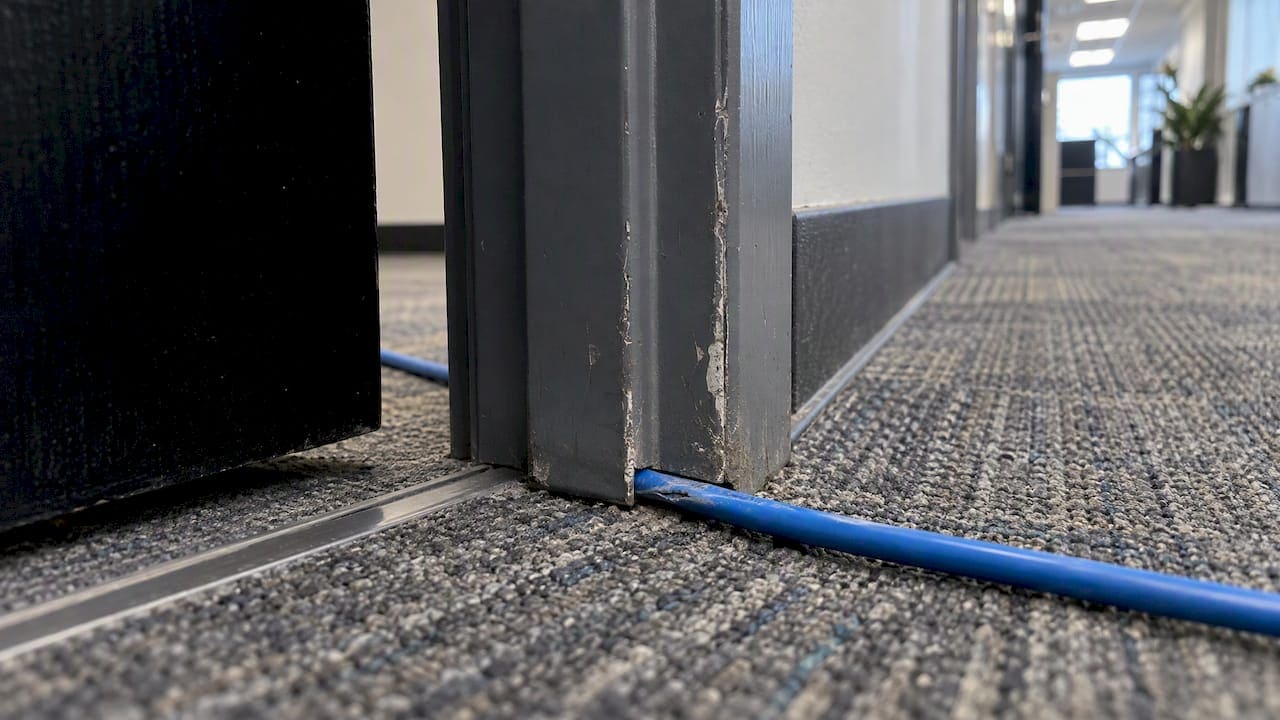
Excess pulling tension and ignoring the manufacturer’s minimum bend radius can permanently damage a cable. Fluke describes damage such as corkscrewing that may not be obvious at install time but degrades performance over time. Cables crushed under a cable tie pulled too tight, stapled, or pinched in a door frame or ceiling grid belong in the same category.
Overlength links
Standards limit the channel to 100 meters, including cords, and the permanent link to 90 meters. A run that exceeds those limits may work most of the day and fail when conditions change.
Interference and crowded pathways
Data cabling bundled tightly with power, or routed beside heavy electrical equipment, can pick up noise. Interference tends to raise the bit error rate, which raises packet loss, and the result looks like random disconnects. Clean pathways and separation are installation decisions, not troubleshooting ones, which is why they are so hard to fix after the fact.
Fiber and optics
For fiber links, dirty connectors, tight bends, and unsupported or damaged SFP modules are frequent suspects. Cisco’s guidance on link flapping says the usual causes include unsupported or damaged SFPs and non-standard cables. Clean and inspect before you replace.
Abandoned and unlabeled cable
Old cable left in pathways makes it harder to trace a bad run, and it adds weight and congestion that stress good cable. Unlabeled bundles in an MDF or IDF turn a ten-minute swap into an afternoon of guessing. Our overview of what happens with poor network cabling covers the wider cost.
How to track down an intermittent fault
Work from the data to the physical, and change one thing at a time.
- Write down the pattern. Record who is affected, which ports, and the times of the drops. Note anything that happens nearby: furniture moves, construction, HVAC schedules, cleaning crews.
- Read the switch logs. Syslog is the first line of defense for identifying which specific port is affected. Look for link up and down events on the suspect ports. Link flapping, defined by Cisco as a port going up and down three or more times a second for at least ten seconds, is a physical-layer indicator and not a configuration error.
- Check the interface counters. CRC errors, runts and giants that increase over time point to a signal-quality problem on that segment, even when the link never fully drops.
- Eliminate the cheap parts. Replace the patch cord at the desk and the patch cord at the panel with known-good, certified cords. Move the device to another port. If the problem follows the cord, you are done. If it follows the port, look at the switch. If it stays with the wall jack, look at the fixed cabling.
- Test the permanent link. Disconnect the cords and run a certification test on the fixed cabling from the jack to the patch panel. A tester that reports wiremap and length catches faults a basic continuity check will miss. A “fail short” on a tester means two conductors that should be isolated are touching, often because of insulation damage. Cisco’s guide notes that professional testers give wiremap and length data that basic checks do not.
- Stress the cable while testing. Because these faults depend on movement, gently flex the cable at the jack, the panel and any bend or pinch points while watching the tester or the switch log. A fault that appears when you move the cable has told you where it is.
- Repair or replace the failing segment, then retest. Record the new result.
Do not downgrade the link
A common shortcut is to hard-set a flaky port to a lower speed so the complaints stop. Practitioners warn that forcing a link to a lower speed leads to ongoing intermittent issues. If a link fails certification, re-terminate it or re-run it. A downgraded link is a fault you have decided to live with.
What link flap protection does and does not do
Switches can err-disable a flapping port, which stabilizes the rest of the network while you investigate. Cisco describes this as giving administrators time to find the root cause. It is a containment tool. The cable still has to be found and fixed.
Why a cable can pass a test and still fail in service
This is the frustrating scenario most IT teams describe: the cable certifies, the user still drops. There are three common reasons.
The test captured a good moment. Intermittent faults depend on variable conditions. A static test at room temperature with nobody touching the cable may never see the fault. Flexing the cable during a test improves your odds.
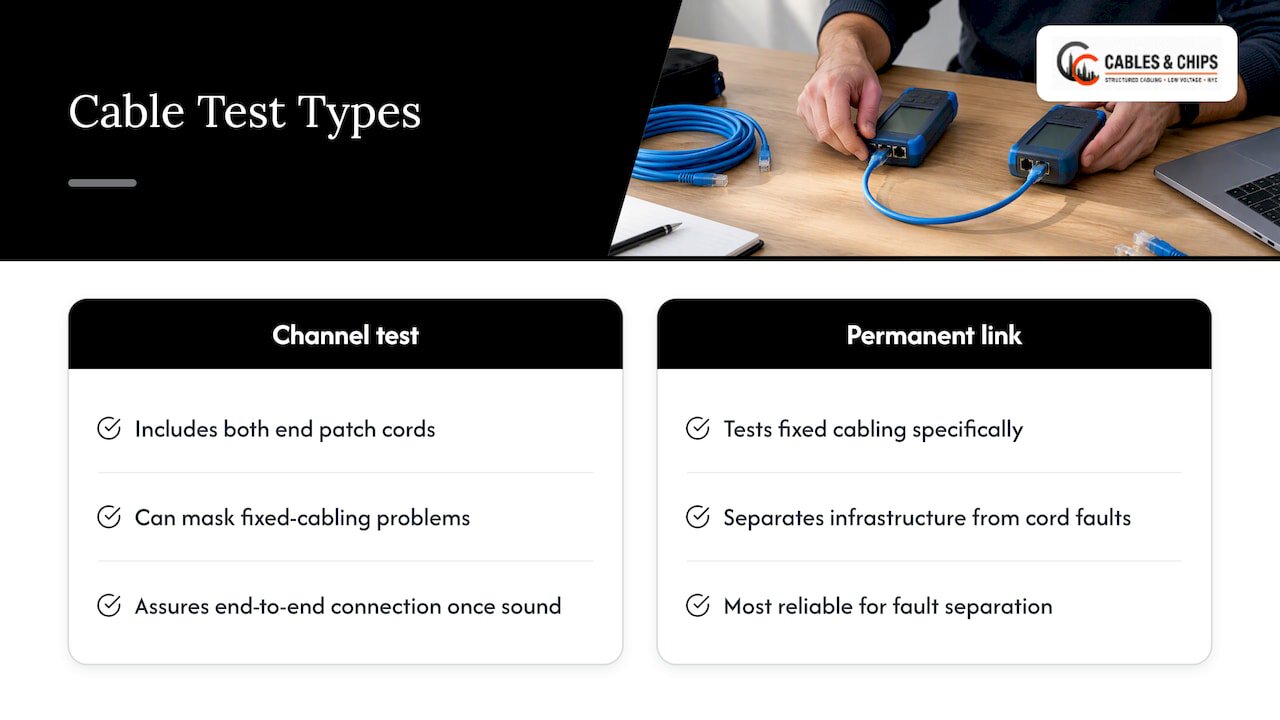
The channel test hid the problem. A channel test includes the patch cords at both ends. Some contractors prefer it because it is easier to pass, but per Fluke it can mask problems in the fixed cabling, which is the true foundation of the network. Testing the permanent link specifically is the most reliable way to separate faults in the infrastructure from faults in the cords. Fluke also notes that channel testing is typically recommended for assurance of the end-to-end connection once the cabling is known to be sound, so the two tests do different jobs.
The fault is not in the copper. Switch ports, SFPs, power over Ethernet budgets and even the device’s network card can mimic a cabling fault. That is why the elimination steps above come before any ceiling work.
To learn more about how certification protects you before a problem starts, read why cable testing matters before use and our cable plant testing guide for IT professionals.
Repair, re-terminate or re-run?
Not every fault justifies a new cable. Use this as a decision frame.
| Finding | Usual action |
|---|---|
| Bad patch cord | Replace with a certified cord, label it |
| Failing at one jack, rest of the run tests clean | Re-terminate the jack |
| Failing at the patch panel punch-down | Re-punch or re-terminate at the panel |
| Fault located mid-run, or visible damage, kinks or crushing | Re-run the cable |
| Run exceeds length limits | Re-route, shorten or add an intermediate closet or fiber link |
| Many runs in one pathway failing | Inspect the pathway, then plan a re-cable of the affected group |
| Fiber link with high loss | Clean and inspect connectors first, then re-terminate or re-run |
Splicing or coupling a mid-run break in horizontal copper is a stopgap. For permanent infrastructure, a clean, continuous run that certifies is the standard to hold.
Patch panels also deserve a look. A poorly laid-out panel strains cords and makes repeated moves harder. Our guides on the role of patch panels in networks and patch panel design for office networks explain how layout reduces strain.
Prevention: build the network so faults are easy to find
Intermittent faults will happen in any building. What you control is how long they take to find.
- Certify every new link at install. Ask for permanent link results, not just a pass summary, and keep the reports.
- Label both ends. Jack, panel port and switch port should map to each other in the records.
- Keep bend radius and tension in spec. This is an installation discipline, and it is invisible once the ceiling is closed.
- Remove abandoned cable. A clean pathway is easier to trace and safer to work in.
- Organize the MDF and IDF. Cords with proper length, routed cleanly, put less strain on terminations. See the as-built documentation guide for what a useful record includes.
- Monitor syslog. Send switch logs to a central place and alert on link flaps so you see the pattern before users complain.
- Retest after moves and renovations. Office buildouts disturb existing cable. A retest after construction is far cheaper than a hunt later.
If you are planning a renovation or expansion, our overview of structured cabling components shows what a complete, serviceable system includes.
Our perspective: intermittent faults are usually decided at installation
We have worked on commercial cabling in New York City for more than 40 years, and the intermittent faults we are called in for tend to share one trait: the cause was set in place on the day of the install. A termination rushed at the end of a day. A bundle pulled tight around a corner. A closet where nothing is labeled and no one can say which cord goes where.
That is why we focus on three things. First, testing and certification of every link, with the permanent link reported on its own. Second, clean and organized work in the MDF and IDF, so a failing port can be found and swapped without guessing. Third, documentation that stays with the building, so the next person to troubleshoot has a map.
We also see how often teams under pressure fall back on the quick fix: lower the port speed, swap cords until the complaints stop, move the user to another jack. Those steps keep people working, and sometimes that is the right call for one afternoon. They should not become the plan. A link that cannot certify needs to be re-terminated or re-run.
Your network is only as strong as the infrastructure behind it. In a Lower Manhattan high-rise or a converted loft, where pathways are tight and buildings are old, that infrastructure deserves the same care as the switches on top of it.
— Ken
Get the fault located and the link certified
If you have a recurring drop that your team cannot pin down, or you want your existing cabling verified before a move or buildout, we can help. Our cable testing and certification service covers testing of installed cabling, and our services page lists the rest of what we do, including cable cleanup and MDF/IDF organization. We are licensed and insured, we are based at 20 Vesey Street in Lower Manhattan, and we offer a no-obligation site survey. Schedule a site survey and we will look at the pathways, the closets and the failing runs in person.
FAQ
Why does my network connection keep going on and off?
If the drops hit one device or one port, the usual culprits are the patch cord, a loose jack or a poor termination. Check the switch log for link up and down events on that port, then swap the cords with known-good ones. If many users drop at once, look at the uplink, the switch or the backbone instead.
Can a cable pass a test and still cause intermittent problems?
Yes. Intermittent faults depend on movement, vibration or temperature, so a static test can miss them. A channel test can also hide a problem in the fixed cabling, which is why the permanent link should be tested on its own. Flexing the cable during testing helps expose the fault.
What does “fail short” mean on a cable tester?
It means two conductors that should be isolated are making electrical contact, often because insulation is damaged or a termination is wrong. The usual repair is to re-terminate the connector or jack. If the short sits mid-run, the cable needs to be re-run.
What are the three types of wire failure?
They are open circuits (a broken conductor), short circuits (conductors touching) and earth or ground faults. When any of them happen only under certain conditions, they are called intermittent faults.
Should I set a flapping port to a lower speed?
No. Forcing a lower speed hides the symptom and leaves the defect in place, which leads to ongoing issues. Find the failing segment, then re-terminate or re-run it so it certifies at full speed.
Sources
- Testing for Intermittent Errors in Cable and Harness Assemblies, Cirris
- Troubleshooting Ethernet, Cisco
- Diagnose Link Flapping on a Switch, Cisco
- Cabling Mistakes #1: Specify Channel Testing While Installing Permanent Links, Fluke Networks
- Channel, Permanent Link, Patch Cords, MPTL, E2E, Fluke Networks
- Going the Distance, Fluke Networks
- How Do You Find a Cable Fault?, PathSolutions