

A patch panel is a passive termination device that serves as the central connection point between permanent horizontal cabling and the active equipment in your telecommunications room. Understanding the role of patch panels in networks is not optional for IT professionals managing structured cabling. Patch panels protect certified cable runs from repeated physical stress, create a documented administration layer, and give your team the ability to reconfigure connections without touching a single wall cable. Every enterprise network, from a 20-seat office in Lower Manhattan to a multi-floor data center, depends on this physical layer discipline to stay reliable and serviceable.
How patch panels integrate with structured cabling standards
Structured cabling is the standardized architecture that organizes all physical network cabling into a predictable, testable system. ANSI/TIA-568.2-D defines two critical concepts that every network administrator must understand: the Permanent Link and the Channel. The Permanent Link covers the fixed horizontal cabling from the patch panel port to the wall outlet. The Channel extends that path to include the patch cords on both ends, connecting active equipment to the panel and the end device to the outlet.
Patch panels terminate horizontal cabling at the MDF (Main Distribution Frame) or IDF (Intermediate Distribution Frame), depending on floor and building layout. This termination point is where your certified CAT6 or CAT6A runs end. The standard governs insertion loss, return loss, and crosstalk performance across the full channel, which means the patch panel itself must meet the same category rating as the cable it terminates. Using a CAT5e panel on a CAT6A run degrades the entire channel’s performance certification.
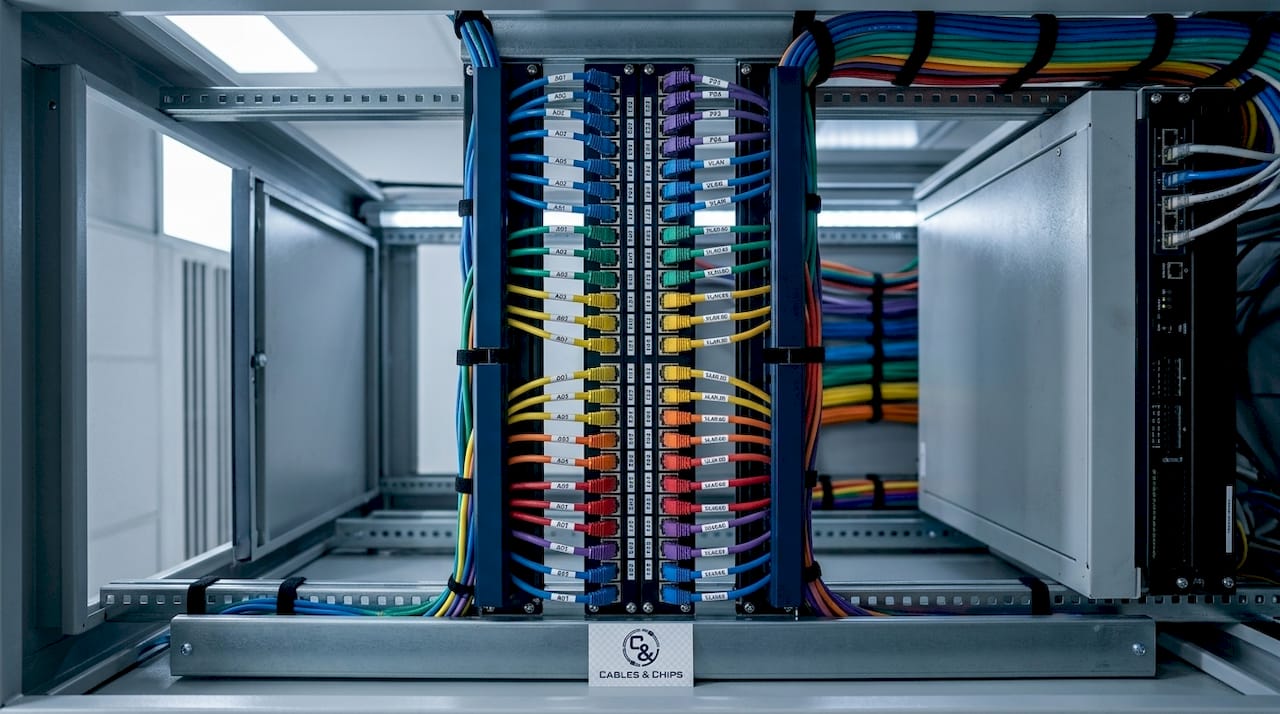
Permanent link testing, performed with tools like Fluke Networks DSX-600 or Versiv, validates the fixed infrastructure independently of patch cords. This separation matters operationally because it means you can swap patch cords freely without invalidating your certified infrastructure. Patch panels act as termination and administration points in telecommunications rooms, separating permanent links from equipment cords so technicians only change patch cords during moves, adds, and changes.
Here is how the structured cabling hierarchy maps to physical components:
| Layer | Component | Function |
|---|---|---|
| Permanent Link | Horizontal CAT6/CAT6A run | Fixed, certified, never disturbed |
| Termination Point | Patch panel | Administration and connection hub |
| Flexible Layer | Patch cord | Connects panel port to switch port |
| Active Layer | Network switch | Forwards traffic between devices |
The compliance benefit is concrete. Networks built to ANSI/TIA-568.2-D can be tested, certified, and warranted by manufacturers like Panduit, CommScope, or Belden. That certification protects your organization during audits, insurance claims, and vendor support escalations.
- Match patch panel category to cable category (CAT6 panel for CAT6 runs, CAT6A panel for CAT6A runs)
- Terminate all horizontal runs at the panel before connecting to switch ports
- Test the Permanent Link independently before patching to active equipment
- Document port assignments at time of installation, not retroactively
Patch panel vs. switch: what is the actual difference?
Patch panels are passive devices that provide physical termination and organization. They do not forward packets, process data, or make any logical decisions. A network switch is active hardware that reads MAC addresses, manages VLANs, applies QoS policies, and forwards traffic between ports. Confusing these two roles leads to incorrect rack design and poor change management practices.
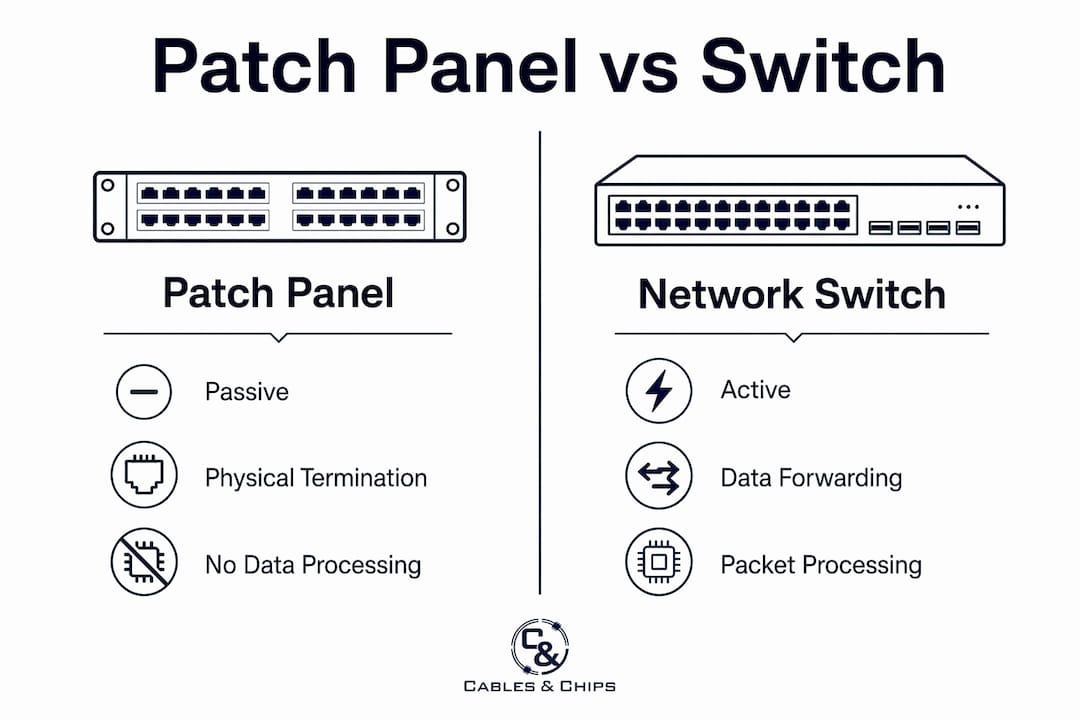
The practical implication is that patch panel failures are almost always physical: a bad punch-down, a damaged port, or a mislabeled connection. Switch failures involve firmware, configuration, power, or hardware faults. Separating the physical layer from the logical layer means your team can troubleshoot each independently, which reduces diagnostic time significantly.
| Attribute | Patch panel | Network switch |
|---|---|---|
| Device type | Passive | Active |
| Function | Physical termination and organization | Traffic forwarding and VLAN management |
| Failure mode | Physical damage, mislabeling | Firmware, configuration, hardware |
| Change impact | Patch cord swap only | Configuration change required |
| Power required | No | Yes |
Pro Tip: Never connect two switch ports directly through a patch panel without a patch cord. The panel is a termination point, not a through-connection device. Each port on the panel maps to one horizontal run, and the patch cord bridges that run to the switch.
Separating physical layer management from logical switching also supports security segmentation. When your team needs to isolate a device at the cabling layer, pulling a patch cord at the panel is faster and more auditable than disabling a switch port, especially in environments where switch access requires change control approval.
How to choose the right patch panel for your environment
Patch panel type selection should be driven by your expected move/add/change rate and the stability of your installation environment. Four primary types cover most enterprise scenarios.
- Punch-Down panels terminate individual conductors directly into 110-style or Krone IDC connectors. They are best for stable environments where port assignments rarely change. The termination is permanent until you re-punch, which makes them reliable but slower to reconfigure.
- Pass-Through panels accept pre-terminated cable ends and allow faster field termination. They suit environments with frequent reconfigurations because no punch-down tool is required for changes.
- Keystone panels use modular keystone jacks that snap into a blank faceplate. They work well for phased deployments where you add ports incrementally as the network grows.
- Fixed-Port panels come pre-wired with a set number of ports in a standardized configuration. They are common in enterprise deployments where uniformity and speed of installation matter more than flexibility.
For small LANs serving 15 to 40 devices, a 24-port patch panel provides the right balance of capacity, rack space efficiency, and room for future expansion without requiring a full rewire. This sizing heuristic holds for most single-floor office environments. Larger deployments typically use 48-port panels per IDF to consolidate horizontal runs from each zone.
Pro Tip: Plan for 20% spare capacity at installation. If you terminate 38 runs today, use a 48-port panel rather than a 24-port. Retrofitting a fully populated panel mid-deployment costs more in labor than buying the larger panel upfront.
Capacity planning also means thinking about scalable cabling infrastructure from day one. Networks that start with a 24-port panel and no growth plan often require a full IDF rebuild within three years as headcount and device density increase.
Operational benefits and best practices for managing patch panels
The most measurable patch panel benefit is the reduction in mean time to repair. Proper labeling and documentation can reduce MTTR from several hours down to under 15 minutes. That difference is the gap between a technician who can trace a connection in seconds using a port map and one who must manually tone out cables across a fully populated rack. In a 200-port IDF, undocumented cabling can turn a five-minute fix into a two-hour outage.
Patch panels also support security segmentation at the cabling layer, giving teams a physical reference point to verify VLAN assignments after wiring changes. When a device moves from one network segment to another, the patch cord change at the panel is the physical record of that move. Without a panel, that change happens at the switch port level only, with no physical audit trail.
Follow these operational disciplines to maintain patch panel effectiveness over time:
- Label both ends of every cable at installation. The panel port label and the outlet label must match your port map exactly.
- Treat the port map as the system of record for all day-2 operations. Update it before and after every change, not after the fact.
- Use horizontal and vertical cable managers in the rack to route patch cords away from switch ports and power cables. This improves airflow and makes individual cord tracing possible without disturbing adjacent connections.
- Color-code patch cords by function or VLAN. Blue for data, red for voice, yellow for management, and gray for cross-connects is a common scheme used in enterprise environments.
- Audit port maps quarterly. Undocumented changes accumulate faster than most teams expect, and a quarterly review catches drift before it becomes a crisis.
Physical cable management, including horizontal and vertical cable managers paired with patch panels, directly improves airflow and rack accessibility. Poor airflow in a dense IDF can raise ambient temperatures enough to shorten switch hardware life. Good cable management is not cosmetic. It is a reliability practice.
Reviewing your network closet organization practices alongside your patch panel discipline gives you a complete picture of physical layer health. The two are inseparable in any well-run network environment.
Key takeaways
Patch panels are the physical layer foundation that separates permanent certified cabling from flexible patch cords, and disciplined documentation of that layer is what converts infrastructure investment into operational reliability.
| Point | Details |
|---|---|
| Passive termination role | Patch panels organize and terminate cabling without forwarding traffic or requiring power. |
| Standards compliance | ANSI/TIA-568.2-D governs Permanent Link and Channel performance, requiring category-matched panels. |
| MTTR reduction | Proper labeling cuts repair time from hours to under 15 minutes in documented environments. |
| Panel type selection | Match Punch-Down, Pass-Through, Keystone, or Fixed-Port panels to your change rate and environment. |
| Port map discipline | The patch panel port map is the system of record for all physical layer changes and audits. |
Why patch panel discipline is the most underrated IT practice
After working in and around network closets across New York City for years, the pattern I see most often is not bad hardware. It is good hardware managed badly. A Panduit or Leviton patch panel installed correctly and then left undocumented for 18 months becomes a liability faster than most IT managers expect. The first technician who needs to trace a connection in that closet will spend more time than the original installation took.
The insight that most articles skip is this: patch panels do not deliver their value at installation. They deliver it at 2 a.m. when something breaks and someone needs to find the right cable in under five minutes. The teams I have seen handle those moments well are not the ones with the most expensive hardware. They are the ones who treated port mapping as a non-negotiable operational discipline from day one.
I have also seen the security argument for patch panels underused. Patch panels support cabling-layer segmentation in ways that switch configurations alone cannot replicate. A physical patch cord removal is auditable, immediate, and does not depend on switch access or configuration rights. For environments with strict access control requirements, that physical layer control is worth more than most teams realize until they need it.
The advice I give every IT team we work with at Cables is straightforward. Build the documentation system before you terminate the first cable. The panel is only as useful as the record attached to it.
— Ken
Professional patch panel installation from Cables
Cables designs and installs structured cabling systems across New York City, including CAT6 and CAT6A patch panel deployments built to ANSI/TIA-568.2-D standards. Every installation includes port mapping, cable labeling, and permanent link testing so your team inherits a documented, certified infrastructure from day one. Whether you are building out a new IDF, reorganizing an existing network closet, or scaling a multi-floor enterprise environment, Cables brings more than 40 years of low voltage experience to every project. Explore our CAT6 structured cabling services or contact us at 20 Vesey Street, Lower Manhattan, to schedule a site survey.
FAQ
What is the role of a patch panel in a network?
A patch panel is a passive termination point that connects permanent horizontal cabling to active equipment via patch cords. It centralizes cable management, protects certified infrastructure, and simplifies troubleshooting and reconfiguration.
How does a patch panel differ from a network switch?
A patch panel is a passive physical device that organizes cabling without processing data. A network switch is active hardware that forwards traffic, manages VLANs, and applies network policies.
What are the main patch panel benefits for IT teams?
The primary benefits include reduced MTTR through documented port mapping, protection of certified permanent links during moves and changes, and physical layer support for security segmentation and VLAN verification.
How many ports should a patch panel have?
For small LANs with 15 to 40 devices, a 24-port panel provides the right balance of capacity and rack space. Larger environments typically use 48-port panels per IDF, with 20% spare capacity built in at installation.
What labeling practices should I follow for patch panels?
Label both the panel port and the corresponding wall outlet with matching identifiers at installation. Treat the port map as a live document and update it before and after every physical change to maintain an accurate system of record.