

Patch panel design is the cornerstone of organized, reliable office network infrastructure, centralizing all cable terminations into a single managed point that simplifies troubleshooting, moves, and future growth. A well-executed network patch panel layout separates functional offices from ones where a single cable swap turns into a two-hour diagnostic session. This guide covers panel type selection, port density planning, labeling standards including ANSI/TIA-606-C, and cable management practices that keep your MDF and IDF closets clean, documented, and serviceable for years. Whether you manage a 20-seat startup floor or a multi-tenant commercial building, the principles here apply directly to your environment.
How do you choose the right patch panel type for your office network?
Patch panel types for commercial offices fall into four categories: fixed, keystone, punch-down, and pass-through. Each serves a different operational profile, and choosing the right type is less about preference and more about lifecycle considerations, specifically whether your cabling is stable or subject to frequent reconfiguration.
Fixed panels come pre-wired with jacks already installed. They offer consistent layouts and are well-suited for repeatable deployments where port types do not change. A law firm with 40 workstations and no plans to shift infrastructure is a strong candidate for fixed panels. Keystone panels, by contrast, accept interchangeable keystone jacks, making them modular for phased upgrades. If you anticipate adding CAT6A ports alongside existing CAT6 runs, keystone panels let you swap individual jacks without replacing the entire panel.
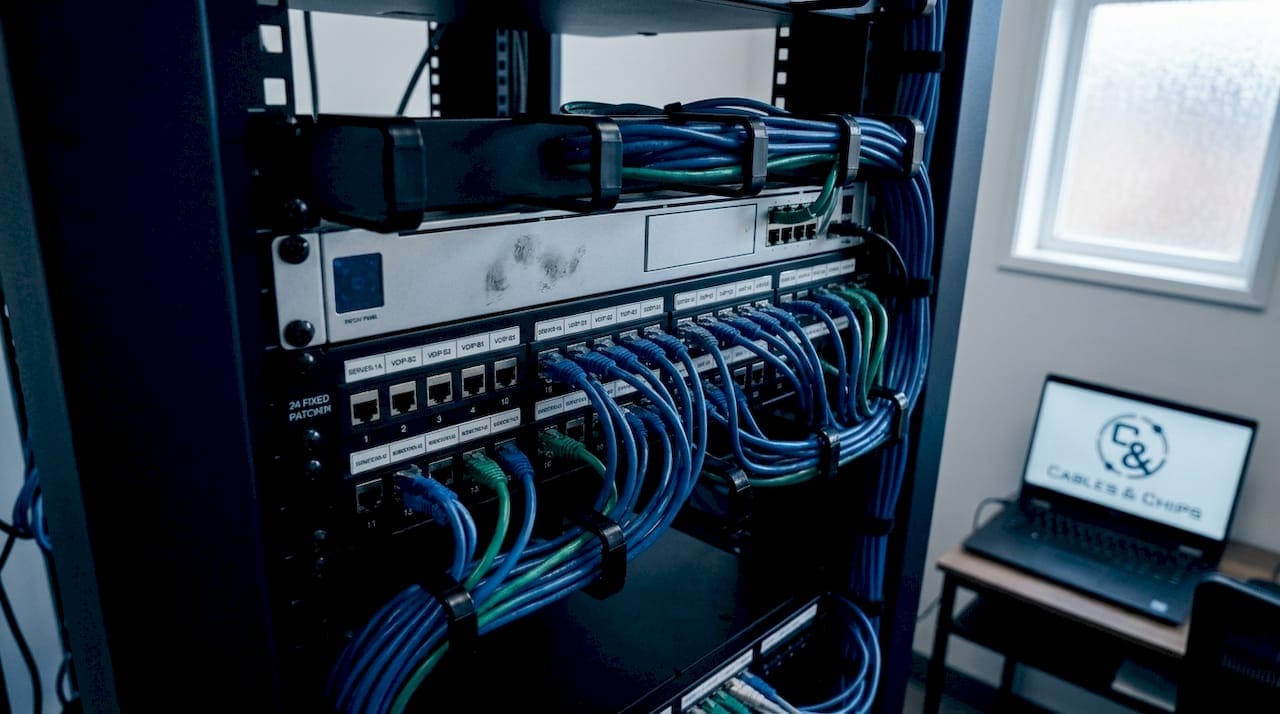
Punch-down panels terminate horizontal cable runs directly at the rear using 110-style or Krone blocks. They are best for permanent horizontal termination and long-term stability, making them the standard choice in most commercial office MDF and IDF closets. Pass-through panels use couplers instead of terminations, allowing cables to connect front-to-back without punch-down work. They are optimal for fast reconfiguration and temporary setups, though they introduce an additional connection point that can affect signal integrity over time.
| Panel Type | Best Use Case | Key Trade-off |
|---|---|---|
| Fixed | Stable, repeatable deployments | No flexibility for port type changes |
| Keystone | Phased upgrades, mixed media | Higher upfront cost per port |
| Punch-down | Permanent horizontal cabling | Slower to reconfigure |
| Pass-through | Temporary or frequently changed links | Extra connection point, potential signal loss |
Pro Tip: If your office undergoes tenant improvements or desk reconfigurations more than once a year, keystone panels pay for themselves in labor savings within two cycles.
What factors determine optimal port density and rack layout?
Port density directly impacts cable routing, airflow, and available rack space, so selecting the right count from the start prevents costly retrofits. Standard configurations run at 12, 24, 48, and 96 ports per panel. For most commercial offices, 24-port panels offer the best balance between change flexibility and space efficiency. Forty-eight-port panels suit space-limited, stable environments where the port count is unlikely to shift significantly.
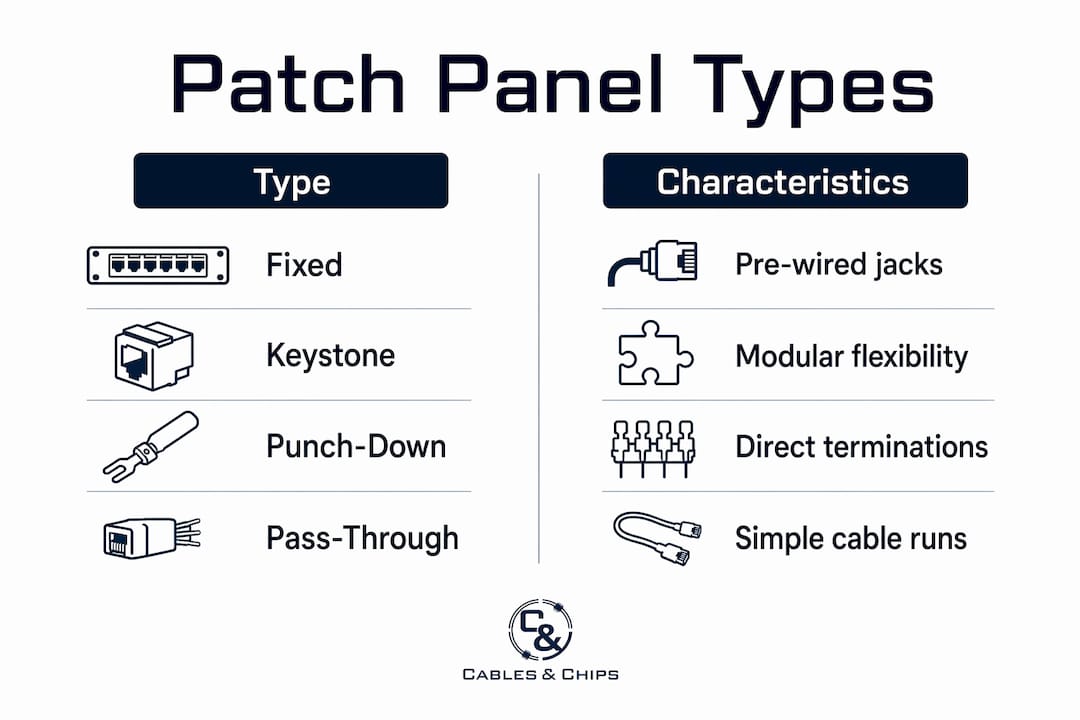
The standard rack layout sequence for office network wiring design follows a clear pattern: patch panel, then horizontal cable manager, then switch. This sequence keeps patch cords short, prevents cable bundles from crossing switch ports, and makes individual port identification fast. Deviating from this order, such as placing the switch above the patch panel, forces longer patch cords that create slack management problems and obscure port labels.
Rack space planning should account for the following:
- 1U horizontal cable managers between every patch panel and switch to control patch cord routing
- Vertical cable managers on both sides of the rack for trunk and power cables
- Blanking panels in every unused rack unit to prevent hot air recirculation
- At least 20% spare rack units reserved for future expansion
- Strain relief at cable entry points to prevent connector damage from cable weight
Pro Tip: Plan your rack layout on paper before ordering equipment. A 42U rack fills faster than expected once you account for cable managers, power distribution units, and patch cord slack storage.
Airflow is a non-negotiable factor in high-density racks. High cable volume restricts airflow, causing thermal problems that degrade network reliability over time. Cables routed through managers rather than draped across equipment maintain the front-to-back airflow path that most switches and servers depend on. For a practical rack setup reference, the sequencing and spacing principles used in server rooms apply equally to office IDF closets.
How to implement effective patch panel labeling and documentation
Labeling is where most office network installations succeed or fail on day two. ANSI/TIA-606-C requires that cable and patch panel labels be visible without moving or disconnecting the labeled component, with labels placed within 12 inches of termination points. This single requirement eliminates the common practice of labeling only the cable jacket, which becomes unreadable once the cable is dressed and routed.
A hierarchical labeling convention ties every port to its physical location in a predictable string. The AMPCOM format illustrates this clearly: a label like HQ-A-02-MDF-PP01-23 encodes the site (HQ), building (A), floor (02), closet (MDF), panel (PP01), and port (23). This structure means any technician, regardless of familiarity with the installation, can locate a port in under a minute. Improvised labels like “Jack 5” or “Conf Room” break down the moment a room is renamed or a port is reused.
The steps for building a maintainable labeling system are:
- Define your location hierarchy before installation begins. Site, building, floor, closet, panel, and port.
- Generate labels using a label printer such as a Brady BMP21-PLUS or Dymo LabelWriter with heat-shrink or self-laminating stock rated for the environment.
- Apply labels to both ends of every cable run and to the face of every patch panel port.
- Create a port-to-endpoint mapping document in a spreadsheet or network management tool like NetBox or Racktables that mirrors the physical labels exactly.
- Name test and certification files from your Fluke DSX-8000 or similar tester to match the port label string, so test records tie directly to physical ports.
Aligning physical port labels, port-to-endpoint mapping, and test file names reduces troubleshooting time from hours to minutes. This synchronization shifts a diagnostic task from a team argument to a 60-second lookup.
Label readability without unplugging components is the single most impactful factor in patch panel maintenance efficiency. Enforce it as a non-negotiable installation standard, not a finishing step.
Pro Tip: Color-code patch cords by function: blue for data, yellow for voice, red for management ports. Combined with a hierarchical label system, color coding cuts visual search time in a dense panel from 30 seconds to under 5.
What are the best cable management practices for office network reliability?
Cable management in office network closets is a discipline, not an afterthought. The goal is a layout where any cable can be traced, replaced, or rerouted without disturbing adjacent connections. Horizontal cable managers control patch cord paths between panels and switches. Vertical managers handle trunk cables, fiber runs, and power cords that travel the full height of the rack.
PoE (Power over Ethernet) introduces a thermal consideration that many office network designs overlook. PoE devices can draw 25 watts or more per port, and dense cable bundles carrying PoE current generate measurable heat. A mismatch between PoE loads and switch PoE budgets is a common cause of network outages tied directly to patch panel design decisions. When designing for IP cameras, wireless access points, or VoIP phones, calculate the total PoE draw against the switch budget before finalizing port assignments.
Practical cable management standards for office networks include:
- Bundle size limits: Keep horizontal cable bundles to 24 cables or fewer. Larger bundles compress cable geometry and can degrade CAT6 performance over time.
- Patch cord length discipline: Use the shortest patch cord that allows a natural bend radius. A 3-foot cord between a panel and a switch directly below it beats a 10-foot cord coiled behind the rack.
- Velcro ties over zip ties: Velcro allows future adjustments without cutting. Zip ties cinched too tightly crush cable pairs and cause crosstalk failures.
- Scheduled audits: Review cable management quarterly. Moves, adds, and changes accumulate quickly in active offices, and undocumented patch cord additions are the primary source of “cable spaghetti.”
- Blanking panels: Fill every unused rack unit. Poor cable layout and open rack units allow hot exhaust air to recirculate to equipment intakes, raising ambient temperatures and accelerating hardware failure.
For offices planning scalable cabling infrastructure, designing cable management with future capacity in mind from day one avoids the expensive teardown and rebuild that comes with reactive growth. A well-organized network closet is the physical proof that your documentation and design decisions were executed correctly.
Key takeaways
Effective patch panel design for office networks requires the right panel type, disciplined port density planning, ANSI/TIA-606-C-compliant labeling, and cable management that protects airflow and supports future changes.
| Point | Details |
|---|---|
| Match panel type to lifecycle | Choose punch-down for stable installs, keystone for phased upgrades, pass-through for frequent reconfigurations. |
| Plan port density with growth in mind | Use 24-port panels for flexibility; reserve at least 20% of rack space for future expansion. |
| Follow ANSI/TIA-606-C labeling | Labels must be visible without disconnecting components and placed within 12 inches of termination points. |
| Align documentation artifacts | Synchronize physical labels, port maps, and test file names to cut troubleshooting time from hours to minutes. |
| Manage PoE heat proactively | Calculate total PoE draw against switch budgets and limit cable bundle sizes to prevent thermal degradation. |
What 40 years of installs taught me about patch panel design
After decades of structured cabling work across Manhattan commercial offices, the pattern is consistent: the installs that cause the most pain on day two are the ones where labeling was treated as optional and cable management was done “good enough.” I have walked into telecom rooms where a single port swap took 45 minutes because no one could read the labels without unplugging half the panel. That is not a hardware problem. It is a documentation problem that was baked in at installation.
The most underrated decision in any office network wiring design is panel type selection relative to the client’s actual change frequency. A media company that reconfigures desks every quarter needs keystone panels and short patch cords. A financial services firm with fixed workstations for five years needs punch-down panels and a clean, permanent layout. Treating these two environments identically is where I see most rushed installs go wrong.
Port density is the other area where I push back on the instinct to maximize. A 48-port panel in a 20-person office looks efficient on paper. In practice, it concentrates cable volume in a way that makes the rack harder to work in and harder to cool. Twenty-four-port panels with room to grow are almost always the better call. Your network is only as strong as the infrastructure behind it, and that infrastructure needs to be serviceable by whoever comes after you.
— Ken
Get expert patch panel installation for your NYC office
Cables designs and installs structured cabling systems for commercial offices throughout New York City, with more than 40 years of experience in CAT6 and CAT6A installations, patch panel setup, rack organization, and full documentation packages. Every installation from Cables meets ANSI/TIA-606-C labeling standards and includes certified test results tied directly to port labels. If you are planning a new office buildout, a network closet upgrade, or a full infrastructure refresh, Cables delivers CAT6 structured cabling that is clean, documented, and built to scale. Contact Cables at 20 Vesey Street, Lower Manhattan, to schedule a site survey and get a custom design for your office network.
FAQ
What is the standard patch panel port count for a commercial office?
Twenty-four-port panels are the standard for most commercial offices because they balance port availability with cable management flexibility. Forty-eight-port panels are used in space-limited, high-density environments where the port count is stable.
How does ANSI/TIA-606-C affect patch panel labeling?
ANSI/TIA-606-C requires labels to be visible without moving or disconnecting the labeled component, placed within 12 inches of each termination point. This standard applies to every port on every patch panel in a compliant installation.
What is the correct rack layout sequence for an office network?
The standard sequence is patch panel, horizontal cable manager, then switch. This order keeps patch cords short, maintains clear port visibility, and prevents cable bundles from blocking switch airflow or obscuring port labels.
How do PoE devices affect patch panel design decisions?
PoE devices can draw 25 watts or more per port, requiring patch panel designs that account for switch PoE budgets and cable bundle heat dissipation. Ignoring PoE load calculations is a leading cause of network outages in office environments with IP cameras, access points, or VoIP phones.
What labeling format works best for office patch panels?
A hierarchical format encoding site, building, floor, closet, panel, and port produces the most maintainable labels. An example like HQ-A-02-MDF-PP01-23 gives any technician a unique, location-specific identifier without relying on institutional knowledge.