
Telecom Room Ventilation: Cooling, Airflow and Code Basics
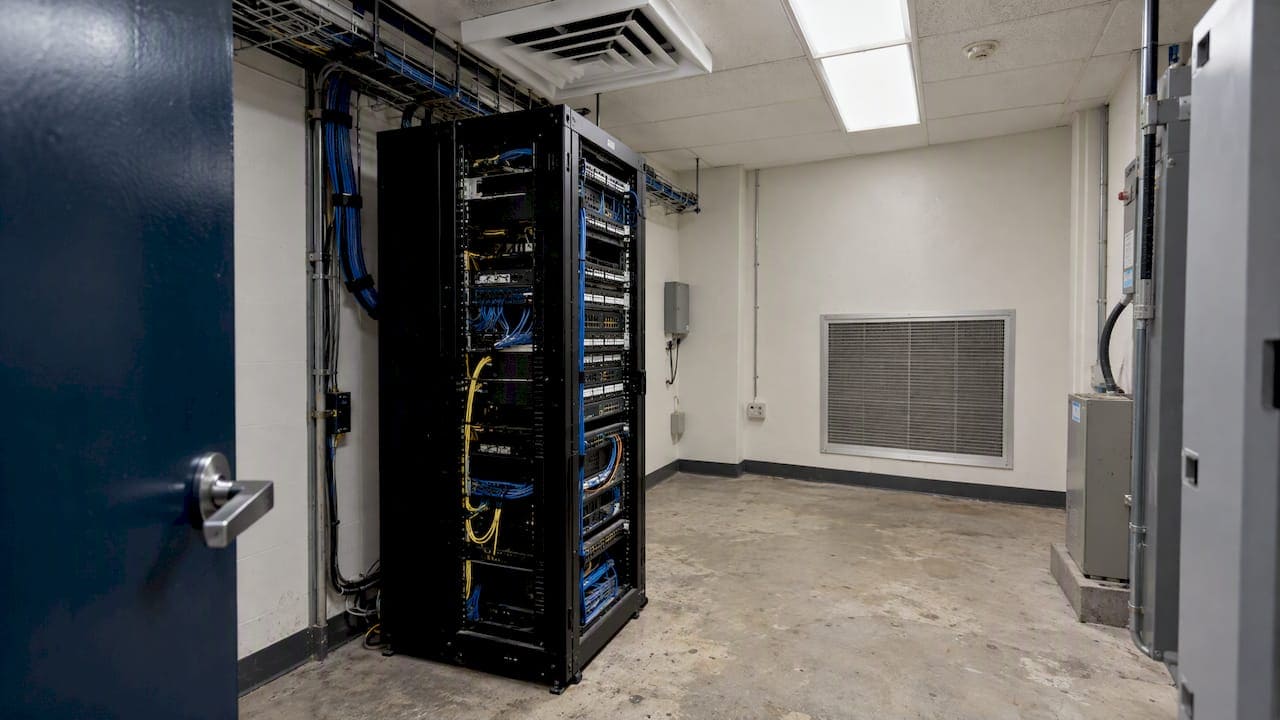
Most telecom rooms do not need fresh outdoor air. They need dependable cooling, controlled humidity and clear airflow around the equipment. In practice, “ventilation” for an MDF or IDF means removing the heat that switches, patch panels, UPS units and servers produce, around the clock, without letting that heat recirculate back to the equipment intakes. When a room runs hot, the cause is usually one of three things: undersized or shared cooling, blocked airflow inside the rack and room, or no one watching temperature at all.
This guide covers what the standards say, how to size and arrange cooling, why cable management is part of the thermal picture, and when a closet needs more than the building’s ceiling diffuser. We pull cables in New York City buildings every week, so we also cover the conditions we see in older commercial space.
TL;DR
- A telecom room is a cooling problem more than a ventilation problem. Equipment heat must be removed 24 hours a day, 7 days a week, independent of the office’s weekday HVAC schedule.
- The 2022 TIA-569-E-1 update sets allowable ranges for telecom spaces: for Class B spaces, 41°F to 95°F dry bulb, an 82°F maximum dew point and 80% relative humidity. Many owners hold tighter setpoints than that.
- Hot aisle/cold aisle layout, front-to-back airflow, blanking plates and tidy cabling prevent most hot spots before any new equipment is bought.
- Measure at the equipment intakes, not at the room thermostat, and put the room on a preventive maintenance schedule.
Ventilation vs. cooling: what a telecom room actually needs
The two words get mixed up. Ventilation brings outdoor air into occupied space for people. Cooling removes heat from equipment. A telecom room is mostly the second job.
An ASHRAE interpretation of Standard 62.1-2007 addresses this directly: telecommunication and data rooms do not require the Table 6-1 ventilation air when unoccupied, and they typically rely on separate cooling systems that run around the clock with no outdoor air. That is the practical answer to the question “is ventilation required in a room like this?” Outdoor air is not the requirement. Continuous cooling is.
This matters for a few reasons:
- Building HVAC often shuts down at night and on weekends. A closet tied to the base-building air handler can sit at a comfortable 72°F on Tuesday afternoon and climb past 90°F by Sunday.
- Outdoor air brings humidity and dust. Neither helps switches, fiber terminations or UPS batteries.
- A door louver or a transfer grille is not a cooling plan. Borrowing air from the corridor works only when the corridor air is itself cooled, filtered and available 24 hours a day.
If you are unsure how your room is served, ask your building engineer three questions: which air handler or condenser feeds this room, does it run on a schedule, and who gets the alarm when it stops.
What the standards say about temperature and humidity
No single document governs every telecom room. Local building and mechanical codes apply, and the equipment manufacturers’ operating specifications apply too. Several industry documents set the working targets.
TIA-569-E-1 and the ASHRAE classes
ANSI/TIA-569-E-1, published in 2022, revised the temperature and humidity requirements for telecommunications spaces and harmonized them with the fifth edition of ASHRAE Thermal Guidelines for Data Processing Environments. For Class B spaces, which is where many telecom rooms fall, the allowable range is 5°C to 35°C (41°F to 95°F) dry bulb, with a maximum dew point of 28°C (82°F) and 80% relative humidity.
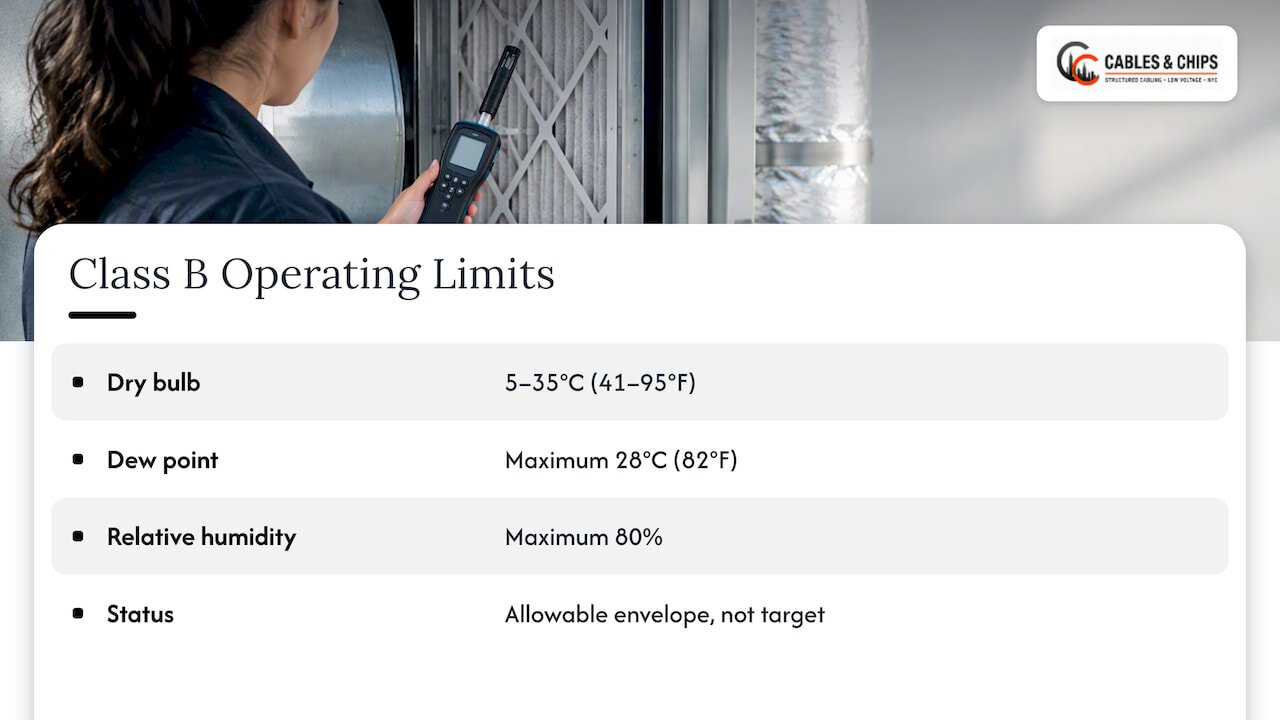
ASHRAE defines environmental classes A1 through A4, B and C to allow different levels of thermal control. Class B tolerates broader fluctuation than the tightly controlled data center classes. That is an allowable envelope, not a target. Running at the edge of it leaves no margin when a compressor trips or a rack is added.
What owners actually specify
Many organizations set tighter setpoints than the allowable range. The University of Central Florida’s telecommunications design standard, for example, requires constant cooling at 68°F for MDFs and 72°F for IDFs. It also prohibits HVAC equipment and chilled-water, refrigerant or condensate piping in telecom rooms, which is a sensible rule: a leaking line above a rack is a far worse day than a warm one.
A university standard is one owner’s rule, not a national code. It is a useful template for what a careful owner writes into a design brief, and it shows two habits worth copying: separate setpoints for main and horizontal distribution rooms, and a hard line against water over equipment.
Altitude is not a New York issue
ASHRAE’s guidance derates the maximum allowable dry-bulb temperature at high altitude, starting above roughly 900 meters, because thinner air carries less heat. Sea-level Manhattan does not need the correction, but it matters if you manage rooms in other regions.
A quick reference
| Item | Value | Source type |
|---|---|---|
| Class B allowable dry bulb | 41°F to 95°F (5°C to 35°C) | TIA-569-E-1 (2022) |
| Class B maximum dew point | 82°F (28°C) | TIA-569-E-1 (2022) |
| Class B maximum relative humidity | 80% | TIA-569-E-1 (2022) |
| MDF setpoint, one university owner | 68°F | UCF standard |
| IDF setpoint, one university owner | 72°F | UCF standard |
| Outdoor ventilation air for unoccupied telecom rooms | Not required under the Table 6-1 approach | ASHRAE 62.1 interpretation |
The equipment in the rack always has the last word. Check the manufacturer’s stated operating range for your switches, UPS and servers, and set the room to the most restrictive one with margin.
Know your heat load before you pick a cooling method
Cooling is sized to heat, and heat in a telecom room comes from a short list: IT equipment, UPS and power distribution, lighting and people. Add the outputs together to get the total load, then compare it with what the serving system can actually deliver in that room, on a summer afternoon, with the door closed.
The numbers that bite are the ones nobody tracked over time:
- Switch refreshes. Moving to higher-power PoE switches to feed WiFi access points, cameras and phones raises the load in the closet. The same thing happens when a floor adds PoE lighting or door controllers.
- UPS units. Every double-conversion UPS gives off heat, and batteries have their own temperature limits.
- Leftover gear. Retired equipment that is still powered, or a forgotten firewall, adds watts with no value.
- Density. Older telecom guidance for central office space caps heat density near 100 watts per square foot, and high-heat equipment may need adjacent floor space left empty to stay inside that limit. A small closet filled with high-density gear can exceed what its cooling was designed for.
A practical method: pull the nameplate or measured power draw for every device, convert watts to BTU per hour (1 watt is about 3.41 BTU/hr), add lighting and occupancy, and compare with the cooling capacity assigned to the room. Leave headroom for growth. Then ask the HVAC engineer to confirm the capacity is available at 3 a.m. on a weekend.
Airflow inside the room and the rack
A room can have plenty of cooling capacity and still cook its equipment. What matters is whether cold air reaches the intakes and hot air leaves without returning.
Front-to-back, hot aisle and cold aisle
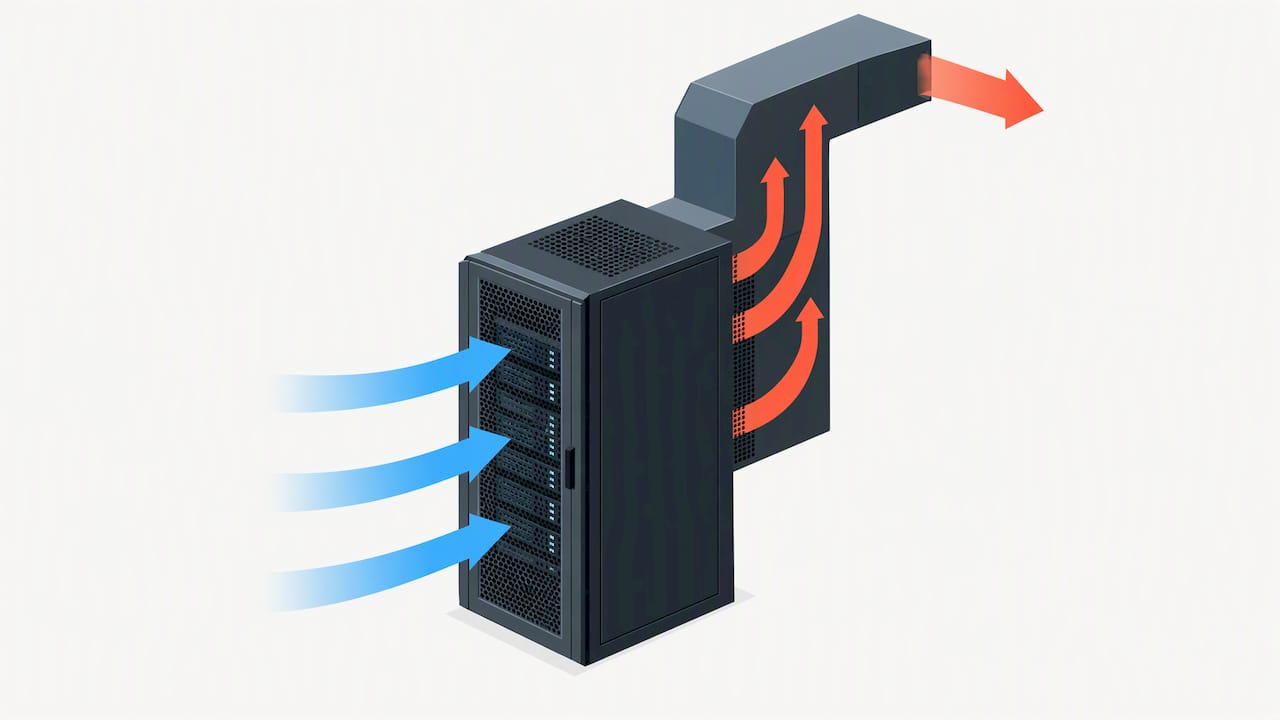
AT&T’s technical requirements for supplemental cooling describe the basic arrangement: racks in hot aisle/cold aisle configurations with front-to-back airflow, cold air supplied to the equipment intakes, and air management features such as blanking plates that stop hot exhaust from recirculating to the front. The U.S. Department of Energy’s guide says the same: good air management, with hot/cold aisles, front-to-back flow and blanking plates, reduces mixing and raises cooling efficiency.
In a one- or two-rack telecom room, this scales down to a few habits:
- Mount equipment so intakes face the cold side of the room and exhausts face the other.
- Fill every empty rack unit with a blanking panel.
- Do not mix side-to-side airflow switches with front-to-back servers in the same enclosure without a plan, such as side baffles or an airflow kit.
- Keep the supply diffuser pointed at the intake face, not at the back of the rack.
- Leave clearance at the front and rear of the rack so air can move and technicians can work.
Supply placement matters in any conditioned room. A general explanation of optimizing AC vents for room temperature covers the same principle at residential scale: where the air enters and where it returns decides whether a space is even.
Cable management is thermal management
This is the part we see ignored most. The DOE guide treats cable management as a thermal issue: abandoned or poorly routed cable can obstruct airflow and contribute to localized equipment failures. A bundle of dead CAT5e piled behind a rack, a rear door packed with slack, or a raised floor choked with old runs all do the same thing: they block the path the air was supposed to take.
Signs that cabling is hurting your cooling:
- The rack rear is blocked by looped slack or drooping bundles in front of exhaust vents.
- Switch intakes are covered by patch cords routed across the faceplate.
- Cables lie over floor tiles or fill the underfloor space in a raised-floor room.
- Overhead trays are packed full, with new runs laid on top of abandoned ones.
The fix is not cosmetic. Removing dead cable, routing with vertical managers, and cutting patch cords to length restores the airflow path. Our guides on common server room cabling errors, examples of poor cable management and how to clean up telecom room cabling walk through what to look for and how the work is sequenced. If your closet has a raised floor, see our notes on raised floor cabling.
When room HVAC is enough, and when it is not
A dedicated, correctly sized and continuously running system serving the room is the baseline. Some closets cannot get that, and some outgrow it.
Signs room cooling is sufficient
- Intake temperatures stay inside your setpoint through a full summer, including weekends.
- The cooling system is dedicated to the room or on a 24/7 schedule.
- Heat load is well below the system’s rated capacity, with spare for the next switch refresh.
- There are no hot spots at the top of the rack.
Signs you need more
AT&T’s technical requirements call for supplemental in-row or overhead cooling when equipment heat loads exceed what traditional room cooling can handle. In an office closet, that looks like:
- Top-of-rack switches reporting high temperature alarms while the room feels cool at the door.
- A closet that was a pass-through for cable and is now a full MDF.
- A closet inside a tenant space with no access to base-building cooling after hours.
- A sealed room where equipment exhaust accumulates faster than the system removes it.
Options are usually a dedicated ductless split system, a supplemental unit sized for the load, or a connection to the building’s condenser water or tenant cooling loop where the lease and building rules allow. Remember the owner rule above: many standards keep water and condensate piping out of telecom rooms, so the placement of any indoor unit deserves a careful look, including drain routing and a secondary pan or leak sensor.
Fans
Fans can help in a narrow case. Older telecom engineering guidance notes that continuous fan operation for electronic switching equipment is often recommended to keep airflow consistent. A fan that moves air inside an enclosure or exhausts it into a cooled space is useful. A fan that pushes warm closet air into a warm corridor only moves the problem, and a fan with no source of cool makeup air can pull hot air through the rack in reverse.
Control from the intake, not the thermostat
The DOE guide says that using external or on-board IT equipment intake sensors to control cooling is more effective than relying on room-level return air temperature. A wall thermostat reads the average of the room, which may be nothing like what the equipment at the top of the rack is breathing. Many managed switches and UPS cards expose temperature readings you can already poll.
The same guide notes that raising supply air temperature so the most demanding equipment intake sits near 80°F is the long-term direction, and that 77°F to 79°F can be a practical setpoint once air management is in place, adjusted in small steps. Treat that as a data center efficiency strategy. For a small commercial closet, raise setpoints only if the equipment specs, your owner’s standard and your monitoring allow it.
How a telecom room differs from a data center or a telecom cabinet
Searches for this topic turn up pages on outdoor telecom cabinets, base station shelters and data centers. They are related, and the differences decide what applies to your closet.
| Telecom room (MDF/IDF) | Data center | Outdoor or remote telecom cabinet | |
|---|---|---|---|
| Where | Inside an office or commercial building | Purpose-built hall or suite | Street, rooftop or remote site |
| Typical load | A few hundred watts to several kilowatts | High, often engineered per row | Small, sealed enclosure |
| Cooling | Building-served or dedicated split system | Engineered precision cooling | Heat exchangers, fans, air conditioners built into the enclosure |
| Main risk | Shared HVAC, blocked airflow, cable clutter | Density and power | Sun load, dust, moisture |
| Who decides | IT, facilities, building engineer, lease | Facility operator | Operator and equipment maker |
The lesson for an office closet: borrow the airflow discipline from the data center, such as blanking panels and intake monitoring, without assuming you have its cooling plant. Do not copy cabinet solutions like thermoelectric coolers or sealed-enclosure heat exchangers into a room unless a mechanical engineer says the load and the space call for them.
Inspection and maintenance
The best cooling plan degrades without upkeep. OSHA’s guidance on commercial building air quality calls for a preventive maintenance program based on the system’s recommended schedules, periodic inspections and routine HVAC maintenance. Apply that to the telecom room explicitly, not as a side effect of the main building schedule.
Where to measure
ASHRAE’s reference guidance says to measure temperature and humidity at operating equipment air intakes and, except in distributor enclosures, at 1.5 m (about 5 feet) above the floor every 3 to 9 m (roughly 10 to 30 feet) along aisle fronts. In a closet with one rack, that means at least a top, middle and bottom reading at the front of the rack.
A simple maintenance routine
- Monthly: Check intake temperatures and any alarm history. Look for blocked vents, boxes stored in front of diffusers and doors propped open.
- Quarterly: Inspect blanking panels, cable routing and rack rear clearances. Confirm filters and condensate lines on any dedicated unit.
- Twice a year: Have the HVAC contractor service the serving system, and test an after-hours run, since failures show up when the schedule changes.
- After every change: When equipment is added, update the load calculation and recheck intakes.
- Documented: Keep a current as-built record so the next person knows what is live. Our as-built documentation guide explains what to capture.
Note that all of this sits on top of local code. Confirm mechanical, fire and electrical requirements for your building with the building engineer and the authority having jurisdiction before changing a closet’s cooling or sealing it.
Our perspective: cooling problems start as cabling problems
In more than 40 years of working in New York commercial buildings, we have seen the same sequence play out. A closet is built for a small network. Years of moves, adds and changes follow. Nobody removes the old cable, the rack fills, and the airflow path closes up. Then someone calls about “a cooling problem,” and the HVAC is fine. The room is just full.
Our view is simple. Start with the cheapest fix: clear the air path. Remove abandoned cable, route what remains cleanly, fill gaps with blanking panels, and document the result. Then measure at the intakes. If temperatures are still high, you have a real load problem, and the conversation with the building engineer about supplemental cooling is worth having, with data in hand.
We also push owners to treat the telecom room as infrastructure that deserves a standing owner, a schedule and a record. Your network is only as strong as the infrastructure behind it, and that includes the air around it. We are licensed and insured, we document what we install, and we test what we terminate. We do not design or install mechanical cooling systems, so we work alongside your HVAC contractor and building engineer. What we control is the cabling, rack and closet organization that decides whether their cooling can do its job.
— Ken
Get the closet ready for cooling: our cleanup and cabling services
If a closet is running hot, we start with a no-obligation site survey. We look at the rack layout, abandoned cable, patch panel and cord routing, and anything blocking the air path, and then we give you a clear scope. Our work covers cable cleanup and network closet organization, server rack installation, cable testing and certification, and structured cabling for new and expanding rooms. You can see the full list on our services page.
If you are planning a build-out, bring us in early. Rack position, cable pathways and room layout are far cheaper to get right on paper. Schedule a site survey and we will show you where the closet stands today. For related background, read our guides on network closet organization and server room cable management setup.
Practical checklist for facilities and IT teams
Use this list before the next budget cycle:
- Confirm which system cools the room and whether it runs 24/7.
- List every device in the room with its power draw, and add UPS and lighting.
- Compare total heat load with available cooling capacity, with growth headroom.
- Check manufacturer operating ranges and set the room to the most restrictive.
- Put temperature sensors at rack intakes, and send alarms to someone who will see them off hours.
- Remove abandoned cable and power down or remove unused equipment.
- Install blanking panels, and set intake faces toward the cold side.
- Rule out water, condensate and refrigerant lines above the rack.
- Write down the setpoint, owner, schedule and contact for the room.
FAQ
Does a telecom room need fresh air ventilation?
Generally no. An ASHRAE interpretation of Standard 62.1 says unoccupied telecom and data rooms do not need the Table 6-1 ventilation air, and they typically use separate cooling with no outdoor air. What they need is continuous cooling. Your local code and building engineer have the final word on your room.
What temperature should a telecom room be kept at?
TIA-569-E-1 allows 41°F to 95°F for Class B spaces, with an 82°F maximum dew point and 80% relative humidity. Many owners set tighter targets, such as 68°F for an MDF and 72°F for an IDF in one university standard. Check your equipment’s operating specification and set the room to the most restrictive requirement.
Can I cool a closet with a fan alone?
Only if the fan moves air that is itself cool, and that air is available around the clock. A fan alone does not remove heat from the building. If the closet exhausts into a warm space or has no makeup air, you need cooling, not more airflow.
How do I know if cable clutter is causing overheating?
Look at the rack rear and the intakes. If bundles sit in front of exhaust vents, patch cords cover intakes, or the top-of-rack switches run hotter than the bottom ones, cabling is a suspect. Measure at the intakes before and after cleanup to confirm the change.
Sources
- ASHRAE Interpretation IC 62.1-2007-17
- TIA-569-E-1 published announcement
- ASHRAE Thermal Guidelines 5th edition reference card
- UCF Telecommunications Design Standards
- Space Planning Requirements
- ATT-TP-76405 Technical Requirements for Supplemental Cooling
- Engineering Guide for Ventilation and Air-Conditioning
- U.S. DOE Best Practices Guide for Energy-Efficient Data Center Design
- OSHA Indoor Air Quality in Commercial and Institutional Buildings