
Seismic Rack Anchoring in NYC: Code, Inspection and Install
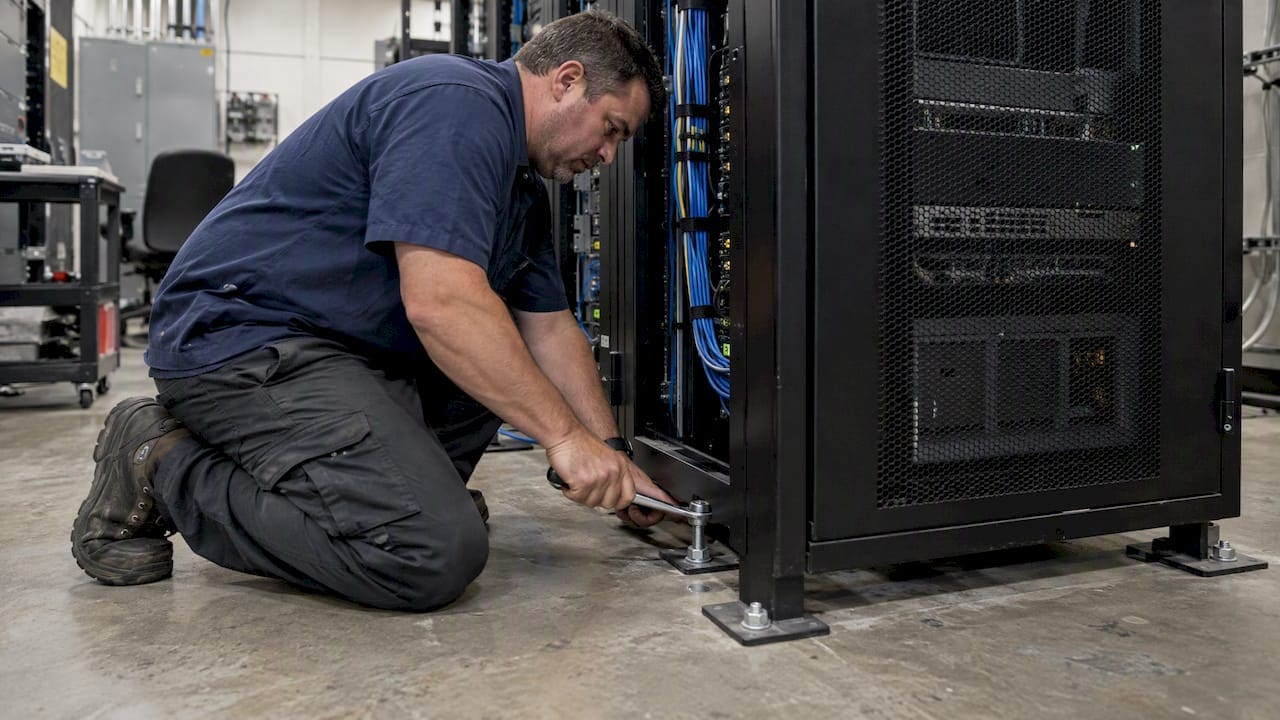
If you manage a server room, telecom closet or data room in New York City, seismic rack anchoring is a code and documentation question before it is a hardware question. Racks above certain weights or heights need positive anchorage. In many cases the installation is a designated special inspection under the NYC Building Code. The part that stalls projects is rarely the bolts. It is the paperwork, the load path and the cabling that has to survive a rack that moves.
This guide explains what applies, what the Department of Buildings (DOB) looks for, how slab and raised-floor anchoring differ, and how to plan the work so it passes the first time.
TL;DR
- Anchorage of storage racks is a designated special inspection in Chapter 17 of the 2022 NYC Building Code (BC 1705.12.4). A registered design professional or qualified agency has to confirm the installation matches the seismic design.
- Under the ASCE 7 thresholds summarized by FEMA, racks over 400 pounds, or items over 20 pounds mounted 4 feet or more above the floor, need seismic anchorage.
- Bolting a rack down is not enough. The anchor, the hardware and the structural path beneath it must match the engineer’s design.
- Cable slack matters as much as anchors. A rack that stays upright but snaps a taut fiber or copper bundle still takes your network down.
- Settle the seismic scope before the rack is ordered, not after the fit-out is finished.
Does New York City really need seismic rack anchoring?
New York is not California, and that is exactly why the issue is overlooked. Many teams assume that a modern building is automatically compliant. Structural engineers say otherwise: bracing for nonstructural components such as racks is a separate design discipline under ASCE 7 Chapter 13, and it is often missed during design and fit-out. The result is costly retrofitting after the space is built.
The NYC Building Code adopts seismic provisions and ties them to inspection. You do not need a major earthquake to be affected. You need a filing, an inspection or a lease-end walkthrough where someone asks for the documentation.
Three situations bring the question up most often:
- New office fit-outs and buildouts. The rack goes in during low voltage rough-in, and the engineer’s drawings are still being finalized.
- Server room or IDF upgrades. Taller racks, heavier equipment or a new row changes the loads the original design assumed.
- Relocations. A team moves its equipment into a space where nobody has checked how the racks will be secured.
What the code and the standards say
Special inspection under the 2022 NYC Building Code
Chapter 17 of the 2022 NYC Building Code lists the seismic items that need special inspection. BC 1705.12.1 covers designated seismic systems, 1705.12.2 covers access floors, and 1705.12.4 covers storage racks. The code library text for that last section states that periodic special inspection applies to the anchorage of storage racks 8 feet or greater in height in structures assigned to Seismic Design Category D.
Two cautions follow from that text:
- The storage rack provision is written around storage racks. Whether a particular IT rack, cabinet or enclosure falls under it, or under the designated seismic system provisions, is a call for the project’s registered design professional. Do not decide it from a blog post, including this one.
- The Seismic Design Category (SDC) drives the answer. It comes out of the building’s structural and occupancy data. Ask the filing engineer or architect of record for the SDC assigned to your building.
In practice, special inspection means a registered design professional or an approved special inspection agency confirms that what was installed matches what was designed. That includes the anchors, the hardware and the structure they attach to.
The weight and height thresholds
FEMA E-74, the reference guide on reducing the risks of nonstructural earthquake damage, summarizes the ASCE 7 approach. Computer and communication racks need seismic anchorage when they weigh more than 400 pounds, or more than 20 pounds when mounted at least 4 feet above the floor. Even where equipment is exempt from detailed structural documentation, it must still be positively anchored to the structure.
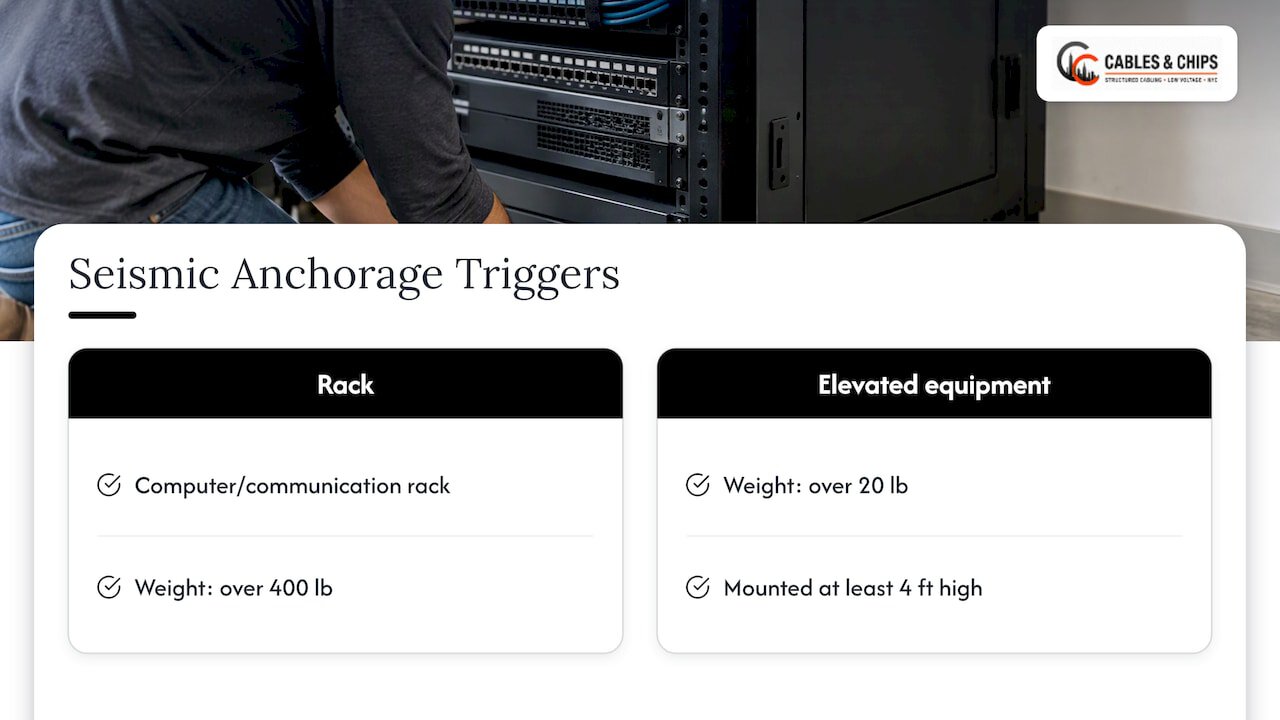
A loaded 42U enclosure clears the 400-pound line easily. A wall-mounted switch cabinet can clear the 20-pound line at height. Most commercial IT rooms are therefore not exempt in any practical sense.
Performance, not just fixation
The FEMA guidance frames the goal as performance. The rack must hold up against the lateral forces predicted for the design event without buckling. A rack with four anchors set into an unknown substrate has been fixed in place. It has not been designed. That gap is why the code asks an engineer to verify the installed condition against the drawings.
Why NYC projects stall: the documentation problem
Most delays we see described in this field come from paperwork, not from physical work. The DOB audits professional certifications. Its January 2026 Enforcement Bulletin describes a Special Enforcement Team audit of professionally certified applications that found major code non-compliances. Research on racking filings points to a recurring pattern: construction documents that omit material identification or seismic design load data for the racking system, or that leave out its designated seismic system status.
A filing that does not list the racks cannot support an inspection of the racks. The inspector arrives, finds equipment with no design basis on file, and the sign-off waits.
For facilities and IT managers, the fix is simple to state:
- Put every rack and enclosure on the equipment schedule early, with its dimensions and loaded weight.
- Make sure the engineer’s drawings specify the anchor type, size, embedment and spacing.
- Keep the manufacturer’s seismic data for the rack or enclosure with the project file.
- Record the as-built condition. Our guide to structured cabling as-built documentation covers what a clean handover package contains.
Slab or raised floor: how the anchoring changes
Where the rack sits determines how complicated the design gets.
Anchoring to a structural slab
On a concrete slab, the rack anchors straight into the structure. The load path is short and easy to inspect. Data center design guidance notes that seismic design is simpler on a slab, while a raised floor is one more system that must be engineered and proven. The same guide says that anchoring directly to structural concrete is often technically superior and more cost-effective than bracing through a raised floor.
Slab anchoring still needs checking: concrete condition, edge distance, rebar and any post-tensioning or embedded conduit. Anchors in concrete also fall under the special inspection requirements in Chapter 17, so the anchor product needs an approved basis.
Anchoring through a raised access floor
A rack on a raised floor does not tie into the main slab by default. The usual approach is a heavy-duty steel stand that passes through the floor tiles and anchors into the concrete sub-slab, so the pedestals are not overloaded. According to the same data center field guide, failing to isolate those loads, or ignoring how the stand interacts with the sub-slab, is a common point of inspection failure.
Raised floors also appear in the code as their own special inspection item (BC 1705.12.2), so the floor and the racks on it may each need an engineer’s attention.
| Factor | Slab-on-grade or structural slab | Raised access floor |
|---|---|---|
| Load path | Rack to concrete, direct | Rack to stand, stand to sub-slab, through the floor |
| Design complexity | Lower | Higher, one more system to engineer |
| Inspection focus | Anchor type, embedment, concrete condition | Stand anchorage, floor isolation, sub-slab condition |
| Typical risk | Hitting rebar or conduit when drilling | Loads transferred to pedestals by mistake |
| Cable routing | Overhead tray or ladder rack | Underfloor or overhead, with openings to coordinate |
The seismic detail teams forget: cable slack
The FEMA guidance is about preventing damage and loss of communication links, and that second part is where cabling comes in. A rack that moves a few inches while its incoming fiber or copper is pulled tight will break those connections. The rack stays upright and the network is still down.
Practical measures for the cable plant:
- Leave a service loop on every connection entering the rack. Size it for the lateral movement your engineer predicts, not for tidy appearance.
- Avoid tight bundles that cannot flex. Use cable management that lets the bundle move as a group without a pinch point.
- Keep fiber bend radius intact through the loop. Fiber is the least forgiving of the media.
- Transition from fixed tray or ladder rack to rack-mounted equipment with a flexible section, not a rigid run.
- Label and document the loops so that later cleanups do not pull them tight.
This is a place where a low voltage contractor and the structural engineer need to talk. The engineer knows the displacement. The cabling team knows how to build a loop that survives it and still looks professional. For the media side, see our comparison of CAT6A and fiber optic installation and our fiber installation page.
A practical sequence for anchoring a rack in NYC
- Inventory the racks. List each rack, cabinet and wall-mount enclosure with its dimensions, empty weight, planned loaded weight and height of the heaviest equipment.
- Confirm the building’s Seismic Design Category. Ask the architect or engineer of record. Do not assume it from the building’s age or class.
- Engage the registered design professional early. They decide which code provisions apply to each rack and specify the anchorage.
- Decide on floor type. If you have a choice, a structural slab simplifies the design. If the room has a raised floor, plan for through-floor stands and sub-slab anchors.
- Choose the rack and accessories with seismic data. The manufacturer’s published seismic information should match the design loads. See our overview of server rack options for enterprise environments.
- Plan the cable plant around movement. Build in service loops, flexible transitions and bend-radius protection from the start.
- Install to the drawings. Anchors, hardware and spacing follow the specification exactly. Substitutions need engineer approval.
- Arrange the special inspection. The inspector should see the anchors before the room is closed up or the rack is loaded.
- Test and document. Certify the cabling and record the as-built condition. Our cable testing and certification service covers the testing part.
Fit-outs and moves: where seismic scope gets lost
Seismic anchoring is easiest to miss in two moments. The first is a buildout where the general contractor, the IT team and the cabling contractor each assume someone else handles the racks. The second is an office move where the IT equipment arrives on a schedule that has no slot for engineering review.
If you are planning a move, a good IT equipment relocation guide helps you sequence packing, transport and reinstallation. Add one line to whatever plan you use: the racks at the new site need their anchorage designed and inspected before equipment is loaded, not after.
For general contractors, the practical advice is to put the rack in the trade coordination meeting. Drilling into the slab, floor penetrations, power, grounding and cable tray all touch the same footprint. Our notes on rack grounding and the plywood backboard specification show how those details are handled in the same rooms.
Our perspective
We have spent more than 40 years working in New York commercial environments, and the pattern is consistent: the rack is treated as furniture and the cabling as an afterthought. Neither is true. A rack is a heavy, tall, loaded piece of equipment that has to be secured, documented and serviced, and everything coming into it has to survive that rack moving.
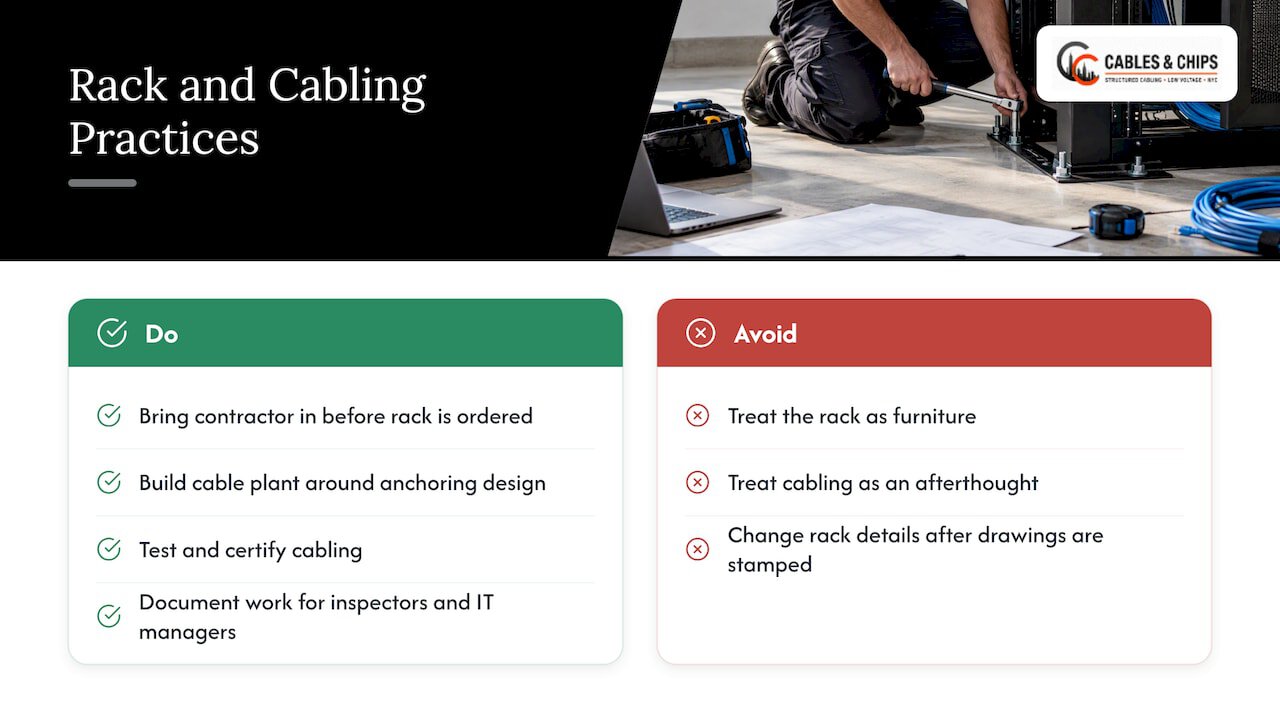
Our position is simple. We install and organize racks as part of structured cabling, and we build the cable plant around the anchoring design, not against it. We do not replace the engineer. The registered design professional decides what the building and code require. Our job is to build the room to that design, with clean routing, service loops where movement is expected, tested and certified cabling and documentation that an inspector or the next IT manager can follow.
We also advise one habit above all others. Bring the cabling contractor into the conversation before the rack is ordered. Rack height, depth, door style, cable entry points and floor type all affect the anchor layout, and changing them after the drawings are stamped is slow and expensive. If you want a second set of eyes on a room, our five questions to ask before buying rack seismic bracing is a good place to start.
— Ken
Common mistakes we see on rack anchoring
- Treating the anchor as the whole job. Anchors without a verified load path, correct concrete and documented design are not a seismic solution.
- Anchoring to the wrong thing. Raised floor pedestals, thin topping slabs and non-structural walls are not where a loaded rack should be fixed.
- Ordering the rack first. Rack selection that ignores seismic data forces a redesign.
- Pulling cables tight. Neat, taut bundles look professional until they have to move.
- No paper trail. Missing equipment schedules, unlisted racks and absent load data are what hold up filings and inspections.
- Letting cleanups undo the design. A later cable cleanup that removes slack or swaps anchors weakens the original work. Our server room rack cleanup and installation work keeps seismic details in view.
Planning the work with us
Cables & Chips is a licensed and insured low voltage contractor at 20 Vesey Street in Lower Manhattan. We handle server rack installation and server room infrastructure, structured cabling, fiber, cable testing and certification, MDF/IDF cleanup and the documentation that goes with them, for commercial offices and secure facilities across the city. See a related data center retrofit and rack cleanup project for how we approach an existing room.
If you have a room to build, retrofit or tidy, schedule a no-obligation site survey. We will walk the space, note the floor type, rack layout and cable paths, and give you a clear scope to share with your engineer. We do not publish prices for these services, so quotes follow the survey.
What to bring to the first conversation
A short package saves a lot of back and forth:
- The floor plan with rack locations and the floor type (slab or raised).
- A rack schedule with sizes and loaded weights.
- The name of the architect or engineer of record and the building’s Seismic Design Category if known.
- The existing cable plant: pathways, tray, entry points and any abandoned cable.
- The inspection and filing timeline, including any lease or move deadlines.
- Your uptime requirements, so the cable slack and routing design reflects what cannot go down.
With that, the engineering, the cabling and the inspection can run in parallel instead of in sequence.
FAQ
Does a server rack in an NYC office have to be anchored?
Often, yes. The ASCE 7 thresholds summarized by FEMA call for anchorage of racks over 400 pounds, or over 20 pounds mounted 4 feet or more above the floor, and even exempt items must be positively anchored. Your engineer of record confirms what applies to your building and rack.
Who inspects rack anchorage in New York City?
Where the code requires special inspection, a registered design professional or an approved special inspection agency verifies the installation against the design. The storage rack provision is BC 1705.12.4. The project’s engineer can tell you whether your racks fall under it or under the designated seismic system provisions.
Is it better to anchor to the slab or through a raised floor?
Where the building allows it, the slab is usually simpler. Design guidance describes direct slab anchoring as technically superior and often more cost-effective. On a raised floor, the rack typically sits on a steel stand that passes through the tiles and anchors into the sub-slab.
What is the most common reason rack work fails inspection or stalls a filing?
Documentation gaps are the most commonly cited issue in the research we reviewed: missing material identification, missing seismic design load data or a missing designated seismic system status. Physical problems, such as loads transferred to raised floor pedestals, also come up.
Do I need slack in my cabling if the rack is anchored?
Yes. Anchored racks can still shift, and taut fiber or copper can break while the rack stays upright. Service loops sized for the engineer’s predicted movement protect the connections.
Sources
- 2022 NYC Building Code, Chapter 17: Special Inspections and Tests
- NYC Administrative Code library: BC 1705.12.4 Storage racks
- FEMA E-74: Computer and Communication Racks
- NYC DOB Enforcement Bulletin, January 2026
- Seismic bracing requirements for nonstructural components, Simpson Strong-Tie blog
- Data center raised floor vs slab design, Anvilfield