

Understanding what is smart office cabling is the first step toward building a network infrastructure that actually supports how modern offices operate. Unlike traditional wiring, which treats power and data as separate concerns, smart office cabling, known formally as structured cabling, integrates both into a planned, standards-compliant low-voltage system. It powers and connects everything from Wi-Fi access points to IP security cameras through a single, organized plant. If you are responsible for a commercial buildout, a tenant improvement project, or an IT infrastructure upgrade, this guide covers what you need to know.
Key takeaways
| Point | Details |
|---|---|
| Structured cabling is the standard term | “Smart office cabling” refers to structured, standards-based low-voltage systems compliant with ANSI/TIA-568 specifications. |
| PoE unifies power and data | Power over Ethernet delivers DC power and data simultaneously over Cat6/6A cables, eliminating separate AC circuits. |
| Standards prevent costly rework | Following ANSI/TIA-568.1-D requirements for labeling, pathways, and testing protects your investment from day one. |
| Documentation is a long-term asset | Detailed cable maps, labeling, and test records reduce troubleshooting time and technician dispatches significantly. |
| Planning for the full device ecosystem matters | PoE power budgets and device compatibility must be verified upfront to avoid misconfigurations during deployment. |
What smart office cabling actually is
The term “smart office cabling” is widely used in planning discussions, but the recognized industry term is structured cabling. It describes a standards-based low-voltage system designed to carry data, voice, and power through a single, organized cabling plant. The “smart” designation reflects its ability to support intelligent building devices, including Wi-Fi access points, IP phones, security cameras, and IoT sensors, through one unified infrastructure.
At the core of any structured cabling system is twisted-pair copper Ethernet cabling, most commonly Cat6 or Cat6A. These cables handle both data transmission and, critically, Power over Ethernet (PoE). PoE uses twisted-pair copper to deliver DC power and data simultaneously over a single run, eliminating the need for separate AC power circuits at each device location.

The practical implications of this are significant. A Wi-Fi access point mounted in the ceiling does not need an electrician to run a dedicated outlet to it. An IP camera at the end of a corridor draws its power directly from the network switch. This is what separates smart office wiring from basic electrical and data installations.
The key components of a structured smart office cabling system include:
- Horizontal cabling: Cat6 or Cat6A runs from the IDF (intermediate distribution frame) to individual workstations, APs, and devices
- Backbone cabling: Fiber optic or high-grade copper connecting MDF to IDF locations across floors or buildings
- Telecommunications rooms: Organized MDF/IDF closets housing patch panels, network switches, and cable management
- Consolidation points and zone cabling: Flexible distribution points supporting open-plan and reconfigurable office layouts
- Testing and certification: Channel and component-level performance validation confirming the system meets specification
Understanding how building cabling infrastructure works in a commercial context clarifies why each of these elements is necessary, not optional.
Industry standards that govern installation
Smart office cabling does not mean installing the latest cables and hoping for the best. It means adhering to recognized standards that define performance, installation methods, and documentation requirements. The governing standard in the U.S. is ANSI/TIA-568.1-D, which specifies requirements for commercial building telecommunications cabling systems, including Cat6A as the recommended horizontal cable for new installations.
Here is why standards compliance matters for decision-makers:
- Performance assurance: Structured cabling design requires measurable performance criteria and compliance testing, so you know your system will support the applications you need, not just the ones you had at installation.
- Pathway and space planning: ANSI/TIA-568 specifies how pathways, conduit fill, bend radius, and clearances must be managed. Ignoring these rules causes signal degradation and physical damage over time.
- Grounding and power separation: Standards require adequate separation between low-voltage data cabling and AC power runs to prevent electromagnetic interference, a frequent cause of intermittent network issues.
- Labeling and documentation: Every cable, patch panel port, and outlet must be labeled according to a documented scheme. This is not administrative overhead. It is the foundation of every troubleshooting call that does not require a technician on-site.
- Future-proofing: Treating smart office cabling as a planned system with telecom subsystems and measurable performance criteria improves long-term scalability.
Pro Tip: Request full test reports in ANSI/TIA format from your installer before you accept a project as complete. A certification printout from a Fluke or equivalent tester confirms every run meets specification. Without it, you are accepting the installer’s word, not a verified result.
Benefits of smart cabling over traditional wiring
The argument for structured cabling over basic wiring comes down to four practical categories: flexibility, cost, reliability, and scalability. Here is a direct comparison:
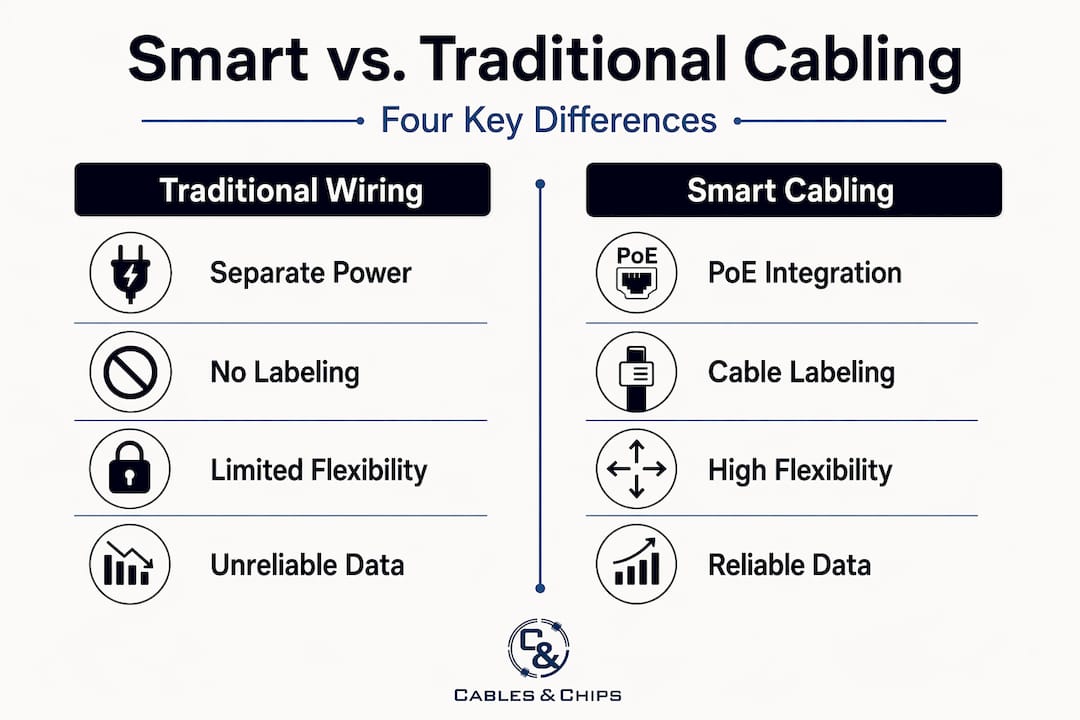
| Factor | Traditional wiring | Smart structured cabling |
|---|---|---|
| Power delivery | Separate AC circuits for each device | PoE over Cat6/6A, no electrician required |
| Device placement | Limited to outlet locations | Flexible; devices go where the network goes |
| Maintenance | Difficult to trace, no documentation | Labeled, tested, fully documented |
| Scalability | Costly rework for changes or additions | Modular; moves and adds are straightforward |
| Standards compliance | Typically absent | ANSI/TIA-568.1-D certified |
| Long-run cost | Lower upfront, higher ongoing | Higher upfront, lower over time |
PoE provides flexibility by eliminating the need for electrical outlets at every device location, and it significantly reduces cabling and installation costs by removing separate AC circuits and conduit runs. For a mid-size office deploying 20 wireless access points, that difference in electrical work alone can represent a meaningful budget line.
The benefits of smart cabling extend beyond the installation phase. Because every run is labeled, tested, and documented, your IT team can diagnose most connectivity issues remotely, by port number and location, before anyone touches a ladder. That operational efficiency compounds over the life of the building.
Pro Tip: When evaluating PoE switches for your deployment, calculate the total power draw of every connected device and compare it against the switch’s total PoE power budget, not just its per-port maximum. Many teams discover budget shortfalls only after installation.
Practical considerations for upgrading
Planning a new installation or upgrading an existing one requires more than choosing the right cable category. Smart building infrastructure fails most often when built incrementally without accounting for how different systems and their power requirements coexist.
Before deployment, address these areas:
- Existing infrastructure audit: Assess whether legacy Cat5e runs can be retained or need full replacement. Cat5e does not support 10-Gigabit applications or higher PoE classes reliably.
- Cable category selection: Cat6 supports 10GBase-T up to 55 meters. Cat6A supports it up to 100 meters and handles higher PoE power classes with better heat dissipation. For new commercial builds, Cat6A is the correct choice.
- PoE power budgeting: PoE design must account for device types and power requirements across your entire device ecosystem. Even buildings with Cat6A throughout can face issues if network switch power expectations and device demands are not aligned from the start.
- Pathway planning: Low-voltage systems require proper design that validates cable categories, grounding, bend radius, and separation from AC power. Unplanned pathways cause recurring issues after deployment.
- Documentation and labeling: Build your labeling scheme before installation begins, not after. Every outlet, patch panel port, and backbone run should be part of a documented scheme from day one.
- Testing and certification: Full channel testing with certified equipment is non-negotiable. Detailed documentation of cable maps, backbone routes, and test results becomes the most valuable long-term asset for troubleshooting and remote diagnosis.
For teams coordinating across IT, facilities management, and contractors, reviewing open office cabling planning strategies early in the project prevents scope conflicts and change orders.
Future trends shaping smart office infrastructure
The smart cabling solutions deployed today need to support technologies that will be standard within three to five years. Several trends are already reshaping what a well-designed office cabling system must accommodate:
- Higher PoE power classes: IEEE 802.3bt (PoE++) delivers up to 90 watts per port, supporting digital signage, pan-tilt-zoom cameras, and thin-client workstations. Cabling and switch infrastructure must be specified to handle both the power load and the associated heat buildup in bundled cable runs.
- Single-pair Ethernet (SPE) and SPoE: New single-pair Ethernet power delivery supports lower-speed building automation devices such as sensors, lighting controls, and HVAC monitors. These systems require their own pathway and documentation strategy.
- Hybrid fiber-copper cables: Fiber optic and copper hybrid cables extend PoE power delivery up to hundreds of meters beyond standard copper limits, supporting smart building applications across large floor plates and multi-building campuses.
- Growing IoT and BIoT device density: Every IP-connected thermostat, occupancy sensor, badge reader, and digital display requires a documented, powered, tested network connection. Designing for current device counts while maintaining 20 to 30 percent spare capacity is standard practice for forward-looking installations.
- Modular and flexible cabling architectures: Zone cabling and consolidation-point designs allow faster, lower-cost reconfiguration as office layouts change, a practical necessity in commercial spaces with evolving tenant needs.
Why decision-makers consistently undervalue this infrastructure
I have seen this play out dozens of times. A company spends millions on a buildout and treats cabling as a commodity line item to cut when the budget gets tight. Six months later, they have a network outage they cannot diagnose, access points that drop clients intermittently, or a security camera network that will not perform as specified. The cabling budget looks like a place to save money until it becomes the reason everything else fails.
What I have learned is that the real cost of smart office cabling is not the installation. It is the documentation and planning that surrounds it. Buildings where every run is labeled, tested, and mapped allow IT teams to resolve issues remotely, onboard new devices without rework, and hand off accurate records when ownership or management changes. Buildings without that documentation force every problem into an on-site investigation.
My honest advice: the cable category you choose matters less than whether the system was planned, installed to standard, tested, and documented. A perfectly installed Cat6A system with full test records will outperform a Cat6A system installed without planning every time. Infrastructure choices made during a buildout define the operational ceiling of that building for years. Make them intentionally.
— Ken
Build your smart office network with Cables

Whether you are planning a new commercial office buildout or upgrading aging infrastructure, Cables delivers structured cabling installations built to ANSI/TIA-568 standards throughout New York City. From CAT6 and CAT6A installation to fiber optic backbone infrastructure, every project is planned, tested, certified, and fully documented. Cables also provides CCTV and access control cabling for teams implementing smart office technology across security, wireless, and IoT systems. With more than 40 years of experience serving commercial offices, IT departments, and building management teams across NYC, Cables builds infrastructure that performs today and scales with your needs. Schedule a site survey to get started.
FAQ
What is smart office cabling in simple terms?
Smart office cabling, formally called structured cabling, is a planned, standards-compliant low-voltage system that carries data and PoE power to every connected device in an office through a single organized cable plant.
How does PoE work in a structured cabling system?
PoE follows IEEE 802.3 standards to deliver DC power and data simultaneously over Cat6 or Cat6A copper cables, allowing devices like Wi-Fi access points and IP cameras to operate without separate AC power circuits.
What cable category should a new office installation use?
Cat6A is the recommended choice for new commercial installations under ANSI/TIA-568.1-D. It supports 10-Gigabit speeds up to 100 meters and handles higher PoE power classes with better thermal performance than Cat6.
Why does cabling documentation matter so much?
Detailed cable maps and test records reduce technician dispatches significantly by enabling remote diagnosis. Without documentation, every fault requires a physical investigation.
How is smart office cabling different from standard wiring?
Smart cabling differs from basic wiring by supporting advanced connectivity and PoE delivery, using planned pathways, and following compliance standards that simplify maintenance, upgrades, and long-term scalability.