
SFP Module Types: Copper, Fiber, Speeds and Reach
SFP module types come down to three choices: the speed class (SFP, SFP+, SFP28), the medium (copper or fiber), and, for fiber, the optic type (SX, LX, BiDi and longer-reach variants). The module you buy has to match your switch port, your cable and the distance of the link. If you get one of those wrong, you get a dark port or a link that drops. The cabling behind the module sets the limits, so the module should be chosen after the cable plant is designed, not before.
This guide is written for the people who specify, approve and maintain that plant: IT directors, facilities and property managers, general contractors and integrators in New York City buildings. It covers what each type does, what range to expect, and how to read a label before you order.
TL;DR
- An SFP is a small, hot-swappable transceiver that plugs into a switch or router port and converts it to copper or fiber. The speed class is set by the port: SFP is 1G, SFP+ is 10G, SFP28 is 25G.
- Copper SFPs use RJ45 and twisted pair. Fiber SFPs use LC connectors. Fiber SFPs include SX for multimode, LX for single-mode, and BiDi for a single strand.
- Reach depends on module and cable together: 1G SX reaches 550 m on OM2 multimode, while 10G SR reaches 300 m on OM3 and 400 m on OM4. LR modules reach 10 km on single-mode.
- 10GBASE-T copper SFP+ modules are limited to 30 m, against 100 m for a fixed 10GBASE-T port.
- Decide the cable first, then the module, then confirm your switch accepts it.
What an SFP module does
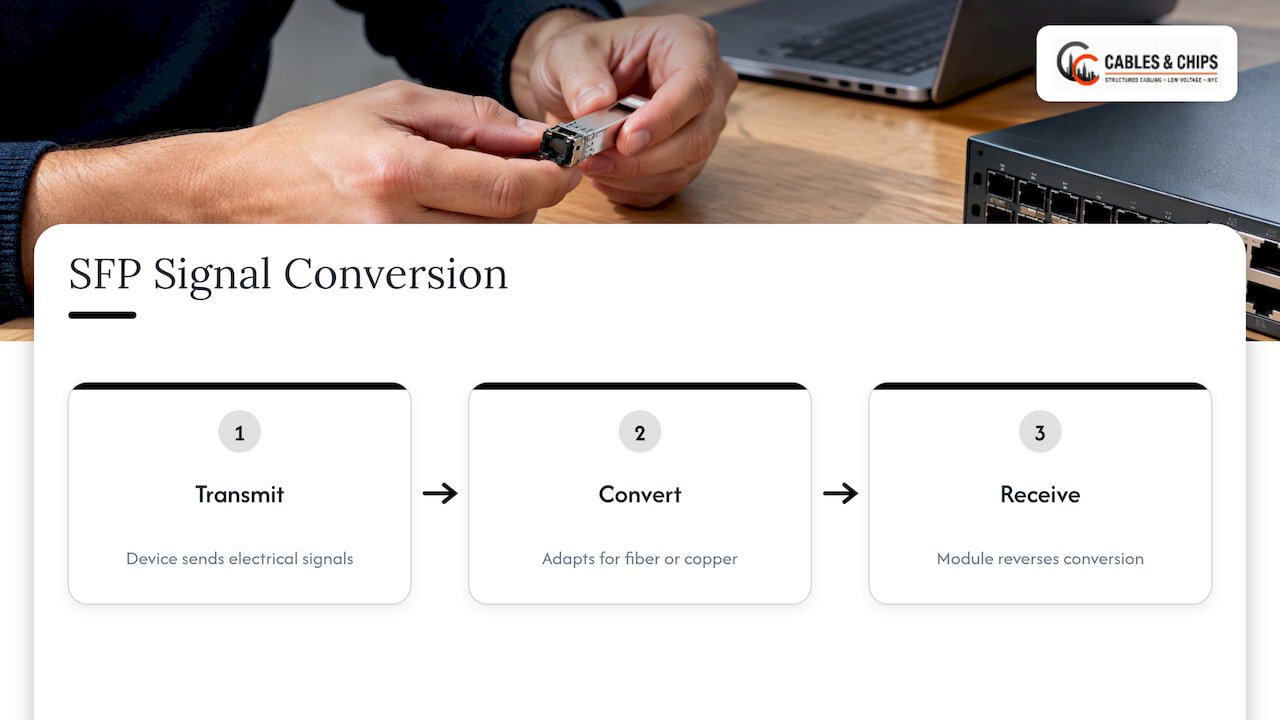
SFP stands for small form-factor pluggable. It is a compact transceiver that slides into a cage on a switch, router, firewall or media converter. The device sends electrical signals, and the module converts them to light for fiber or conditions them for copper, and the reverse on the receiving side. TechTarget describes the SFP as a converter between the switch and the cable. The SFP format is defined by a multi-source agreement, which is why modules from different makers share the same physical shape. The format is about half the size of the older GBIC, which it replaced in most uses.
The practical value for a building is flexibility. A switch with SFP ports is not locked to one medium. The same port can carry a short copper link to the next rack today and a single-mode link to another floor or building tomorrow, by swapping a module and not the switch. Modules are hot-swappable, so a change does not require powering the switch down.
SFP module types by speed class
The first way to sort modules is by the speed they were built for. The physical cage looks almost identical across the SFP family, which is why mix-ups are common.
| Form factor | Typical speed | Common use in offices |
|---|---|---|
| SFP | 1G (some 100 Mbps) | Access-switch uplinks, links between closets |
| SFP+ | 10G (also accepts 1G modules on many ports) | Aggregation, backbone risers, server links |
| SFP28 | 25G (supports 10G and 1G on many ports) | High-density server and storage links |
| QSFP+ / QSFP28 | 40G / 100G | Data center and core links |
The speed hierarchy above follows HPE’s published transceiver guide, which lists SFP at 1G or 100 Mbps, SFP+ at 10G, SFP28 at 25G, QSFP+ at 40G and QSFP28 at 100G. SFP+ arrived in 2006, and SFP28 followed in 2014, according to the Small Form-factor Pluggable overview. QSFP types use four lanes at once to reach higher totals, which is why they are sized differently.
Three rules keep this simple:
- A higher-class port often accepts a lower-class module, but the link then runs at the lower speed. An SFP+ port can usually take a 1G SFP. Confirm it in the switch documentation.
- A lower-class port will not run a higher-class module. A 1G SFP port cannot give you 10G by inserting an SFP+.
- Some switches are restrictive. Lenovo’s best-practices paper notes that its switches support only Lenovo-approved modules and disable the port when a non-approved one is inserted. Check your vendor’s compatibility list before ordering in volume.
Copper SFP vs fiber SFP
The second sort is by medium, and it is the one office teams ask about most.
Copper SFP modules
A copper SFP has an RJ45 jack on its face and runs over ordinary twisted-pair cabling. The 1G version uses 1000BASE-T. Some also support 10/100/1000 through SGMII, as Microchip’s application note explains. At 10G, the SFP+ version uses 10GBASE-T.
The constraint is distance. Signals weaken as they travel through twisted pair, and patch panels and punch-down blocks add loss. HPE’s guide says a 10GBASE-T SFP+ transceiver is capped at 30 m, while a fixed 10GBASE-T port reaches 100 m, and the guide recommends Cat6A shielded cable for 10G copper. Copper SFP+ modules also draw more power, roughly 2.5 to 3.0 W against about 0.8 to 1.0 W for a short-reach fiber SR module, according to a 10GbE SFP+ deployment guide.
Copper SFPs fit when you need to connect an SFP-only port to a nearby RJ45 device, such as a switch to a firewall in the same rack or room, using cable you already have.
Fiber SFP modules
A fiber SFP has a duplex LC connector (two strands) or, for BiDi types, uses one strand. Intel’s technology guide notes that most SFPs on the market are optical, and that fiber is the better choice when you need higher throughput and longer distance, which justifies a higher infrastructure cost. It also notes that BASE-T copper is the easiest and most budget-friendly to deploy.
Direct attach and active optical cables
The same SFP cage also accepts direct attach copper (twinax) cables and active optical cables, which have the connectors built onto a fixed length of cable. Intel’s guide describes direct attach as easier to deploy than fiber at the same speed but limited to shorter distances, making it a cost-friendly rack-to-rack or host-to-host option. For permanent links through walls and risers, structured cabling is the right foundation.
| Copper SFP | Fiber SFP | Direct attach | |
|---|---|---|---|
| Connector | RJ45 | LC (duplex) or single strand (BiDi) | Fixed, built into the cable |
| Cable | Twisted pair, Cat6A for 10G | Multimode or single-mode fiber | Twinax assembly |
| Typical reach | Up to 100 m at 1G, 30 m at 10G | Hundreds of meters to tens of km | A few meters, rack to rack |
| Best for | Short links to RJ45 devices | Risers, between closets, between buildings | Inside a rack or adjacent racks |
If you are weighing a copper backbone against a fiber one for a floor-to-floor design, our CAT6A vs fiber optic decision guide walks through the trade-offs.
Fiber SFP types: SX, LX, BiDi and longer reach
Fiber modules are named for the wavelength of light they use and the distance they target. The names look cryptic, but they follow a pattern.
SX: short reach on multimode
SX modules (1000BASE-SX at 1G, 10GBASE-SR at 10G) use 850 nm light over multimode fiber. Crestron’s product specification lists SFP-1G-SX as 850 nm over 50-micron multimode fiber at up to 550 m on OM2 or better, and recommends OM3 or better for new installations. SX is the usual choice for links inside one building, such as an IDF to the MDF.
LX: longer reach on single-mode
LX modules (1000BASE-LX, or 10GBASE-LR at 10G) use 1310 nm light over single-mode fiber with a 9-micron core. The same Crestron sheet lists the 1000BASE-LX10 module at 1310 nm and 10 km. Choose LX or LR when the run is long, when a campus or multi-building link is involved, or when you want a cable that will carry later speed upgrades without being replaced. If you are specifying single-mode, our OS1 vs OS2 comparison covers which grade to install.
BiDi: two wavelengths, one strand
BiDi (bidirectional) modules send and receive on different wavelengths over a single fiber. TechTarget notes the use of different wavelengths for each direction, and BiDi modules work in pairs: one end transmits at 1310 nm and receives at 1490 nm, and the other end does the reverse. The Crestron sheet lists 1000BASE-BX10 uplink at 1310 nm and downlink at 1490 nm. BiDi suits cases where strands are scarce, such as an existing fiber with few spare pairs.
ER, ZR and other long-reach types
Extended-reach modules push single-mode links further: 10GBASE-ER runs at roughly 1550 nm up to 40 km, and ZR variants reach 60 to 80 km depending on the vendor, per the 10GbE SFP+ deployment guide. Most single-building and metro office projects never need them.
Reach by module and cable
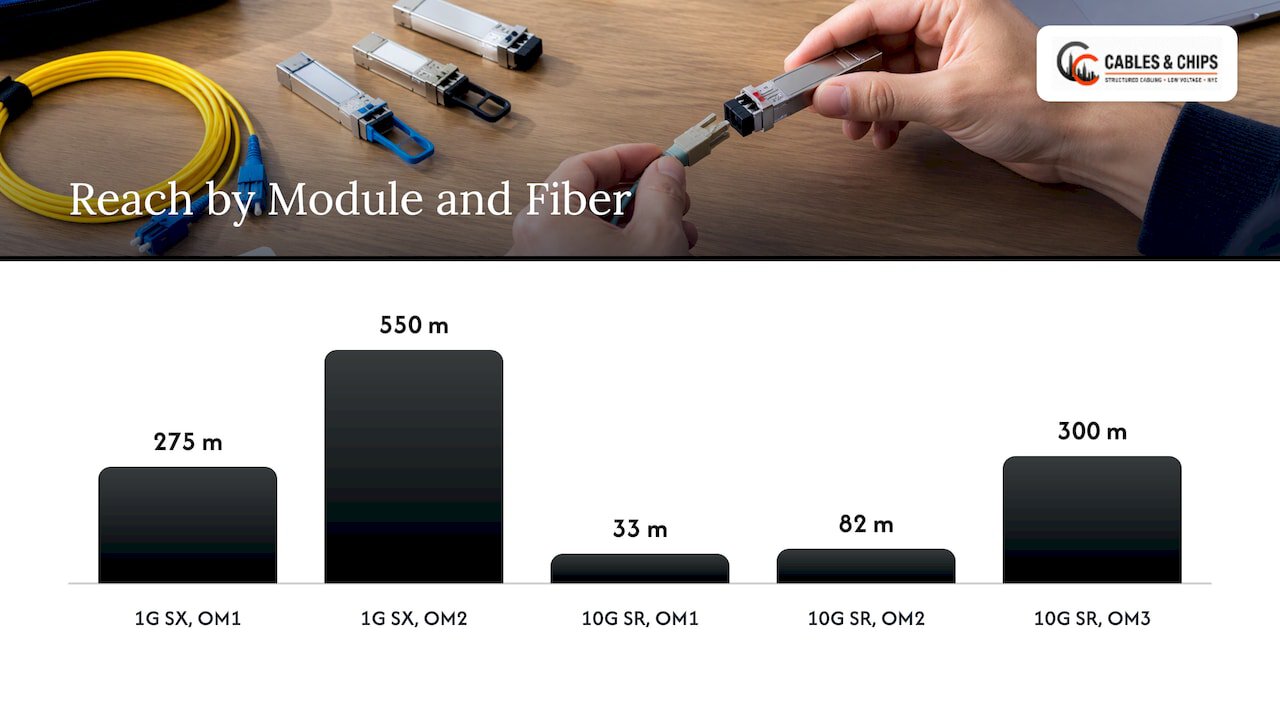
Module reach is not a property of the module alone. It is the lower of what the module can do and what the fiber grade allows. Lenovo’s tables give the clearest numbers:
| Module | Fiber | Reach |
|---|---|---|
| 1G SX | OM1 (62.5 micron) | 275 m |
| 1G SX | OM2 (50 micron) | 550 m |
| 1G LX | Single-mode | 10 km |
| 10G SR | OM1 | 33 m |
| 10G SR | OM2 | 82 m |
| 10G SR | OM3 | 300 m |
| 10G SR | OM4 | 400 m |
| 10G LR | Single-mode | 10 km |
| 10G ER | Single-mode | 40 km |
| 25G SR (SFP28) | OM3 / OM4 | 70 m / 100 m |
These figures come from Lenovo’s networking best-practices paper. Notice what happens to older multimode. The same OM1 fiber that reaches 275 m at 1G reaches only 33 m at 10G. That is why a building with legacy riser fiber may run happily at 1G and then fail the moment someone orders 10G modules. Before any speed upgrade, find out what grade is actually in the walls and what it measures.
For a short-reach 10G link you can use rules of thumb, but the actual loss in the link depends on connectors, splices and cleanliness. Lenovo notes that low light is the most common fiber problem and is often caused by dirty or defective cabling, and that modules running outside their optical specification can produce errors or fail early. See the same Lenovo paper for that guidance.
How to read an SFP label
A module label usually packs form factor, speed, distance class, fiber mode and wavelength into one string. Huawei’s documentation explains the convention: form factor (SFP, SFP+, SFP28), rate (GE, 10GE, 25GE), distance type (SX short, LX medium, LH long), distance in kilometers, SM or MM for the fiber mode, and the center wavelength in nanometers, per its guide to interpreting optical module names. Here is a quick decoder:
- 850 nm: multimode. SX or SR.
- 1310 nm: single-mode. LX, LR, or the 1310 side of a BiDi pair.
- 1550 nm: single-mode. ER and longer.
- SM or MM in the product string: single-mode or multimode.
To check whether a fiber already installed is single-mode or multimode, read the jacket print and the connector. Multimode jackets are commonly marked with the grade (OM1 to OM4) and a 50/125 or 62.5/125 micron size. Single-mode is marked OS1 or OS2 and 9/125. Never plug a single-mode module into multimode fiber, or the reverse, and expect a clean result. An SX module on single-mode, for example, can still show light, but the link is unreliable and outside the standard.
On the question of whether modules at both ends must match: yes, in type, wavelength and speed. A pair of duplex modules must be the same standard (SX to SX, LR to LR), and BiDi modules must be complementary, one at each end of the pair. Extreme Networks states that the type of switch or router determines which SFP module types are compatible.
If you want a second explainer on common optical SFP labels and how they interconnect telecom rooms, this reference on optical SFP and SFP+ modules lays out the wavelength variants.
How to choose the right module for a link
Work through the decision in this order.
- Measure the run. Use the real cable route length, including slack, risers and patch cords, not the straight-line distance between rooms.
- Identify what is installed. Copper category, or fiber grade and mode. If it is undocumented, it needs to be tested and labeled before you buy anything.
- Set the speed target for today and the next upgrade. If you will move from 1G to 10G within a few years, the cable you pull now should already support it.
- Pick the medium. Short links to RJ45 devices can use copper. Risers, closet-to-closet runs and building-to-building links belong on fiber.
- Match the module to the port and vendor. Check the switch’s list of supported modules and the port’s speed.
- Pick the connector and polarity plan. Duplex LC for most SFPs. Keep the transmit and receive pairs consistent across the link.
- Test and certify the link. Record the result in documentation that the next technician can use.
The weak point in this list is almost never the module. It is step 2, where the plant turns out to be mixed, mislabeled or dirty. Our guide to structured cabling components shows how the pieces fit, and the fiber backbone design guide covers riser planning.
Common mistakes with SFP modules in offices
- Ordering 10G modules for old multimode. As the table shows, OM1 and OM2 drop to a small reach at 10G.
- Mixing single-mode and multimode patch cords. The colors help, but jackets get replaced and labels fade.
- Using a 30 m copper SFP+ on a 60 m run. The fixed 10GBASE-T port limit of 100 m does not apply to a module.
- Ignoring the vendor’s compatibility list. A port may simply stay down.
- Leaving dust caps off. A dirty connector causes the low-light faults Lenovo flags as the most common fiber issue.
- Undocumented swaps. A module changed during a night outage and never recorded makes the next fault harder to trace.
Cabling closets are where these mistakes pile up. A tidy, labeled MDF or IDF with documented fiber runs makes module changes quick. The server rack setup checklist is a useful companion for the rack side.
Our perspective
We have spent more than 40 years in New York commercial buildings, and the SFP question we hear most is really a cabling question in disguise. Someone orders a box of modules, and then the link will not come up because the riser fiber is a grade nobody recorded, or the patch panel was never certified.
Our view is simple. Design the cable plant first, install it cleanly, test and certify it, and document it. Then the module choice is a short, low-risk decision. A properly terminated and tested fiber link accepts SX today and a faster module later, without opening a wall.
In the closets we organize, the difference shows. Labeled fiber, clean patch fields and as-built records mean a technician can swap a module in minutes, and the next person can see what is plugged in and why. That is the standard we install to in commercial offices and secure facilities across the city.
Ken
When to bring in a low voltage contractor
You can order modules yourself. The cable behind them is the part that benefits from a specialist. Bring one in when you are:
- moving into or renovating a space and need fiber and copper pulled to the right standard before the switches arrive;
- upgrading a backbone from 1G to 10G or 25G and need to know what the existing fiber will support;
- inheriting closets with abandoned or unlabeled cable;
- adding CCTV, access control, WiFi access points or conference rooms that need uplinks back to the MDF.
Cables & Chips handles fiber installation, termination and testing, structured CAT6 and CAT6A cabling, cable testing and certification, and MDF and IDF cleanup for commercial offices and secure facilities in New York City. We are licensed and insured, and we start with a no-obligation site survey. Read about our fiber installation service in NYC, or see the full list of low voltage services. To plan your next link, schedule a site survey.
Copper-side work is covered on our structured CAT6 cabling page, and if your project is growing, these scalable cabling examples for IT teams show how to leave room for the next upgrade.
FAQ
What is the difference between SFP and SFP+?
The two use the same physical cage size, but SFP is built for 1G (and some 100 Mbps) and SFP+ for 10G. An SFP+ port generally accepts a 1G SFP and runs it at 1G. An SFP port cannot run an SFP+ module at 10G.
Do SFP modules at both ends have to match?
Yes, in standard, wavelength and speed. An SX module must face an SX module, and an LR module an LR module. BiDi modules are the exception in that they come as a complementary pair with opposite transmit and receive wavelengths. Your switch vendor may also require approved modules.
How can I tell if an SFP is single-mode or multimode?
Read the label. Multimode modules (SX, SR) use 850 nm, and single-mode modules (LX, LR, ER) use 1310 nm or 1550 nm. The product string often includes SM or MM. The fiber jacket will show OM grades for multimode and OS1 or OS2 for single-mode.
When should I use a copper SFP instead of a fiber SFP?
Use copper for short links to RJ45 equipment over cable you already have, keeping in mind the 30 m limit for 10GBASE-T SFP+ modules. Use fiber for risers, longer runs, and links between closets or buildings, where reach and future speed matter.
Sources
- Small Form-factor Pluggable overview
- SimpliPHY Dual Media Copper/Fiber/SFP application note
- An introduction to SFP ports on a Gigabit switch, TechTarget
- Technology Guide: Ethernet Cables and Transceivers Overview, Intel
- AOS-S and AOS-CX Transceiver Guide, HPE
- Best Practices for Networking: Transceivers, Cables, and more, Lenovo
- Pluggable Transceivers Installation Guide, Extreme Networks
- How Can I Interpret the Name of an Optical Module? Huawei
- Product Specifications: SFP-1G, Crestron
- 10GbE SFP+ Module Procurement and Deployment Guide