
Rack PDU Selection: A Practical Guide for NYC Server Rooms

The right rack PDU is the one sized to the rack’s real load, matched to the circuit that feeds it, fitted with the metering your team will actually use, and mounted so it does not choke the airflow. Get those four decisions right and the PDU disappears into the background. Get one wrong and you see it as a tripped breaker, a hot server or a cord tangle nobody wants to touch. At Cables & Chips we work inside New York City server rooms and network closets, and we treat power distribution as part of the same job as the cabling around it: one rack, one documented layout.
This guide is written for IT directors, facilities and property managers, and the contractors who build out their spaces. It walks through the specification order that works, the metered versus switched decision, what PDUs cost, and how placement affects cooling.
TL;DR
- Size to the rack’s measured or derated load, then add growth headroom. Never size to the sum of nameplate ratings alone, and never to a guess.
- In North America, a 20A breaker is derated to 16A of continuous load, so the circuit, the cord and the PDU must all be checked, not just the PDU’s label.
- Buy metering when you need to see capacity, and switching only where you will actually reboot or sequence outlets remotely.
- In A/B redundant racks, either power path must be able to carry the whole rack by itself.
- Mount the PDU and route cords so the rear exhaust path stays open, and fill empty rack units with blanking panels.
What a rack PDU does, and why it is not a power strip
A rack PDU (power distribution unit) takes one or more feeds from the room’s power circuits and splits them across many outlets for servers, storage and network gear. In the usual chain, power arrives from the utility, passes through a UPS (uninterruptible power supply) for conditioning and ride-through, goes through floor-level distribution, and only then reaches the rack PDU, which delivers it to each device’s power supply, as Sensaka’s overview of the power chain lays out. In dual-corded designs, an A PDU and a B PDU sit on independent paths so either one can carry the full load.
A rack PDU is not a consumer power strip. It has defined electrical ratings, rack-mounting options and, depending on the model, metering and remote control, a distinction Matrix Solutions stresses in its sizing guide. That is why a PDU selection is an engineering decision tied to the circuit behind it, not a line item to add at the end of a rack order.
Step 1: Establish the rack’s power budget
Start with what the rack will draw, in watts or kilowatts.
A server’s nameplate rating is the maximum its power supply can deliver, not what it draws in service. Matrix Solutions explains that sizing to nameplate over-buys the PDU and circuit, while sizing to a guess under-buys and trips breakers. Two practical methods exist:
- Measured: read actual draw from existing metered PDUs, the UPS display or the server’s management interface, then add growth.
- Estimated: Raritan’s seven-step method multiplies the sum of nameplate values by 70% to get a working kW budget, and suggests considering headroom for growth.
Dell’s buyer’s guide adds the margin that matters: allow for derating, growth and change, and add capacity for redundancy. It notes that Underwriters Laboratories requires 20 percent derating in North America and recommends adding 30 percent to present consumption, because servers can draw far more than they did five years ago.
A worked example
Take a rack with eight 1U servers, each with a 750 W nameplate.
- Nameplate total: 8 × 750 W = 6,000 W.
- Working budget at 70%: 4,200 W.
- Add 30% growth headroom: about 5,460 W.
Now check it against the circuit. On a 208V single-phase 30A circuit, the continuous limit is 80% of 30A, or 24A. That is 208V × 24A, about 4,990 W. The 5,460 W budget does not fit on that circuit. You have three honest options: a 208V three-phase feed, a higher-amperage circuit, or splitting the load across two circuits. In an A/B design, the same check applies to each path separately, because if one path drops the other carries all 5,460 W.
This is the reason to run the arithmetic before ordering. The cost of the PDU is minor next to a circuit that cannot carry what you plugged into it.
Step 2: Match voltage, phase and the input plug
The feed decides the PDU, not the other way around. Confirm what the room actually provides.
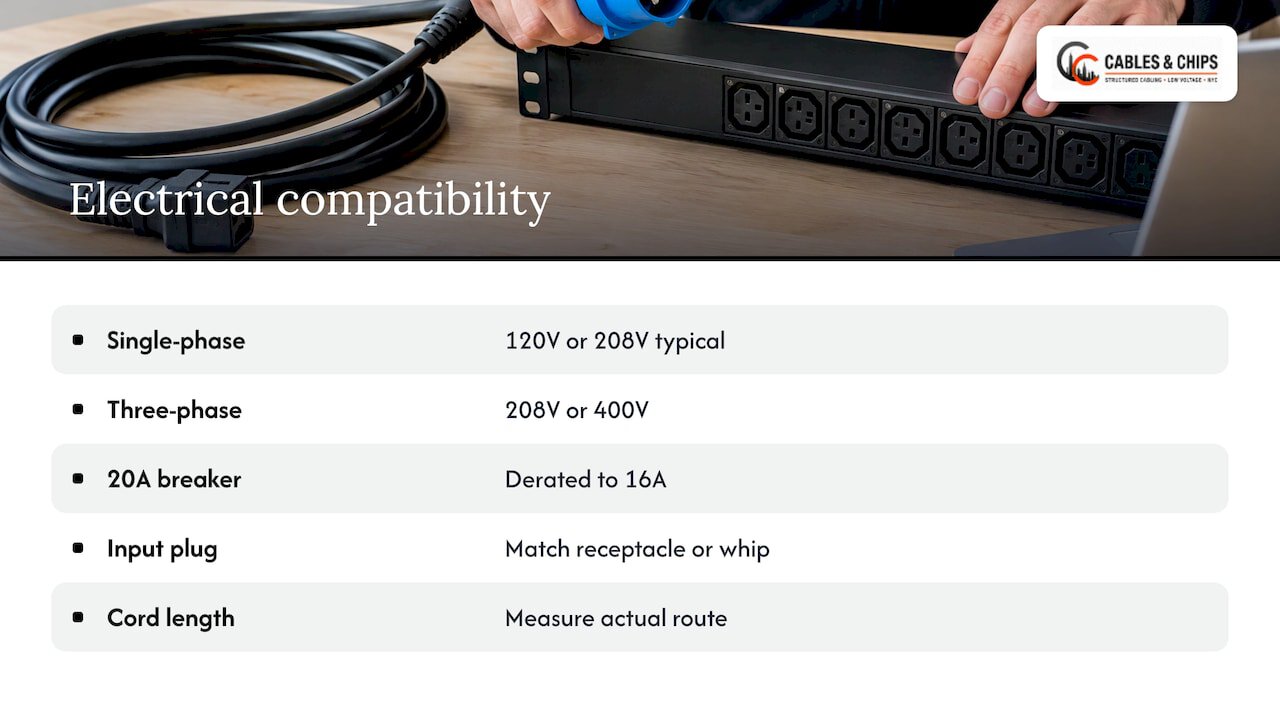
Voltage and phase. Raritan lists the typical North American infrastructure as 120V or 208V single phase, and 208V or 400V three phase. CyberPower’s guide notes that most offices have single-phase 120V or 208V power, while three-phase is common in higher-density commercial racks. In many NYC office server rooms you will find 120V or 208V single-phase circuits, so confirm at the panel and the receptacle before you specify.
Breaker derating. Schneider Electric’s white paper explains that North American rack PDUs use 20A circuit breakers derated to 80%, or 16A, whereas European 16A breakers are not derated. Equipment specified from overseas catalogs can therefore be misleading. Read the derating explanation in the white paper before comparing models, and always compare usable current, not the headline amperage.
Input plug and cord. The plug has to match the receptacle or the whip that feeds the rack. Raritan ties the plug type to the circuit count, phase and amperage you decided on. Eaton’s buying guide also says to check the line cord length: too long leaves surplus cord to stuff in the enclosure, too short forces the PDU into a poor location. Measure from the feed point to the mounting position, following the actual route the cord will take.
If the rack is fed by a whip, the pre-terminated cable that runs from a distribution panel to the rack, the whip’s rating belongs in the same check. Our guide on when a custom or built-to-order PDU whip is needed covers that decision, and the compatibility notes for US rack types and electrical standards cover the matching.
Step 3: Choose outlets that match your equipment
Count the devices, then count their power cords.
Dell’s guide lists the common connectors: IEC 60320 C13, rated 4A in its table, for most 1U, 2U and 4U servers and PCs. C19, rated 16A, is for high-power workstations, routers, blade servers and UPS units. NEMA 5-15R and 5-20R are for meters, test devices and environmental probes. The connector list is in Dell’s PDU buyer’s guide.
Schneider’s white paper recommends a popular mix of 36 C13 outlets and 6 C19 outlets so that one common PDU can serve most racks. A standardized mix has a real operational benefit: when every rack in a room uses the same PDU, spares are interchangeable and a replacement does not become a research project.
Two habits prevent most outlet problems:
- Leave spare outlets. A PDU filled to the last receptacle has no room for the next server, and that is when someone plugs into a neighboring rack’s PDU.
- Use retention. Raritan notes retention clips or locking outlets prevent accidental unplugging. In a shared closet where several people touch the rack, that matters.
Step 4: Decide the form factor
Horizontal PDUs mount in the rack units themselves. Raritan lists the typical sizes as 1U (1.75 in., 44 mm) and 2U (3.5 in., 88 mm). Vertiv describes horizontal units as taking 1U or 2U with 8 to 16 outlets, and vertical (zero-U) units as holding up to 54 outlets while mounting at the back or side without using equipment space.
A simple rule follows:
| Situation | Usually a better fit |
|---|---|
| Small wall-mount or short rack, a handful of devices | Horizontal 1U |
| Full-height cabinet with dense servers | Vertical zero-U |
| Cabinet narrower than the vertical PDU plus cable managers need | Horizontal, or a wider cabinet |
Zero-U is not free. It needs side-channel room in the cabinet, which is a cabinet-selection question as much as a PDU question. Our guide to server rack options for enterprise environments explains how the enclosure choice constrains what goes in the rear channels.
Metered or switched: which PDU do you need?
This is the decision that moves the price most, so make it deliberately. The tiers, as the manufacturers define them:
- Basic: distribution only, reliable and low cost. Vertiv’s PowerIT brochure describes basic units as cost-effective distribution.
- Metered: adds a digital display of power consumption. Eaton distinguishes metered-input models, which measure at the branch or unit level, from metered-outlet models, which measure each outlet.
- Monitored: per Vertiv, reports current, voltage, real and apparent power, power factor and kWh remotely, at unit or outlet level.
- Switched: adds remote on, off and reboot of each outlet. APC’s pocket guide says switched models combine metering with remote control for power cycling and delayed power sequencing.
When metering is the right call
Metering answers capacity questions: how close is this rack to its limit, which circuit is carrying more than the others, and can we add another server? APC notes that metered-by-outlet PDUs log kWh for capacity planning. If you are consolidating racks, relocating an office or planning growth, that data pays for itself before the first new server arrives. Metering is also what turns the budget in Step 1 from an estimate into a measurement.
When switching earns its place
Switching matters where nobody can walk to the rack quickly: a colocation cage, a remote floor, a secure room with escorted access. Eaton notes that switched PDUs let administrators remotely reboot malfunctioning devices and turn outlets on and off. Delayed sequencing also helps after an outage, so that a rack of servers does not all start at once and trip the breaker.
For a rack in a closet down the hall from the IT team, a metered unit often does everything required. Obelinf’s buying rule is a useful one: buy the cheapest PDU that provides the data your operation needs, and do not pay for outlet switching in a rack you will never reboot remotely.
What a rack PDU costs
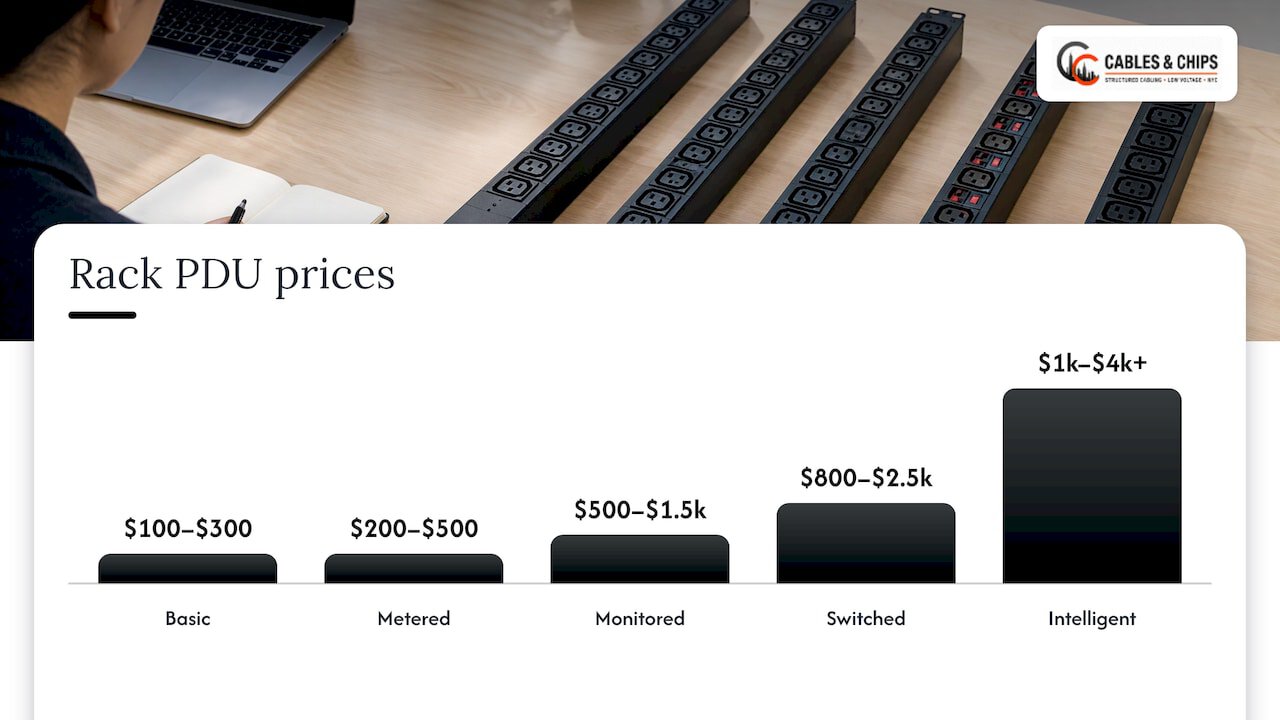
Prices depend on capacity, outlet count and intelligence. As a US snapshot, Obelinf’s August 2026 guide puts basic units at roughly $100 to $300, metered at $200 to $500, monitored at $500 to $1,500, switched at $800 to $2,500, and intelligent models at $1,000 to $4,000 or more. Its price ladder by PDU type is a good orientation, though street prices move with the manufacturer, amperage and phase.
For a sense of how capacity drives price, Eaton’s 2014 US pricebook listed basic units from $94 for a 1.44 kW horizontal model up to $1,258 for a 17.3 kW vertical model with an industrial input plug. A 4.99 kW 1U unit with 16 C13 outlets was $418. Those are 2014 list prices, useful for the shape of the curve and not for budgeting today.
The PDU is rarely the largest cost on the page. Circuits, whips, cabinet space and installation labor typically outweigh it, which is why choosing the wrong amperage costs far more than choosing the wrong feature tier.
Server rack airflow: where the PDU gets in the way
Power distribution and cooling share the same rear half of the rack. A poorly placed PDU or a bundle of power cords can block exhaust, so the airflow plan and the PDU plan must be made together.
Start with the room layout. NVIDIA’s cooling design guide says to orient racks with their backs facing each other in a hot aisle and their fronts facing each other in a cold aisle. It sets aisles at least 36 inches wide and strongly recommends a 48-inch cold aisle. It also recommends aisle containment to prevent hot air recirculating into the cold side, blanking panels over unoccupied rack units, and brush grommets in cable pass-throughs. Those three details are cheap and they decide whether hot exhaust takes the shortest path back to the intakes.
Inside the rack, the same discipline applies:
- Fill every empty rack unit with a blanking panel. An open slot is a return path for hot air.
- Separate power and data. A common arrangement routes data cabling down one rear channel and the PDU with its cords down the other, which keeps the central exhaust path clear.
- Use right-length cords. Slack power cord piled behind a server is an obstruction. Short, labeled cords in the right color for each path (A and B) keep the rear readable and open.
- Mount PDUs where they do not face the exhaust. Zero-U units in the side channels leave the rack-unit plane free for equipment. Check the cabinet width before you commit.
- Keep the rack’s front clear. Horizontal PDUs and cable managers in front of equipment can interfere with intakes and service access.
Cable pathways matter in the closet too, not just the rack. The same pass-through openings that carry cable should be sealed with brush grommets so conditioned air is not bypassing the equipment. Our work on rack cleanup in a data center retrofit shows what this looks like on a real job: removing tangles, relabeling and restoring clear rear access.
Plan redundancy before you order
In an A/B design, each device’s two power supplies connect to different PDUs on independent circuits. The check people skip is the failure case. As Matrix Solutions puts it, the test is whether either surviving path can carry the full rack load. Anvilfield’s field guide gives the same instruction and adds that usable current must be checked at every limiting component: the breaker, the cord, the plug and the receptacle. The weakest link sets the usable capacity.
A short pre-order checklist keeps this honest:
- Rack load budget, with growth, in watts.
- Voltage and phase confirmed at the panel and the receptacle.
- Usable amperage after derating, at every component in the path.
- Outlet types and counts, with spares.
- Metering and switching decided by what the team will use.
- Cord length measured along the real route.
- Mounting position and cabinet clearance checked against the airflow plan.
How we approach racks and PDUs in NYC
In commercial buildings, the rack is rarely the only constraint. Risers, shared telecom rooms, landlord requirements and tight closets decide where a feed can land and how a cabinet can be oriented. Our server rack installation work is delivered by a licensed and insured NYC contractor with more than 40 years of experience in commercial environments, from MDF and IDF closets to enterprise server rooms. Racks leave our hands organized and documented, the way as-built documentation is meant to record them, and a clean patch layout, as covered in our patch panel design guide, keeps the data side from competing with the power side for the same rear channel.
If you are specifying a rack from scratch, relocating an office or cleaning up a closet that grew without a plan, we offer a no-obligation site survey. We walk the room, look at the rack position, pathways and cabling, and give you a clear picture before you commit to equipment. See our server rack installation and other services or contact us at 20 Vesey Street in Lower Manhattan.

Our perspective
Most PDU problems we see described on a project start long before the PDU is bought. A rack gets filled in stages, nobody records what is plugged in, and the power ends up as the last thing anyone designs. The result is a rear panel that looks like a knot and a breaker nobody wants to test.
Our view is simple. Treat the rack as one system: power, data, labels and airflow on a single plan, with a record that someone can read two years later. Choose the PDU after the load is known, not before. Choose cord lengths for the route, not for the catalog. Keep data on one side and power on the other, and give every empty rack unit a blanking panel.
That discipline is what our clean, documented installations are built on, and it is why a rack we organize stays serviceable when the next engineer opens the door. Your network is only as strong as the infrastructure behind it, and in a server room that includes the power strip behind every server.
Ken
FAQ
What is the difference between a metered and a switched PDU?
A metered PDU shows how much power the rack or outlets are drawing, which supports capacity planning. A switched PDU adds remote on, off and reboot control for each outlet, and typically includes metering as well. Choose switched where remote power cycling saves a site visit, and metered where you mainly need to see your load.
How much does a rack PDU cost?
In the US, one 2026 guide puts basic units at roughly $100 to $300 and switched units at $800 to $2,500, with metered and monitored tiers in between. Capacity, phase and outlet count drive the price as much as features do. The circuit and installation work around the PDU often cost more than the unit itself.
How do I size a PDU for my rack?
Add up the nameplate ratings, apply a working factor such as 70%, then add growth headroom of around 30%. Compare the result to the usable current of the circuit after the 80% derating on North American breakers. For A/B racks, the result must fit on a single path.
Does PDU placement affect server rack airflow?
Yes. Cords piled behind equipment or a PDU in the exhaust path restrict airflow and create hot spots. Mount vertical PDUs in the side channels, route data and power on opposite sides, use correctly sized cords and cover empty rack units with blanking panels.
Do I need a three-phase PDU?
Only when the rack load or the feed calls for it. Single-phase 120V or 208V covers many office racks, while three-phase is common in higher-density commercial racks. Work out your load budget and the circuit’s usable current first, and the answer usually follows.
Sources
- What Is a PDU? Power Distribution Unit Explained, Sensaka
- How to Size and Engineer a Rack PDU, Matrix Solutions
- Seven Steps to Selecting a Rack PDU for Your Data Center, Raritan
- Power Distribution Units buyer’s guide, Dell
- How to Choose IT Rack Power Distribution, Schneider Electric
- Choosing a Power Distribution Unit, CyberPower
- Find the Right PDU for Your Data Center, Eaton
- Rack Mount PDU: Power Distribution Solutions Explained, Vertiv
- Vertiv PowerIT Rack PDU overview brochure
- APC Rack Power Distribution and Rack Systems Pocket Guide
- Rack Power Budgeting: kW, PDU Types, and A/B Feeds, Obelinf
- Eaton 2014 Pricebook
- Cooling and Airflow Optimization, NVIDIA
- Data Center Rack PDU Types and Power Distribution Field Guide, Anvilfield