

A tangled network closet is not just an eyesore. It costs you time, money, and reliability. When cables are unmanaged, troubleshooting a single downed port can take hours instead of minutes. Disorganized cables block server air intakes, driving up fan speeds and accelerating equipment wear. Safety and compliance risks follow close behind. The good news: you can reduce cable clutter in your network closet systematically, with the right tools, the right sequence, and a plan that holds up over time. This guide gives you exactly that.
Key Takeaways
| Point | Details |
|---|---|
| Start with an audit | Remove unused cables before adding any new organization hardware or labeling systems. |
| Use Velcro, not zip ties | Velcro straps protect cable jackets and allow future adjustments without cutting and replacing. |
| Label both ends of every cable | TIA-606 requires durable mechanical labels within 12 inches of each termination point. |
| Separate power and data cables | Maintain at least 6 inches between power and data runs to reduce electromagnetic interference. |
| Audit quarterly | Compare physical labels to digital port maps every 90 days to prevent documentation rot. |
What you need before you reduce cable clutter
Jumping straight into reorganizing cables without preparation creates more problems than it solves. Before you touch a single cable, gather the right tools and make a plan.
Tools and materials checklist
- Velcro cable ties: Reusable, adjustable, and safe for cable jackets. Stock more than you think you need.
- Horizontal and vertical cable managers: Horizontal managers route patch cables between panels and switches. Vertical managers handle longer runs on the sides of the rack.
- Cable trays and D-rings: Trays support overhead or under-floor runs. D-rings guide cables along rack rails without sharp bends.
- Label maker with mechanical printed labels: Pen labels smear and fade. A thermal or laser label maker produces durable, TIA-606 compliant labels that stay readable for years.
- Short patch cables (6 to 12 inches): Long patch cables create excess slack that bunches up and blocks airflow. Match cable length to the actual distance between ports.
- Port mapping software or a live spreadsheet: Documentation is not optional. You need a digital record that mirrors the physical closet.
Planning your rack layout
A well-planned rack layout is the foundation of neat cable management. Allocate 1U of cable management space for every 1U of active equipment. That ratio increases for high-density fiber deployments using MPO connectors, where cable volume is significantly higher.
Position patch panels at the top of the rack, with switches directly below them. This keeps patch cable runs short. Place servers and heavier equipment lower in the rack for stability. Route power cables along one side of the rack and data cables along the other. The standard recommendation is to maintain 6-inch separation between power and data runs to reduce electromagnetic interference. Using vertical cable managers on opposite sides of the rack reinforces this separation physically.
Pro Tip: Map your rack layout on paper before touching any hardware. A five-minute sketch prevents hours of rework.
Labeling scheme: color-coding that works
Standardized color-coding removes ambiguity during troubleshooting and speeds up any future Moves, Adds, or Changes. A practical 2026 scheme assigns colors by function: Production (white), Backup (yellow), Cross-connect (blue), Management (green). Apply labels on both ends of every cable, within 12 inches of each termination point. Labels must be visible without moving any adjacent hardware.

Step-by-step: how to declutter and organize network cables
With your tools gathered and your layout planned, you are ready to execute. Follow these steps in order. Skipping steps, especially the audit phase, leads to a closet that looks organized but still contains hidden problems.
-
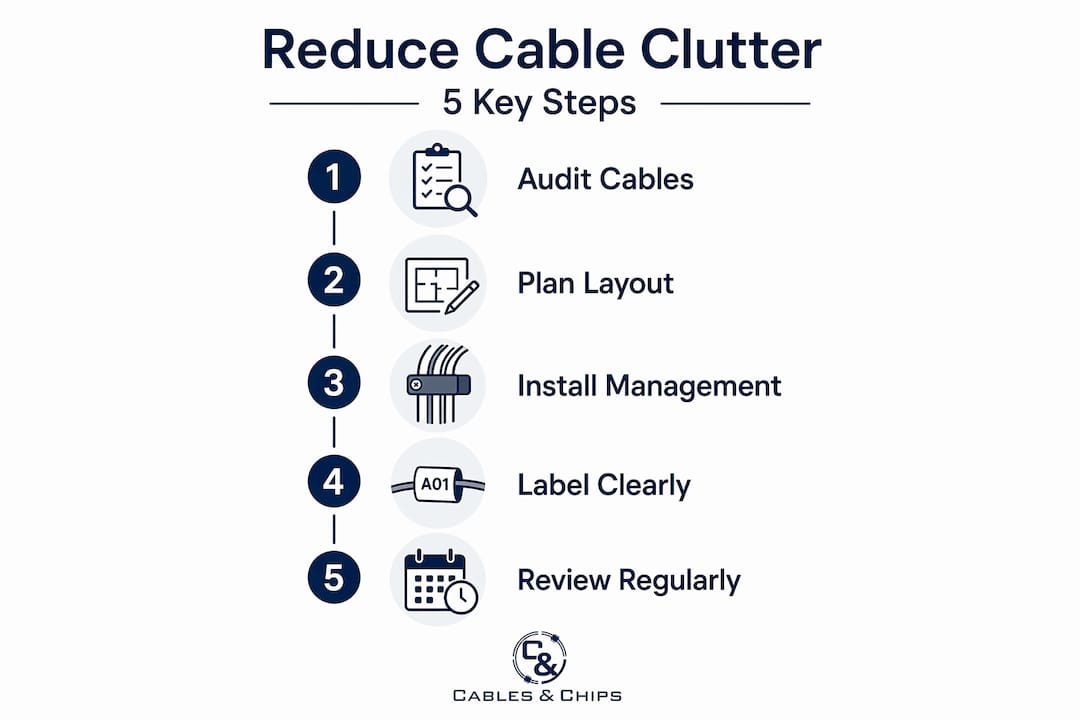
Audit every cable in the closet. Pull out your port mapping tool and trace each cable from end to end. Identify every cable that is unused, unlabeled, or connected to decommissioned equipment. Do not assume a cable is live just because it is plugged in. Unused cables left in place are the primary driver of cable clutter in network closets.
-
Remove dead cables completely. Cut and remove every cable you identified as unused. Do not coil them up and leave them in the closet. Physical removal is the only way to actually declutter a network closet. Bag and label removed cables if you need to keep them for spare use, and store them outside the rack environment.
-
Bundle active cables with Velcro straps. Group cables by destination or function, then bundle them loosely with Velcro. Experts advise against zip ties because they cinch cable jackets permanently, which degrades signal quality over time and makes future changes difficult. Velcro straps allow you to add or remove a single cable without cutting and replacing the entire bundle.
-
Install cable managers and trays. Mount horizontal cable managers between each patch panel and its corresponding switch. Run data cables through D-rings or cable trays to keep them off the floor and away from rack-mounted equipment intakes. Cable pathways must not obstruct front intake or rear exhaust areas, since blocked airflow raises inlet temperatures and forces cooling systems to work harder.
-
Create service loops for every run. Leave 6 to 12 inches of slack on each cable and store the loop in a vertical cable manager behind the equipment. Service loops allow you to slide equipment forward for maintenance without disconnecting cables. Skipping service loops is a common mistake that forces technicians to disconnect and reconnect cables every time they need physical access to a device.
-
Label both ends of every cable. Apply your standardized labels within 12 inches of each termination. Use the color-coding scheme you defined in the planning phase. Update your port mapping database immediately after labeling. Proper labeling reduces costly downtime by making it possible for any technician, not just the one who installed the cable, to identify and trace connections quickly.
-
Verify airflow corridors are clear. Walk through the rack visually after installation. No cable bundle should cross in front of a server’s intake grille or block the rear exhaust. Thermal performance depends on this as much as it depends on cooling equipment.
Pro Tip: Replace patch cables one-by-one rather than removing everything at once. This prevents accidental outages and keeps your port map accurate throughout the process.
Common mistakes that undo good cable management
Even well-intentioned cable cleanup projects fail when these specific mistakes go uncorrected.
Using zip ties instead of Velcro
This is the most common and most damaging mistake. Zip ties tighten permanently and are difficult to remove without cutting. Over time, they compress cable jackets, which degrades signal integrity. They also make any future change a destructive act. Replace every zip tie you find with a Velcro strap during your audit.
Letting documentation rot
Documentation rot is the leading cause of operational issues in network closets. A port map that was accurate 18 months ago is now a liability. Every time a cable is moved, added, or changed without updating the documentation, the gap between the physical closet and the digital record widens. Set a firm policy: documentation updates happen within 24 hours of any change. No exceptions.
Labels that are obscured or hand-written
Labels must be visible without moving components and must be mechanically printed, not hand-written. A pen label applied in 2022 may be unreadable today. Obscured labels force technicians to trace cables manually, which takes time and introduces the risk of accidental disconnections.
Ignoring firestop compliance
Every cable penetration through a fire-rated wall or floor requires a firestop seal. NFPA 75 compliance requires sealing every cable penetration and resealing it after any MAC activity. Use re-enterable firestop products so future cable changes do not require destructive removal of existing seals. This is not just a code requirement. It is a life-safety issue.
Your network is only as strong as the infrastructure behind it. Clean cables and documented connections are not cosmetic improvements. They are operational necessities.
Pro Tip: Keep a small stock of re-enterable firestop putty pads in the closet. Any time a cable is added or removed through a fire-rated penetration, the seal gets updated on the spot.
Verifying and maintaining a clean network closet
Getting organized is the first step. Staying organized requires a repeatable process.
-
Perform quarterly audits. Compare every physical label against your digital port map. Quarterly audits prevent documentation rot by catching discrepancies before they become troubleshooting nightmares. Check service loops for proper slack, verify that no zip ties have been reintroduced, and confirm that cable fills in managers are within capacity.
-
Monitor thermal performance. Check inlet temperatures at the front of each rack during audits. If temperatures are climbing without a corresponding increase in workload, obstructed airflow from cable creep is often the cause. Cables shift over time, especially in active closets where technicians are regularly making changes.
-
Enforce MAC discipline. Every Move, Add, or Change gets documented before the technician leaves the closet. Assign one person as the documentation owner for each closet or MDF/IDF location. Accountability matters here. A single undocumented change can cascade into hours of troubleshooting during the next incident.
-
Train every team member who touches the closet. Cable management standards only hold if everyone follows them. A 30-minute orientation covering your labeling scheme, Velcro bundling technique, and documentation process is enough to protect months of cleanup work. Build this into your onboarding for any new IT staff.
-
Review cable density at each audit. As your environment grows, cable density increases. Plan for scalable cabling infrastructure before you hit capacity, not after. Adding a second vertical cable manager or an additional patch panel is far easier when the closet is already organized.
My take: cable management is infrastructure, not housekeeping
I have walked into network closets where a single downed connection took three hours to trace because no one could tell which cable went where. The irony is that the fix, once we found the right cable, took 30 seconds. Every minute of that three-hour search was a direct cost of poor cable management.
What I have learned over years of working in MDF and IDF environments is that most teams treat cable organization as something you do when you have extra time. That framing is the problem. A messy closet does not just look bad. It raises cooling costs, shortens equipment lifespan, and turns routine changes into high-risk events.
The thermal argument alone should be enough to make the business case. When cables obstruct airflow, servers run hotter. When servers run hotter, fans spin faster and components wear out sooner. The energy cost is real, and the hardware replacement cycle shortens. That is a direct line from cable clutter to budget impact.
Labeling discipline is the part I see neglected most often, even in otherwise well-run IT environments. Teams invest in good hardware and skip the label maker. Then, 18 months later, no one knows what half the ports do. A printed label applied correctly takes 90 seconds. The troubleshooting it prevents can save hours.
Treat cable management as an ongoing infrastructure investment. Schedule the audits. Enforce the documentation policy. Buy the Velcro. The closet you maintain today is the one that does not fail you at 2 a.m. on a Tuesday.
— Ken
Professional cable management services in NYC

If your network closet has reached the point where a full cleanup requires more than internal resources can handle, Cables brings 40 years of structured cabling experience to commercial offices and enterprise environments across New York City. From structured CAT6 and CAT6A installation with standardized color-coding and full documentation to complete network closet cleanup and organization, every project is built to be maintainable, tested, and compliant. Whether you are starting from a tangled MDF or building out a new IDF from scratch, Cables delivers infrastructure that holds up over time. Contact Cables & Chips at 20 Vesey Street, Lower Manhattan, to schedule a site survey.
FAQ
What is the fastest way to reduce cable clutter in a network closet?
Start by auditing and physically removing all unused or decommissioned cables before adding any new organization hardware. Dead cables are the primary source of clutter and removing them has an immediate visual and functional impact.
Why are Velcro straps better than zip ties for network cables?
Velcro straps are reusable and adjustable, which makes future cable changes possible without cutting. Zip ties permanently compress cable jackets, which can degrade signal quality over time and make any modification a destructive process.
How often should I audit my network closet?
Quarterly audits are the standard recommendation. Each audit should compare physical labels to digital port maps, check service loops, verify airflow corridors are clear, and confirm that no zip ties have been reintroduced since the last review.
What does TIA-606 require for cable labeling?
TIA-606 requires durable, mechanically printed labels placed within 12 inches of each termination point on both ends of every cable. Labels must be visible without moving adjacent hardware or equipment.
How does cable clutter affect network equipment lifespan?
Disorganized cables obstruct server air intakes and exhaust paths, which forces cooling fans to run at higher speeds and raises operating temperatures. Sustained elevated temperatures accelerate component wear and shorten the replacement cycle for network hardware.