

Effective server rack cable organization is defined as the systematic routing, bundling, labeling, and documentation of all cables within a rack to preserve airflow, reduce troubleshooting time, and support long-term maintainability. When you organize messy server rack cables without a plan, you create a system that fights you every time equipment changes. The industry term for this discipline is structured cable management, and it applies equally to a 12U IDF closet and a 42U data center rack. This guide covers the planning, routing, labeling, and hardware decisions that separate a professional installation from a cable nightmare.
How to plan server rack layout for optimal cable routing
The biggest mistake in rack builds is improvising the physical layout before cable installation, which produces racks that are impossible to manage within months. Planning is not optional. It is the foundation of every clean rack you have ever seen.
Start by mapping equipment placement on paper or in a rack diagram tool before a single cable is pulled. Switches and patch panels belong at the top of the rack, servers in the middle, and power distribution units (PDUs) at the bottom or rear. This arrangement keeps data cables short and separates them from power runs, which matters for both signal integrity and troubleshooting clarity.
Once equipment positions are set, plan your cable management hardware alongside them. Industry guidance recommends a 1:1 ratio of horizontal cable management space per 1U of active equipment, increasing to 1.5U for MPO fiber due to bend radius requirements. This ratio is not a suggestion. Skipping it means patch cords pile up in front of ports with nowhere to go.
- Place a 1U horizontal cable manager directly below or above each patch panel or switch
- Position 0U vertical cable managers on both sides of the rack for long cable runs
- Reserve at least 2U of empty space at the top and bottom for future expansion
- Mark airflow paths on your diagram before finalizing equipment positions
Pro Tip: Use a free tool like Rack Planner or a simple spreadsheet to document U-positions before ordering hardware. Changing positions on paper costs nothing. Changing them after installation costs hours.
Proper routing design reduces installation time significantly by prioritizing accessible paths over minimal cable length. A cable routed cleanly through a vertical manager may be 18 inches longer than a direct run, but it will save 30 minutes of labor the first time a technician needs to trace it.

What are the best methods for routing and bundling cables?
Routing discipline separates a rack that stays clean for five years from one that degrades in five months. The sequence matters as much as the technique.
Follow these steps for every cable run in the rack:
- Run cables horizontally across the rear of the rack first, then bring them forward through horizontal managers to their destination ports. This keeps the front of the rack clear and creates a consistent visual plane.
- Respect minimum bend radius at every turn. Ethernet cables must not be bent tighter than 4x the cable diameter. Fiber optic cables require 10x the cable diameter. Violating these limits degrades signal performance and, in fiber’s case, can cause permanent damage.
- Limit fill to 50% in vertical cable managers. Overfilling blocks airflow through the rack and makes future additions nearly impossible without pulling everything apart.
- Separate power and data cables physically. Run power cables on one side and data cables on the opposite side of the rack. Electromagnetic interference from power lines degrades signal quality on copper data cables, particularly at longer runs.
- Bundle with Velcro straps, not zip ties. Zip ties crush cables and damage fibers when over-tightened. Velcro hook-and-loop straps are reusable, adjustable, and safe for both copper and fiber.
Pro Tip: When bundling patch cords, group them by destination zone rather than by color. Zone-based bundles are far easier to trace during a fault than color-coded bundles that cross the rack in every direction.
Cable bundles that block server intake vents degrade cooling efficiency and may shorten equipment lifespan. Before finalizing any bundle path, hold a flashlight behind the bundle and confirm that airflow through the server’s front intake is unobstructed.
Why cable length standardization and labeling matter
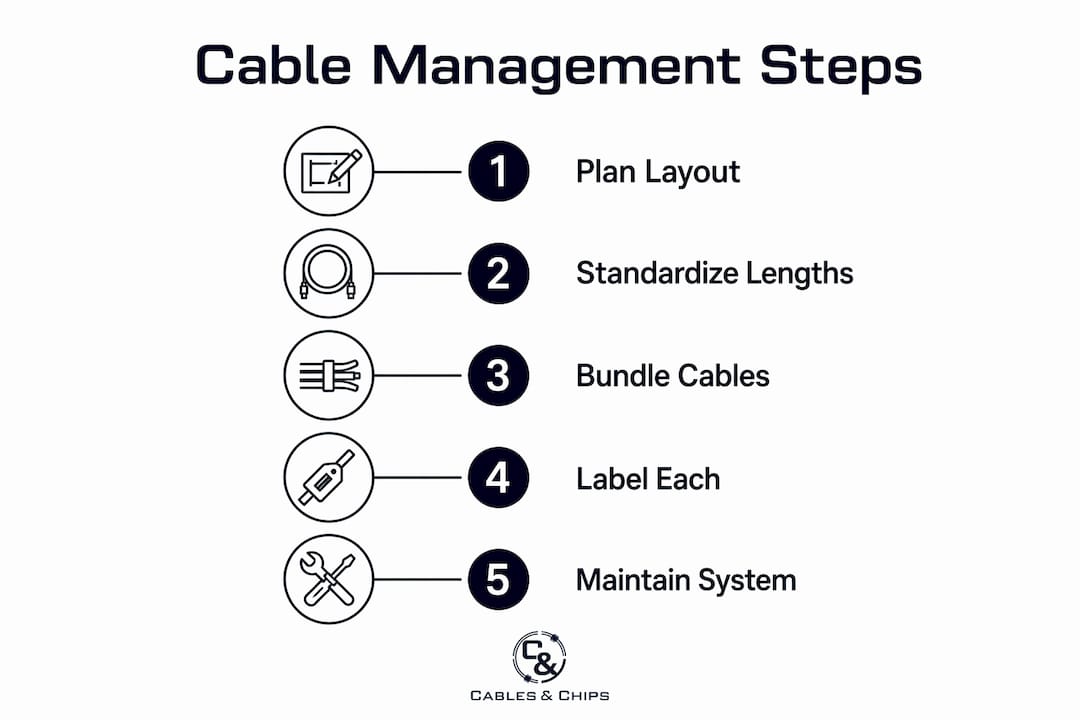
Standardized cable lengths are the single most underrated element of a clean rack. Random-length patch cords create loops, tangles, and slack that fills cable managers and obscures port visibility. The fix is straightforward: use pre-terminated lengths of 0.5m, 1m, 2m, and 3m as your standard inventory. Any cable longer than 3m should be re-routed through a vertical manager rather than coiled in place.
Service loops are equally non-negotiable. Leave 6 to 12 inches of service loop at each cable termination point. This extra length allows hardware to be pulled forward on slides for maintenance without disconnecting active cables. Skipping service loops is a common shortcut that creates downtime during routine hardware swaps.
Labeling ties the entire system together. Label each cable at both ends with durable wrap-around labels that include the source port, destination port, and cable type. A technician standing at the rear of the rack should be able to identify any cable in under 10 seconds.
| Labeling element | Best practice |
|---|---|
| Label placement | Both ends of every cable, within 2 inches of the connector |
| Label format | Source port > Destination port (e.g., SW1-P01 > PP1-P01) |
| Label material | Wrap-around vinyl rated for at least 5 years |
| Documentation link | Each label ID maps to a live port database |
A live documentation system mapping each cable and port is the final layer of organization. Tools like NetBox, Racktables, or even a well-maintained spreadsheet give you a searchable record that survives staff turnover and equipment refreshes. Labels without documentation are useful. Labels with documentation are a system.
What tools and components does server rack cable management require?
The hardware you choose determines how well your routing techniques hold up over time. These are the core components for any professional rack build.
| Component | Function | Best use case |
|---|---|---|
| 1U horizontal cable manager | Routes patch cords left and right from ports | Placed above or below every patch panel or switch |
| 0U vertical cable manager | Runs cables top to bottom along rack sides | Long runs between equipment at different rack heights |
| Patch panel | Terminates structured cabling and provides a clean demarcation point | MDF/IDF termination for all horizontal runs |
| Velcro cable ties | Bundles cables without crushing or permanent commitment | All copper and fiber patch cord bundling |
| Lacing bars and cable rings | Guides cables along rear of rack without managers | Rear cable routing in open-frame racks |
Patch cords are the most frequently manipulated cables in any rack and should always be routed through 1U managers to prevent accidental disconnections and port stress. A patch cord pulled sideways across a switch face without a manager puts lateral stress on the RJ45 connector every time someone works nearby. Over months, that stress causes intermittent failures that are genuinely difficult to diagnose.
The patch panel is the most important structural component in a well-organized rack. It creates a fixed demarcation between your structured cabling infrastructure and your active equipment, meaning you can swap a switch without touching a single horizontal run. For racks with high-density fiber, CAT6A and fiber optic routing require separate planning for bend radius and manager sizing.
How do you maintain cable organization over time?
A clean rack at installation degrades without a maintenance discipline. These are the practices that keep organization intact through equipment changes, staff turnover, and growth.
- Audit labels and documentation every quarter. Ports change, equipment gets swapped, and labels fall off. A 30-minute quarterly review catches drift before it becomes a full remediation project.
- Never use permanent zip ties on patch cords. When the next technician needs to add a cable, they will cut the zip tie and rarely replace it with anything. Velcro straps make additions and removals a 10-second task.
- Keep cable bundles under 50% fill in every manager. When a manager hits 60% or 70% capacity, it is time to add a second manager or re-route, not compress the existing bundle further.
- Reserve at least 20% of rack space for future equipment. Growth that was not planned for is the most common cause of cable management collapse in commercial environments.
- Document every change at the time it is made. A port mapping system updated six months after the fact is not a documentation system. It is a guessing game with extra steps.
Pro Tip: After any equipment change, photograph the front and rear of the rack before closing the cabinet. A timestamped photo library costs nothing and has saved hours of troubleshooting on more than one occasion.
For teams managing multiple racks or an entire network closet organization program, a consistent naming convention applied across all racks from day one eliminates the confusion that comes from different technicians using different labeling logic.
Key takeaways
Structured cable management in server racks requires deliberate planning, standardized hardware, and consistent documentation to remain functional and maintainable over time.
| Point | Details |
|---|---|
| Plan before pulling cable | Map equipment positions and cable manager placement before installation begins. |
| Respect bend radius limits | Ethernet requires 4x cable diameter; fiber requires 10x to avoid signal degradation. |
| Standardize cable lengths | Use 0.5m, 1m, 2m, and 3m pre-terminated lengths to eliminate unnecessary slack. |
| Label both ends consistently | Wrap-around labels at both ends, linked to a live port database, cut troubleshooting time. |
| Maintain with Velcro, not zip ties | Velcro straps allow adjustments without cable damage and support long-term flexibility. |
Why cable planning is an operational necessity, not an aesthetic choice
After more than 40 years of pulling cable in New York City server rooms, telecom rooms, and enterprise environments, I can tell you that the racks that fail the fastest are the ones where someone decided to “clean it up later.” Later never comes. What comes instead is a technician at 2 a.m. tracing an unlabeled cable through a bundle the size of a forearm, with a switch down and a client on the phone.
The racks I am most proud of are not the ones with the most expensive hardware. They are the ones where a junior technician can walk in six months after installation, read the labels, pull up the documentation, and make a change without calling anyone. That is the real measure of a clean rack. Accessibility, not appearance.
The routing discipline described in this article, specifically the rear-first approach, the service loops, and the zone-based bundling, adds maybe 20% to installation time on a first build. It saves multiples of that on every subsequent visit. Good cable routing design is not about making things look neat. It is about making the next person’s job faster and the network more reliable.
If your team is inheriting a rack that was never properly organized, do not try to fix it incrementally. A full remediation with proper documentation and hardware is almost always faster than patching a bad foundation one cable at a time. Your network is only as strong as the infrastructure behind it.
— Ken
Professional server rack cable management from Cables & Chips
Cables & Chips provides professional structured CAT6 cabling installation and complete server rack organization services for commercial offices, data centers, and enterprise environments throughout New York City. Whether you are building a new rack from scratch or remediating a rack that has grown beyond control, the team at Cables brings the planning discipline, hardware expertise, and documentation standards described in this article to every installation. From scalable cabling infrastructure design to fiber optic termination and testing, Cables handles the full scope. Contact Cables & Chips at 20 Vesey Street in Lower Manhattan to schedule a site survey.
FAQ
What is the correct bend radius for server rack cables?
Ethernet cables require a minimum bend radius of 4x the cable diameter, while fiber optic cables require 10x the cable diameter. Violating these limits causes signal degradation and, in fiber, permanent physical damage.
Should I use zip ties or Velcro straps in a server rack?
Velcro hook-and-loop straps are the correct choice for server rack cable bundling. Zip ties crush cables and damage fibers when over-tightened, and they cannot be adjusted without cutting and replacing.
How many cable managers do I need per rack?
The industry standard is one 1U horizontal cable manager for every 1U of active equipment, with 0U vertical managers on both sides for long runs. For MPO fiber, increase the horizontal allocation to 1.5U per active unit.
Why do service loops matter in a server rack?
Service loops of 6 to 12 inches at each cable termination allow hardware to be pulled forward on slides for maintenance without disconnecting active cables. Skipping them forces disconnections during routine hardware swaps, which creates unnecessary downtime.
How often should I audit rack labels and documentation?
A quarterly audit of labels and port documentation is the minimum standard for a well-maintained rack. Any equipment change should trigger an immediate documentation update, not a batch correction weeks later.