
Avoid Sparkles and Dropouts: HDMI Length Limits for 1080p–8K
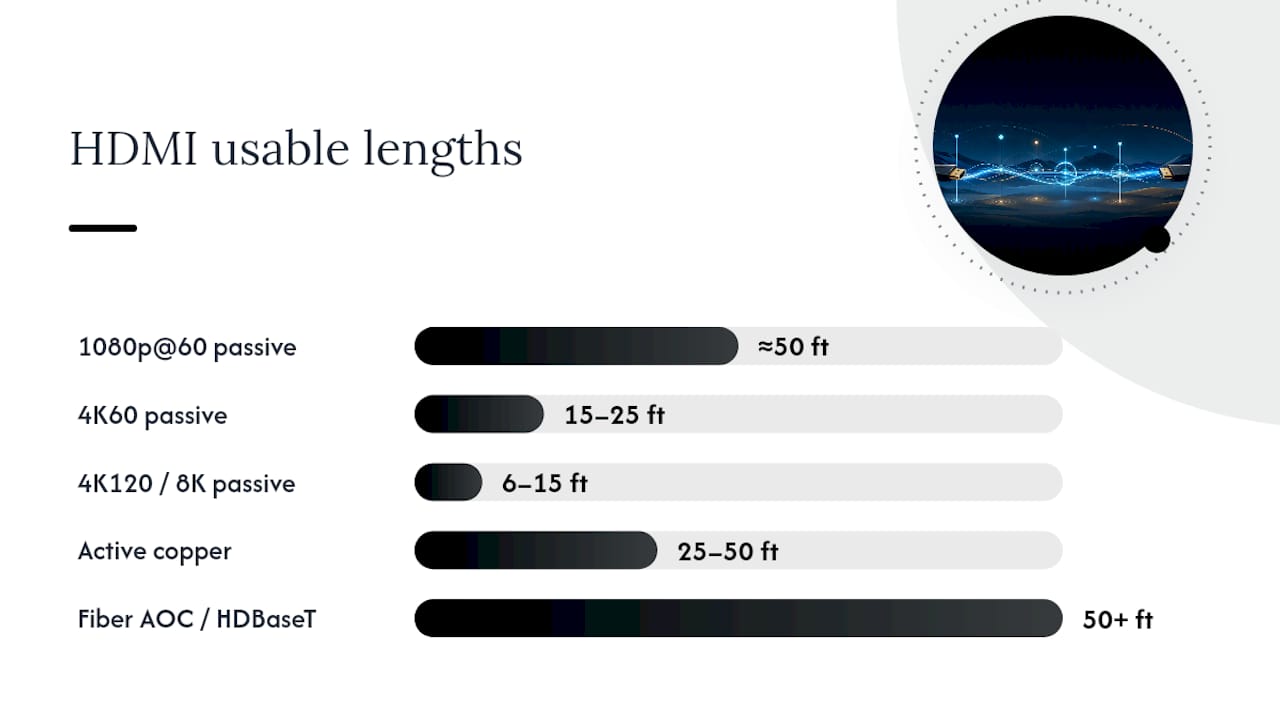
Passive copper HDMI holds up reliably to about 50 feet at 1080p, 15 to 25 feet at 4K60, and often less than 15 feet at 4K120 or 8K, depending on conductor gauge. Beyond those ranges, active copper, fiber AOC, or an HDBaseT extender over Cat6A becomes the dependable fix. If you’re seeing sparkles, dropped frames, or a display that keeps renegotiating to a lower resolution, the cable is too long for the signal you’re asking it to carry, and swapping to a shorter or active/fiber run is the fastest path back to a clean picture.
TL;DR:
- Passive copper HDMI cables reliably carry 1080p signals up to 50 feet but struggle beyond 25 feet for 4K60 and well past 15 feet for 4K120 or 8K.
- Active copper, fiber AOC, and HDBaseT extenders significantly extend usable ranges, with fiber solutions supporting well over 100 feet at full bandwidth.
- Higher bandwidth formats and resolutions require thicker wire gauges (like 24 AWG) and Ultra High Speed cables to avoid signal degradation and the cliff effect.
- In-wall long-distance HDMI runs must use fire-rated cables and proper routing to ensure safety and signal integrity, especially for multi-room setups.
- Professional installation and testing are recommended for runs exceeding passive copper limits, ensuring compatibility and performance for high-resolution building-wide AV systems.
Passive, Active, and Fiber HDMI Length Limits by Resolution
There’s no length limit printed anywhere in the HDMI specification. HDMI Licensing and the HDMI Forum certify cables through functional and compliance testing, not a distance number, which is why two “6-foot HDMI cables” from different manufacturers can perform very differently at the same length. Early testing on the Ultra High Speed cable category suggests passive UHS cables hold their full 48 Gbps bandwidth reliably to around five meters, or about 16 feet, though real-world results vary with build quality.
Practical, field-tested ceilings look like this:
- 1080p at 60Hz: passive copper stays clean up to roughly 50 feet, since the bandwidth demand is modest.
- 4K60 HDR: passive copper is reliable to about 15 to 25 feet; past that, error rates climb fast.
- 4K120 or 8K60: passive copper often struggles past 6 to 15 feet, since these formats push close to the full 48 Gbps ceiling.
- Active copper: extends usable range to 25 to 50 feet for high bandwidth signals, per Anker’s testing.
- Fiber AOC or HDBaseT: routinely supports 50 feet and beyond, some solutions running well past 100 feet.
Cable category matters as much as length. Premium High Speed cables are rated for 18 Gbps, which covers 4K60 at 8-bit color comfortably but runs out of headroom for 4K120 or 8K. Ultra High Speed cables carry the full 48 Gbps needed for 4K120, 8K60, and HDR at higher bit depths. If your source and display both support Ultra High Speed formats, buying anything less defeats the purpose regardless of length.
For a typical living room run under 10 feet, passive copper of either category is fine. Once you’re routing behind a wall, across a conference room, or up to a projector mount, start treating length and category as a single decision, not two separate ones.
Why HDMI Cable Distance Is Limited by Bandwidth and Wire Gauge
HDMI degrades with distance for the same reason a garden hose loses pressure over a long run: more data per second means less tolerance for resistance and interference along the way. A 1080p signal at 60Hz needs roughly 4.95 Gbps. A 4K120 or 8K signal at full chroma needs up to 48 Gbps, nearly ten times the payload squeezed through the same copper pairs. That’s why the practical range for 8K is a fraction of what works fine for 1080p.
Wire gauge (AWG) drives how far that signal can travel before it degrades past the point of correction. Thicker 24 AWG conductors carry less resistance than thinner 28 AWG conductors, and industry testing shows that difference roughly doubling practical passive distance at a given bandwidth — a 28 AWG passive cable might top out near 25 feet for 4K60, where a well-shielded 24 AWG cable pushes toward 50 feet on lower-bandwidth signals.
Quick reference: what AWG buys you
- 28 AWG passive: shorter runs, thinner and easier to route, weaker at high bandwidth.
- 24 AWG passive: bulkier cable, but noticeably longer reliable runs at the same resolution.
- Both benefit from better shielding against nearby power lines and fluorescent ballasts.
HDMI doesn’t fail gradually like an analog signal fading into static. It hits what engineers call the cliff effect: a perfect picture right up until the signal drops below a threshold, then a hard failure, sparkle artifacts, or a display that renegotiates HDCP and drops to a lower resolution mid handshake.
How to Extend HDMI Beyond Passive Copper’s Reliable Range
Once you’re past the practical ceiling for passive copper, three extension methods cover almost every real-world scenario.
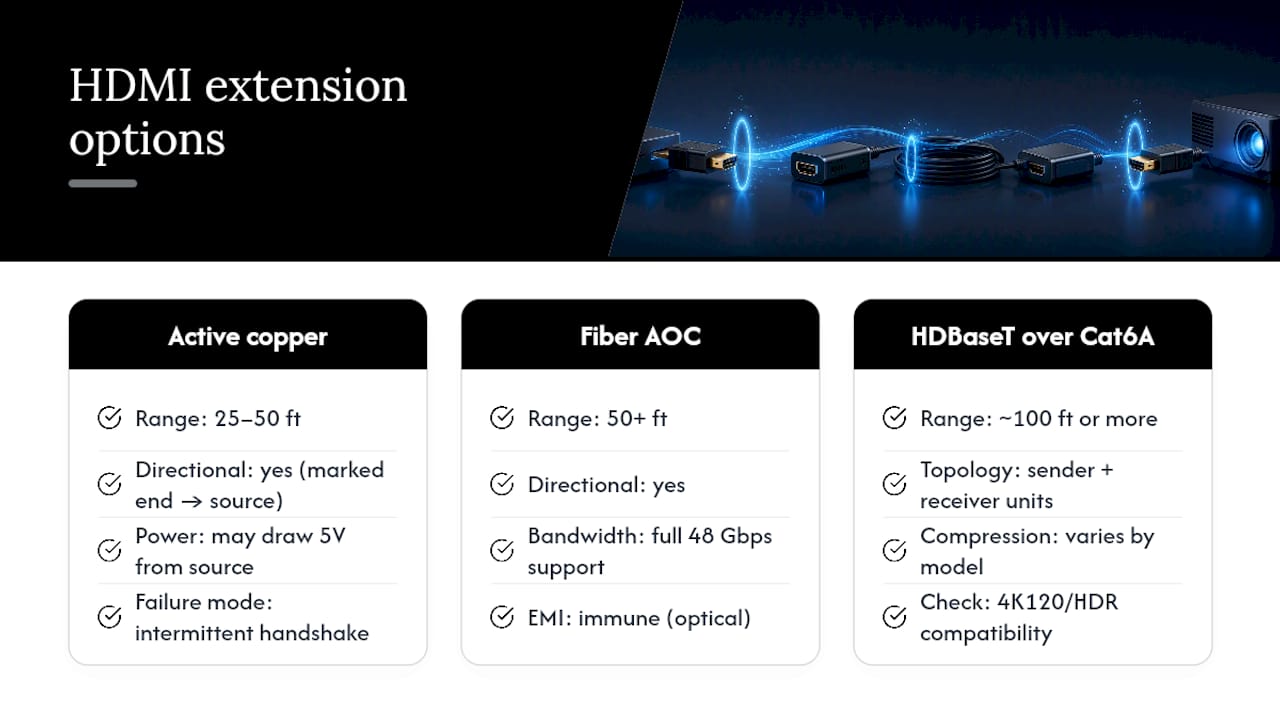
Active (equalized) copper cables embed a signal-boosting chip in one connector, typically extending usable range to 25 to 50 feet. They’re directional, meaning the marked end has to plug into the source, and some pull power from the source’s 5V pin. A weak HDMI port on an older device can leave an active cable underpowered, which shows up as an intermittent handshake rather than a clean failure.
Fiber AOC (active optical cable) converts the signal to light for the run and back to electrical at the display end, which sidesteps electromagnetic interference entirely. It’s the strongest option when you need full 48 Gbps bandwidth over 50 feet or more, and it’s also directional. For fiber runs feeding a whole building or multiple rooms, professional fiber installation gets the termination and testing right the first time.
HDBaseT extenders over Cat6A split HDMI into a sender and receiver unit connected by structured cable, often running 100 feet or more. Compression and format support vary by extender model, so check 4K120/HDR compatibility before buying. This is the backbone approach installers favor for whole-building AV distribution rather than fishing a single long HDMI cable through walls.
Pro Tip: If a run needs to cross more than one room or floor, stop thinking “longer HDMI cable” and start thinking “AV-over-IP or HDBaseT backbone.” A single long passive or even active run rarely survives future resolution upgrades, while a Cat6A or fiber backbone does.
In-Wall HDMI Runs: Fire Ratings and Routing Rules
- Use CL2 or CL3 fire-rated cable jacket for any in-wall run, or bring in a licensed low-voltage contractor. Standard HDMI jackets aren’t approved for behind-the-wall installation under common electrical code guidance.
- Keep HDMI runs separated from AC power lines where possible. Crossing at right angles beats running parallel, since parallel runs invite interference.
- Support long cable runs with proper strain relief at both ends. Sagging or tight bends over years shorten a cable’s working life.
- Check the connector housing on any active or AOC cable before installation. The source and display ends are usually printed clearly, and installing one backward causes a no-signal condition that looks like a defective cable.
Diagnosing HDMI Signal Loss: A Step-by-Step Test Order
- Note the symptom. Total blackouts point to a handshake failure. Sparkles or pixel noise point to marginal signal integrity. A display quietly stepping down to a lower resolution means it’s auto-negotiating around a bandwidth problem.
- Swap in a known-good, short cable. If the picture clears up immediately, length or cable quality is confirmed as the cause.
- Lower the source’s output resolution or refresh rate. If that fixes it, you’ve confirmed a bandwidth ceiling issue rather than a bad connector.
- Move to active copper, AOC, or an HDBaseT extender built for your resolution and distance.
- Escalate to functional testing with a video generator and analyzer when problems persist. This bit-for-bit method catches single errors that basic compliance testing misses, per Glenair’s application note on cable verification, and it’s the only reliable way to confirm a cable at a specific target resolution rather than guessing from symptoms.
What Installers Check Before Signing Off on a Long HDMI Run
On commercial jobs, we test every run at the target resolution before calling it done, then label and document each cable run for future service. Fiber and HDBaseT get chosen over long passive copper for building backbones because they hold up as displays move to higher resolutions later. Before final sign-off, we always verify active cable orientation and confirm the source port actually delivers enough power. A backward or underpowered active cable is one of the most common callbacks in the field.
Should You Buy a New Cable or Call a Professional?
Short runs under the passive ceilings, say a 10 foot cable from a source to a nearby TV, are squarely DIY territory. Pick the right category (Ultra High Speed for 4K120/8K, Premium High Speed for 4K60) and you’re done. In-wall runs, multi-room distribution, or any project that needs code compliance and documented testing is where hiring an installer pays off; a professional catches gauge, shielding, and routing issues before they turn into a callback six months later.
— Ken
Get a Compliant Long HDMI Run Done Right the First Time
Professional installation services can prevent guesswork about cable specs and ensure a 75 foot HDMI cable survives an in-wall run in a Manhattan office or conference space. Experienced commercial low voltage teams run fiber, HDBaseT, and structured Cat6A backbones instead of stretching passive copper past its limits; testing and documentation before completion is standard practice.
If you’re planning a conference room video system, a multi-floor AV distribution setup, or any run where a consumer HDMI cable simply won’t cut it, our structured services cover site surveys, fiber installation, and full testing and certification. Request a no-obligation site survey and we’ll spec the right solution for your resolution, distance, and building constraints before you buy a single foot of cable.
Where to Verify HDMI Testing Standards and Real-World Ranges
- Glenair’s application note explains how functional, bit-for-bit testing verifies cable performance since neither HDMI nor DisplayPort define an official length limit.
- Conversionstech’s distance table breaks down AWG-to-distance correlations across passive, active, and fiber options.
- Readers comparing interfaces for gaming setups can also see why some builders choose DisplayPort over HDMI for certain high-refresh scenarios.
Sources
- Glenair application note: Video cable assemblies – function vs. compliance
- How long can an HDMI cable be?
- HDMI cable length limits: passive vs active vs fiber (Conversionstech)
FAQ
Is a 25 Foot HDMI Cable Too Long?
For 1080p, no. A 25 foot passive cable handles 1080p comfortably. For 4K60, 25 feet sits right at the edge of reliable passive performance, so a well-built Ultra High Speed cable or an active cable is the safer bet.
Will a 50 Foot HDMI Cable Work?
A 50 foot passive cable works reliably for 1080p but is unreliable for 4K60 and above on standard passive copper. For 4K at that distance, active copper, fiber AOC, or an HDBaseT extender is the recommended solution rather than a passive cable alone.
How Long Can an HDMI Cable Be Before It Degrades?
Degradation starts once the signal’s bandwidth demand outpaces what the copper can carry cleanly, typically past 50 feet for 1080p or past 15 to 25 feet for 4K60 on passive cable. The failure shows up suddenly, as a cliff effect, rather than gradual picture fading.
Is a 10 Foot HDMI Cable Too Long?
No. A 10 foot cable is well within passive copper’s reliable range for any current resolution, including 4K120 and 8K on a quality Ultra High Speed cable. Signal issues at this length almost always point to a defective cable or a source/display compatibility problem, not distance.
What’s the Best HDMI Solution for Runs Over 50 Feet?
Fiber AOC or an HDBaseT extender over Cat6A are the reliable choices past 50 feet, since passive and even most active copper cables struggle to maintain full bandwidth at that distance. For building-wide or commercial installations, professional fiber installation and testing ensures the run performs at the resolution you actually need.