
Fiber Connector Cleaning: Inspect, Clean, Re-Inspect
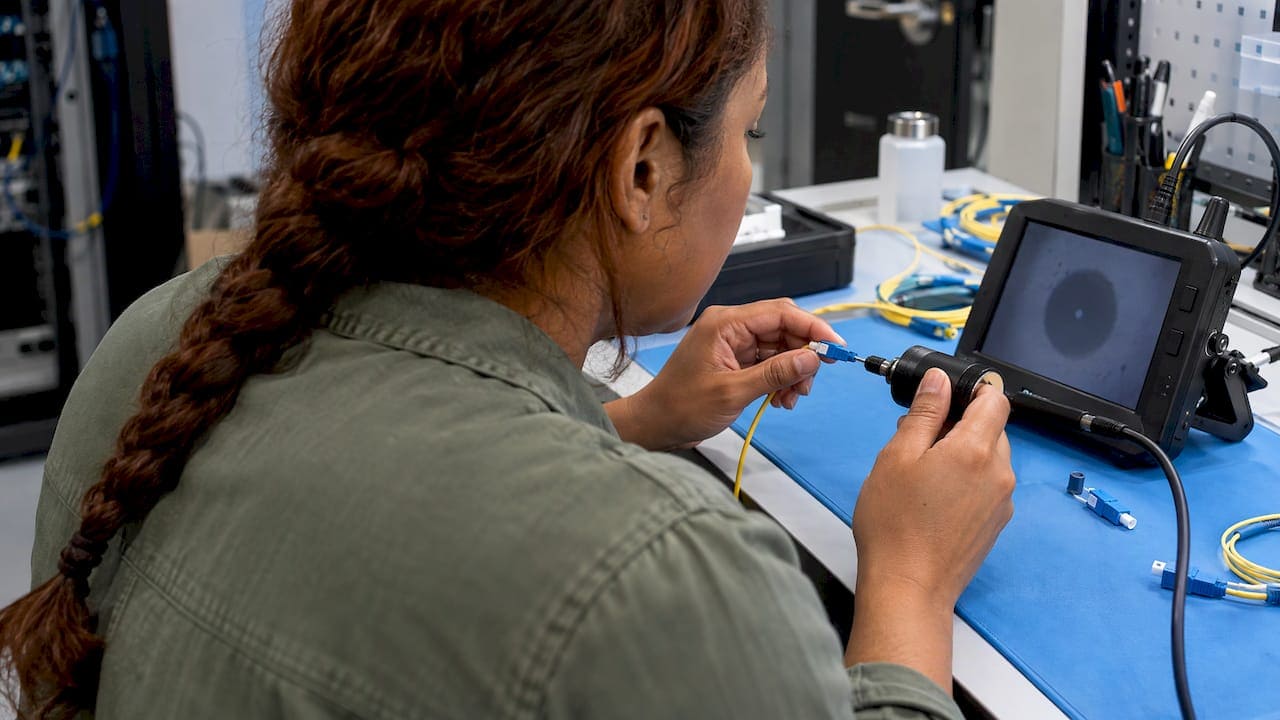
The right way to clean a fiber connector is a loop: inspect the end face with a scope, clean it dry, inspect again, and use a wet-to-dry clean only if contamination remains. Then inspect once more before you mate the connector. Skipping the scope and wiping on instinct is how most cleaning mistakes happen. The rest of this guide covers the tools, the steps, the errors that leave a connector dirtier than before, and how DAC, AOC and transceiver choices change how much cleaning your team does.
It is written for IT directors, facilities teams and technicians who maintain fiber in New York City offices, server rooms and telecom closets.
TL;DR
- Inspect every fiber connector before mating, clean it only if it needs it, and inspect again. Cisco’s procedure states that every connector must be inspected and cleaned prior to mating.
- Start with a dry clean. Move to wet-to-dry only when the connector is still dirty, and never use drugstore rubbing alcohol.
- Never use the wet method on multifiber (MPO) connectors, and do not clean an end face that already inspects clean.
- DACs have no optical connectors to clean. AOCs and transceivers with patch cords do, so plan tools and training before you choose.
- Clean, inspected, documented connections are part of a well-built network closet, not an afterthought.
Why a clean connector matters more than most teams assume
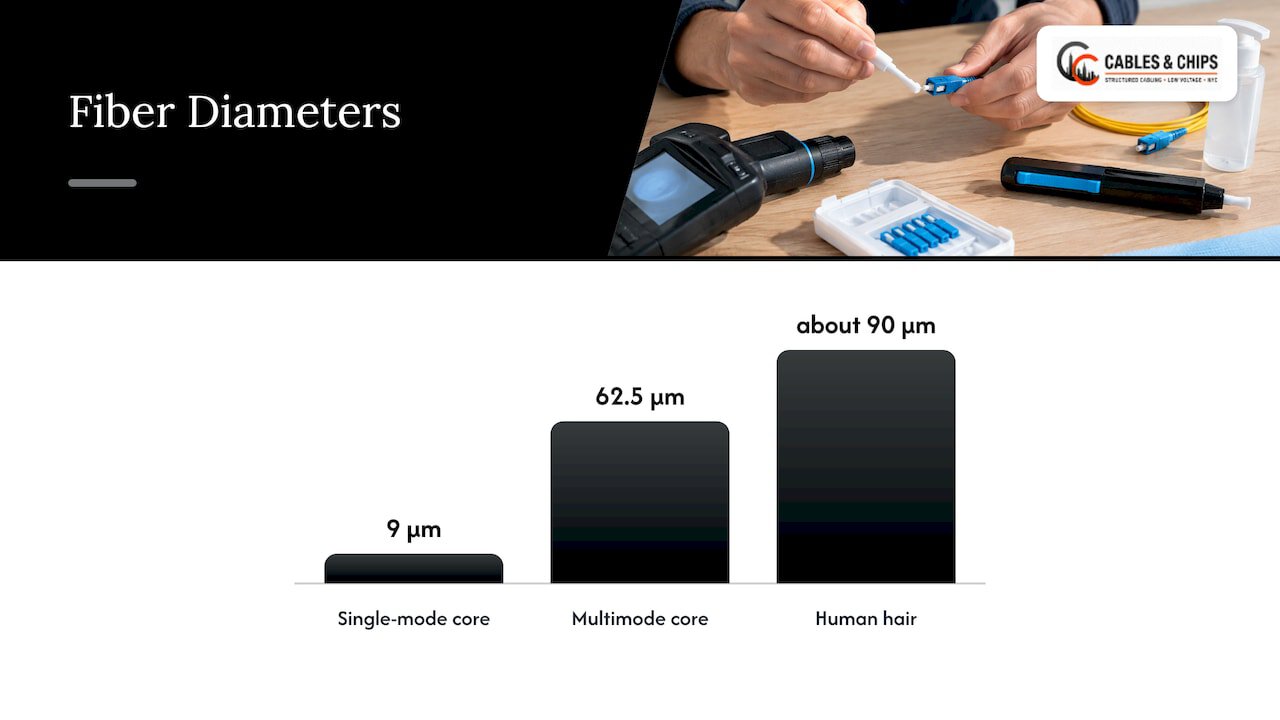
A fiber core is tiny. AFL notes that typical cores measure 9 µm for single mode and 62.5 µm for multimode, while a human hair is about 90 µm. A speck you cannot see with the naked eye can sit directly on the light path.
The numbers from Cisco make the point. According to its inspection and cleaning procedures, a 1-micrometer dust particle on a single-mode core can block up to 1% of the light, a 0.05 dB loss, and a 9-micrometer speck can block the core completely. Cisco also explains that contamination can cause strong back reflections, scratches, air gaps or misalignment.
Power raises the stakes. Panduit’s visual inspection and cleaning document states that high-power laser systems, up to 200 mW coupled power, can fuse contaminants in the core area onto the fiber surface when the laser is on. The core can then become non-cleanable and the fiber unusable.
There is a cost side too. The Fiber Optic Association reports that network operators attribute 15 to 50% of network problems to dirty connectors. AFL adds that many optical networks have tight loss budgets, and a dirty connector can quickly exceed the allowed loss. Cleaning is quick and inexpensive compared with downtime and service calls.
In practice, this is why a link that passed testing on install day can misbehave after a patching change. Every time a connector is unplugged and replugged, it can pick up dust, skin oil or residue from a dust cap. Treat every mating as a cleanliness event.
The tools you need
A fiber cleaning kit is small and does not cost much. A complete setup includes the following.
- An inspection scope. Huawei’s cleaning guide lists an optical fiber endface magnifier (400x) among the standard tools. A handheld video probe does the same job and lets the technician and a supervisor see the same image.
- Dry cleaners. These are click-type pen cleaners, cassette cleaners with reel tape, or dry wipes. They are the first choice for loose particles and light films.
- Lint-free wipes and swabs. The same Huawei guide specifies swabs sized to the port: 2.5 mm for SC and FC, and 1.25 mm for LC. Using the wrong swab size is a common field error.
- Cleaning fluid. If you use isopropyl alcohol, it must be optical grade. AFL says to use optical grade 99% IPA and never common drugstore rubbing alcohol, which is roughly 70% pure. Even 99% IPA can leave residue and absorbs moisture from the air, which lowers its purity.
- Protective caps. Keep them on every unused connector and port. A cap that has been lying on a bench is a source of contamination, so replace it if it looks soiled.
- An optical power meter, for confirming performance after cleaning.
The FOA describes why prepackaged alcohol pads became popular: the sealed packages keep the alcohol pure, and the wet section loosens dirt while the dry section removes it. Bulk IPA, by contrast, is hard to source and absorbs water once opened.
Inspect before you clean
The rule that separates professionals from guessers is simple: inspect before you connect. Cleaning without looking first means you do not know whether you are fixing a problem or creating one.
Research from RP Photonics warns that unnecessary cleaning attempts can make things worse, for example by creating static electricity that attracts dust to the fiber end. If the scope shows a clean end face, mate it.
When you inspect, look at the whole end face, not only the core. Particles in the contact zone frequently cause scratches and pits on both connector end faces. MicroCare’s article on the standard notes that failing to remove debris causes cross-contamination of the two ferrule end faces and disrupts the optical path.
Inspect both sides of the connection: the plug and the port or adapter it mates into. Contamination in a bulkhead adapter transfers to a freshly cleaned plug in seconds.
Safety comes before any inspection. Make sure the link is dark or the transmitter is off before you put a scope near an end face. Never look into a fiber end or a live port.
Fiber connector cleaning procedure, step by step
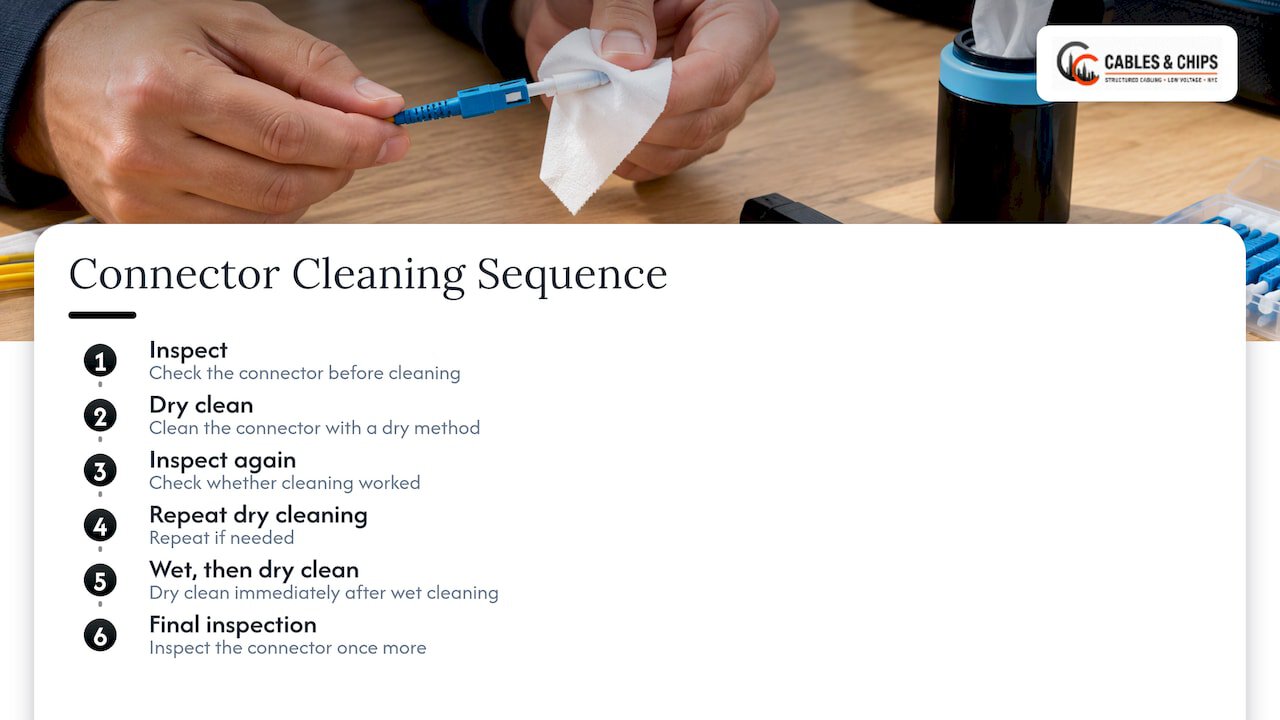
Cisco’s published sequence is to inspect, dry clean, inspect again, repeat dry cleaning if needed, then wet clean followed immediately by a dry clean, with a final inspection. Here is that workflow as a field checklist.
Step 1: Inspect the connector
Put the end face under the scope. Note whether you see dust, oil, scratches or residue. Dust usually responds to dry cleaning. Oily films and dried residue often need a wet-to-dry pass.
Step 2: Dry clean
The FOA’s FOA-8 reference lists three methods: wet, dry and wet/dry, and requires inspection after cleaning until the connector is acceptable. For most connectors, dry is where you begin.
- Use a click-type or cassette cleaner suited to the connector type (LC, SC, MPO, and so on).
- Apply consistent pressure and a single, steady stroke.
- Use a fresh section of tape or wipe each time. RP Photonics advises discarding a cleaner when the tape is spent or visibly soiled, because stretching a reel increases re-contamination.
- Inspect again.
The FOA notes that dry cleaners are convenient and fairly effective, but they may generate a static charge on the ferrule that attracts airborne dust. Some are now designed to be conductive to prevent buildup. That is another reason to re-inspect rather than assume.
Step 3: Wet-to-dry, only if the dry clean did not work
For stubborn contamination, use the wet-to-dry method:
- Apply a small amount of optical-grade IPA to a lint-free wipe, creating a small wet zone beside a dry zone.
- Touch the end face to the wet zone to loosen the contamination.
- Drag once across into the dry zone, so the last point of contact is dry and carries the residue away.
- Let the solvent evaporate fully, then inspect immediately. RP Photonics warns that dissolved contaminants can redeposit as a faint ring while drying.
For connectors that open into a port or bulkhead, use a swab sized for the ferrule, with the same logic: wet to loosen, dry to remove.
Step 4: Inspect again, then mate
The connector is ready only when the scope confirms it. Repeat the loop if it is not. Mate it promptly and cap anything left open.
Step 5: Record the result
In a documented installation, inspection images and test results belong with the link records. If your team signs off on a closet or a backbone, a clean-connector record is part of that sign-off. Our guide to OTDR testing for fiber technicians covers the measurement side of that documentation.
Mistakes that leave connectors dirtier
Using the wrong alcohol. Drugstore rubbing alcohol is out. RP Photonics adds that denatured and household alcohols are unsuitable because denaturants can leave a film or damage parts.
Over-wetting. EXFO’s connector maintenance note states that evaporated or absorbed alcohol leaves a residue on the ferrule that is extremely difficult to remove, usually harder than the original contaminant. A little fluid, then a dry finish.
Wet cleaning multifiber connectors. The same EXFO note says the wet technique should never be used on multifiber, E-2000 or F-3000 connectors, because guide pins and caps can trap alcohol and cause recontamination. For MPO links, use dry cleaners made for MPO. This matters in high-density backbones, where polarity and MPO methods already demand careful handling.
Blowing on it, or using compressed air carelessly. EXFO says compressed air is only good for dust, not grease. Take care not to trap dust in small crevices, and spray the first burst into the air, because it can contain condensation or propellant that leaves residue.
Touching the end face. Skin oil is a contaminant that dry cleaning may not fully remove. Handle connectors by the body and keep caps on.
Cleaning without inspecting afterward. This is the most common mistake. The cleaning step proves nothing. The scope does.
Reusing spent tape or wipes. A used section just redistributes what it picked up.
What the standard says about a failed inspection
Inspection results are judged against IEC 61300-3-35. MicroCare’s summary says Section 5.3 advises installers to inspect, clean if necessary, and re-inspect the ferrule.
The 2022 revision changed one practical point. Fluke Networks explains that a connector cleaned of loose debris that still fails inspection may still be used if it passes insertion loss and return loss tests. Optical performance takes precedence over a failed visual inspection. In that situation there is no need to replace cables or equipment if the link works as expected.
For project teams, that means a clear acceptance sequence: inspect, clean, re-inspect, and where a visual fail persists, rely on measured loss and reflectance. Good termination practice reduces how often you reach that point. Our article on IEC and TIA fiber termination methods explains how clean terminations prevent callbacks.
DAC, AOC and transceivers: how the choice changes the cleaning workload
Many readers searching for connector cleaning are really deciding what to plug between a switch and a server. The cable type decides how often anyone will be holding a fiber end face.
What each one is
NVIDIA’s cable management guidelines define a DAC (direct attach copper) as a high-speed electrical cable with an SFP or QSFP connector at each end and no active components in the RF connections. A transceiver converts between an electrical connector and an optical connector. An AOC (active optical cable) has the optical conversion built in at both ends, with the fiber permanently attached.
Reach and typical use
The same NVIDIA document says DACs are the lowest-cost interconnect, but after 2 to 5 meters, depending on data rate, the signal attenuation becomes significant. AOCs cover roughly 3 to 100 meters.
| Option | Typical reach | Optical connector to clean? | Typical use |
|---|---|---|---|
| DAC | About 2 to 5 m, rate dependent (NVIDIA) | No | Same rack or neighboring racks |
| AOC | About 3 to 100 m (NVIDIA) | No, ends are sealed in the cable | End-of-row, across racks |
| Transceiver plus patch cord | Set by the transceiver and fiber | Yes, at every connector | Structured cabling, patch panels, longer runs |
The table’s cleaning column follows from how each is built: a DAC is copper and an AOC’s fiber is terminated inside its ends, so neither presents a connector you mate in the field. Transceivers with patch cords do.
How to choose with cleaning in mind
NVIDIA says that if you lack optical-connector cleaning tools and experience, an AOC is the safer choice. It also notes that replacing a pair of transceivers is easier than replacing an AOC, since the cable stays in place. And it observes that AOCs are traditionally more common in InfiniBand installations, while transceivers with patch cables are more common in Ethernet systems with structured cabling.
A practical rule for a New York office or colocation room:
- Inside one rack, short hops: DAC.
- Across racks or rows, point to point, with no patch panel: AOC.
- Through patch panels, riser or backbone fiber, or anywhere you need serviceability and documented links: transceivers with structured fiber, plus a cleaning and inspection routine.
Structured fiber is where an organization gets flexibility, upgrade paths and clean documentation. If you are weighing copper against fiber for the whole building, our CAT6A vs fiber optic decision guide walks through that choice, and the fiber optic backbone design guide covers how to lay out risers and closets.
Build cleaning into the closet, not just the toolbox
Cleanliness is easier to keep when the closet is organized. Cables hanging loose, uncapped ports and unlabeled patch cords invite mistakes. Some habits that help:
- Keep a sealed cleaning kit and a scope at each major closet, or assign them to the person who does patching.
- Cap every unused port and every spare patch cord.
- Label both ends of each fiber jumper and keep a record of what connects where.
- Route patch cords so connectors are never dragged along the floor or a tray edge.
- Re-inspect after any move, add or change.
A tidy rack makes all of this realistic. See why clean cable management helps IT professionals, and how to clean up telecom room cabling without disrupting live links.
Perspective
Fiber problems that show up as mystery slowdowns or flapping links are very often connector problems, not cable problems. In our work with commercial environments in New York City, the most useful habit we can recommend is also the plainest: look at the end face every time before you connect it.
We believe cleaning belongs inside a documented process. A scope image, a clean-and-re-inspect sequence and a recorded test result turn a one-off fix into something the next technician can rely on. That is what we mean by serviceability: the person who opens the closet in two years can see what was done and trust it.
It is also why we design and install fiber with maintenance in mind. Enough slack, capped ports, labeled jumpers, and a rack layout where a technician can reach a connector without disturbing its neighbors. With more than 40 years of experience in commercial NYC spaces, we have learned that the cleanest installations are the ones that stay reliable.
Ken
Get your fiber closets installed and organized properly
If your fiber connections are inconsistent, undocumented or crowded into a messy closet, we can help. Cables & Chips is a licensed and insured low voltage contractor at 20 Vesey Street in Lower Manhattan. We handle fiber installation, termination and testing, server rack setup, and MDF/IDF cleanup for offices and secure facilities across New York City.

We offer a no-obligation site survey. Schedule a site survey through our services page, and we will walk your closets with you and map out what needs to be done.
FAQ
What alcohol is used to clean fiber optics?
Use optical-grade isopropyl alcohol at 99% purity, and use it sparingly. AFL says to avoid common drugstore rubbing alcohol, which is about 70% pure, and to remember that even 99% IPA can leave residue and absorbs moisture. Always follow a wet wipe with a dry one and inspect afterward.
Can I clean a fiber connector with a dry method only?
Often yes. Dry click cleaners or cassette cleaners remove loose dust and light films, and Cisco’s sequence starts with dry cleaning and repeats it if needed. If the scope still shows contamination, move to wet-to-dry and finish with a dry pass. Re-inspect after every step.
How often should fiber connectors be cleaned?
Inspect before every mating, and clean only what the scope shows needs it. AFL describes it as good practice to clean and inspect connectors each time they are disconnected. A connector that inspects clean should not be cleaned again.
Do DAC or AOC cables need connector cleaning?
Not in the way patch cords do. A DAC is a copper cable, and an AOC’s optical connections are built into the cable ends. Transceivers with fiber patch cords have connectors that need inspection and cleaning. NVIDIA says an AOC is the safer pick if you lack the tools and experience for optical cleaning.
Can I use the wet method on MPO connectors?
No. EXFO states that wet cleaning should never be used on multifiber connectors, since guide pins and caps can trap alcohol and recontaminate the end face. Use dry cleaners designed for MPO and inspect with a scope that supports multifiber connectors.
Sources
- Cisco: Inspection and Cleaning Procedures for Fiber-Optic Connections
- AFL: Fiber Optic Cleaning FAQs and Connector Care
- Panduit: Visual Inspection and Cleaning of Multimode and Single Mode Connectors
- Fiber Optic Association: Inspection and Cleaning reference
- Fiber Optic Association: Inspecting and Cleaning Connectors, FOA-8
- MicroCare: What IEC 61300-3-35 Means to You
- Huawei: Cleaning the Connector of an Optical Fiber
- RP Photonics: Cleaning of Fiber Ends
- EXFO: Connector Maintenance application note
- Fluke Networks: Easier Fiber End Face Inspections, Changes to IEC 61300-3-35
- NVIDIA: Cable Management Guidelines and FAQ