
Installers: 100m PoE Limit? How to Choose CCTV Cable Types
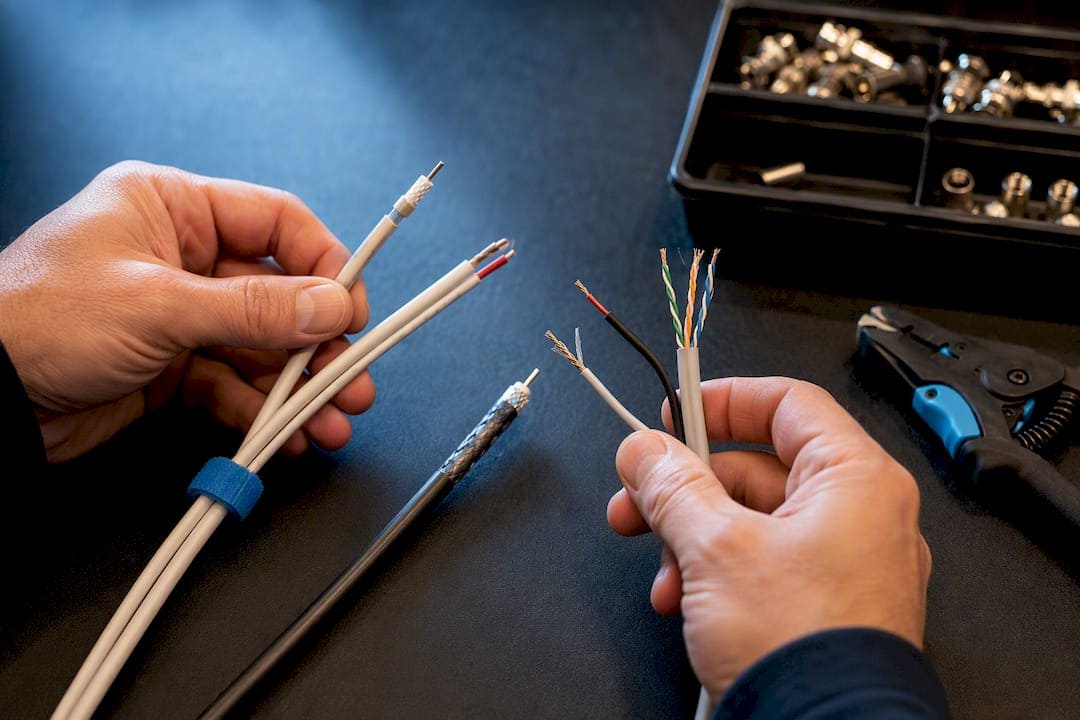
For new installs carrying IP cameras and Power over Ethernet, Cat6 is the practical default. Legacy analog systems still run well on RG59 or RG6 coax, often paired as siamese cable for power. Fiber optic takes over once a run exceeds copper’s reach or crosses between buildings. Everything else in CCTV wiring is a variation on those three families.
TL;DR:
- For new IP camera installations, Cat6 offers reliable 1 Gbps performance at 100 meters and supports future bandwidth needs better than Cat5e.
- Legacy analog systems still run efficiently on RG6 coax for distances up to 500 meters, with RG59 suitable for short runs but prone to interference.
- Fiber optic cable becomes the optimal choice when distances exceed copper limits or high bandwidth is required, especially for campus or building-to-building links.
- Proper termination, grounding, and testing of connectors are essential to ensure system reliability and prevent costly failures over time.
- Installing surge protectors and using shielded cables in electrically noisy environments enhances system longevity and compliance with code requirements.
Understanding CCTV Cable Types Before You Buy
The right cable depends on three questions: what kind of camera system you’re running, how power gets to the camera, and how far the signal has to travel. Analog cameras send video over coaxial cable and need a separate power line unless you’re using siamese cable. IP cameras send data over Ethernet, and in most modern installs, that same cable also delivers power through PoE, so you’re pulling one line instead of two.
Cost, distance, and future flexibility all trade off against each other. Coax is cheap and simple for short analog runs, but it’s bulkier, harder to terminate cleanly, and more prone to interference than twisted pair. Ethernet cabling meets EIA/TIA 568B structured cabling standards, terminates faster, and gives you a documented, serviceable system. Fiber costs more upfront and requires more specialized termination skills, but it is the only realistic option once you’re pushing signal well beyond typical copper limits.
Here’s how the major cable families stack up before we go deep on each one:
- Coaxial (RG59/RG6): best for maintaining existing analog or HD-over-coax systems
- Siamese cable: coax plus power in one jacket, useful where conduit space is tight
- Cat5e/Cat6/Cat6a: the backbone of any IP camera system running PoE
- Fiber optic (single-mode/multimode): the answer when distance or bandwidth outgrows copper
The sections ahead break down distance limits, connector choices, environmental ratings, and the testing steps that keep a CCTV system reliable for years instead of months.
Coaxial and Siamese Cable: When Legacy Wiring Still Makes Sense
RG59 is the coax you’ll find behind most older analog DVR setups, and it works fine for short runs. Beyond that, the signal starts degrading, showing up as fuzzy edges, rolling lines, or washed-out contrast on the monitor. RG6 uses a thicker center conductor and better shielding, which lets it push analog and HD-over-coax signal roughly 500 meters, or about 1,000 feet, depending on the format in use.
Siamese cable bundles the video coax with a power conductor inside a single jacket, so one pull gets you both video and power to the camera. That’s a real convenience for retrofits where you don’t want to run two separate cables through a wall or ceiling cavity, though the bundled jacket is thicker and stiffer than standalone coax, which matters if you’re threading it through tight conduit.
Coax’s biggest weakness is interference and ground-loop susceptibility. A camera powered from one electrical circuit and grounded through a DVR on another can develop a voltage difference between the two, and that shows up as rolling hum bars in the picture. Twisted pair cabling, when paired with the right transceivers, offers meaningfully better isolation from these problems than coax does, according to Security Info Watch’s analysis of wiring options. Termination is another factor: BNC connectors need a proper crimp tool and a clean strip job, and a rushed field termination is one of the most common causes of intermittent CCTV picture loss we see on service calls.
- RG59 suits short, budget-conscious analog runs
- RG6 extends analog and HD-over-coax reach considerably
- Siamese cable simplifies power delivery in a single pull
- Ground loops and loose BNC crimps cause a disproportionate share of coax failures
Pro Tip: If you’re inheriting a building with existing coax runs, don’t assume they’re all RG6. Measure the conductor and check the jacket markings before planning your camera layout. Mixed RG59/RG6 runs from previous contractors are more common than you’d think.
Ethernet Options: Cat5e, Cat6, and Cat6a for IP Camera Systems
Cat5e handles 1 Gbps up to 100 meters and does the job for a lot of standard 1080p and 2K IP cameras. It gets marginal once you start layering high-resolution, high-frame-rate cameras onto the same switch, or when you’re stretching close to that 100-meter ceiling with a marginal termination.
Cat6 is the practical baseline for new CCTV installs in 2026. It delivers 1 Gbps at 100 meters and 10 Gbps performance at shorter distances around 55 meters, with improved crosstalk control and more headroom than Cat5e. That extra headroom matters more than it sounds like it should: camera resolutions keep climbing, and a cable plant installed today needs to handle bandwidth demands that didn’t exist when the building was designed. Many installers now default to Cat6 specifically because the price gap over Cat5e is small relative to the bandwidth insurance it buys.
Cat6a cables can support 10 Gbps performance out to 100 meters and include heavier shielding to control crosstalk at high speeds. It costs more and the cable itself is thicker and less forgiving around tight bends, so it tends to show up in commercial installations that need serious bandwidth headroom, not typical single-camera home setups.
PoE (Power over Ethernet) is what makes IP camera cabling so much simpler than the old two-cable analog approach: one Ethernet run carries data and power together. But PoE has a hard limit.
PoE’s standard maximum run length is typically 100 meters (328 feet), consistent with standard Ethernet cable length limitations. Beyond that distance, you have three real options: a PoE repeater or extender partway through the run, a midspan injector closer to the camera, or a switch to fiber for the long haul with a local PoE switch at the camera end.
PoE also comes in power classes defined by IEEE 802.3af, 802.3at, and 802.3bt, each delivering progressively more power. Older 802.3af tops out around 15 watts, useful for basic fixed cameras, while 802.3at and 802.3bt scale up to power PTZ cameras, heaters, and multi-sensor units that draw significantly more current.
- Cat5e: solid for standard-resolution cameras within 100 meters
- Cat6: the recommended baseline for new CCTV/IP installs
- Cat6a: reserved for high-bandwidth or future-proofed commercial deployments
- Shielded twisted pair (STP) helps in electrically noisy environments; plenum-rated jacketing is required in air-handling spaces
Shielded versus unshielded comes down to environment. If your cable run passes near fluorescent ballasts, motors, or heavy electrical conduit, shielded cable earns its extra cost. For a full breakdown of how to plan a compliant, well-documented Ethernet backbone, our structured Cat6 cabling installation guide covers termination standards and testing in more detail.
Fiber Optic Cabling: When Copper Isn’t Enough
Fiber earns its place when a run outstrips what copper can carry, whether that’s distance, bandwidth, or both. Single-mode fiber (OS2) is the choice for long-distance backbone links between buildings or across a large campus, while multimode fiber (OM3/OM4) handles shorter, high-bandwidth in-building connections where the extra reach of single-mode isn’t needed.
Because fiber doesn’t carry electrical power, delivering PoE to a camera at the end of a fiber run requires one of three approaches. You can run fiber to a local PoE switch positioned near a cluster of cameras, use PoE media converters at each camera location, or install hybrid fiber-power cable that bundles fiber strands with copper conductors in a single jacket. Placing a small PoE switch near a cluster of cameras is especially common on campus and multi-building deployments, since it combines fiber’s distance advantage with local, low-cost PoE distribution to each camera.
Outdoor and specialty fiber comes in several jacket types depending on the installation path. Direct-burial fiber uses gel-filled cores and rugged jacketing for underground runs. Armored fiber adds a corrugated steel layer for rodent and abrasion resistance in ductwork or crawl spaces. Aerial fiber is rated for UV exposure and temperature swings when strung between poles.
- Single-mode fiber: long-distance backbone and campus links
- Multimode fiber: short, high-bandwidth in-building connections
- Hybrid fiber-power cable: simplifies camera-end power delivery
- Armored and direct-burial variants: protect against rodents, moisture, and burial stress
Fiber costs more per foot and demands specialized termination and testing equipment, but for a building-to-building link or a run that would otherwise need multiple PoE extenders daisy-chained together, it’s usually the cleaner and more reliable answer. Our CAT6A vs. fiber optic decision guide walks through the cost and complexity trade-offs in more detail for facility managers weighing the two.
Connectors, Termination, and Testing That Actually Hold Up
A cable is only as good as its termination. Loose or poorly seated connectors cause more service calls than bad cable ever does.
- BNC connectors (coax): use a compression or crimp connector, not a twist-on type, and always test continuity before closing up the wall.
- RJ45 (Ethernet): follow the 568B pinout consistently across every jack, and verify all eight conductors seat before crimping.
- Fiber connectors (LC/SC): clean the ferrule with a proper fiber cleaning tool before every mating, and inspect under a scope. Dust on a fiber end face is the single most common cause of intermittent fiber link failures.
- Testing: certify Cat6/6a runs with a proper cable certifier, not just a continuity tester, and run OTDR or optical loss testing on every fiber link before calling the job done.
A quality RG6/RG59 compression tool, like the ones CommsBuyer supplies, produces a far more reliable connection than a cheap crimp-style tool that leaves the center pin loose.
Pro Tip: Install a surge protector at every building entry point where cable runs outdoors, and bond your grounds properly on any mixed coax-and-Ethernet system. Ground loops rarely show up during testing; they show up three months later during the first thunderstorm.
CCTV Cable Distance and Performance at a Glance
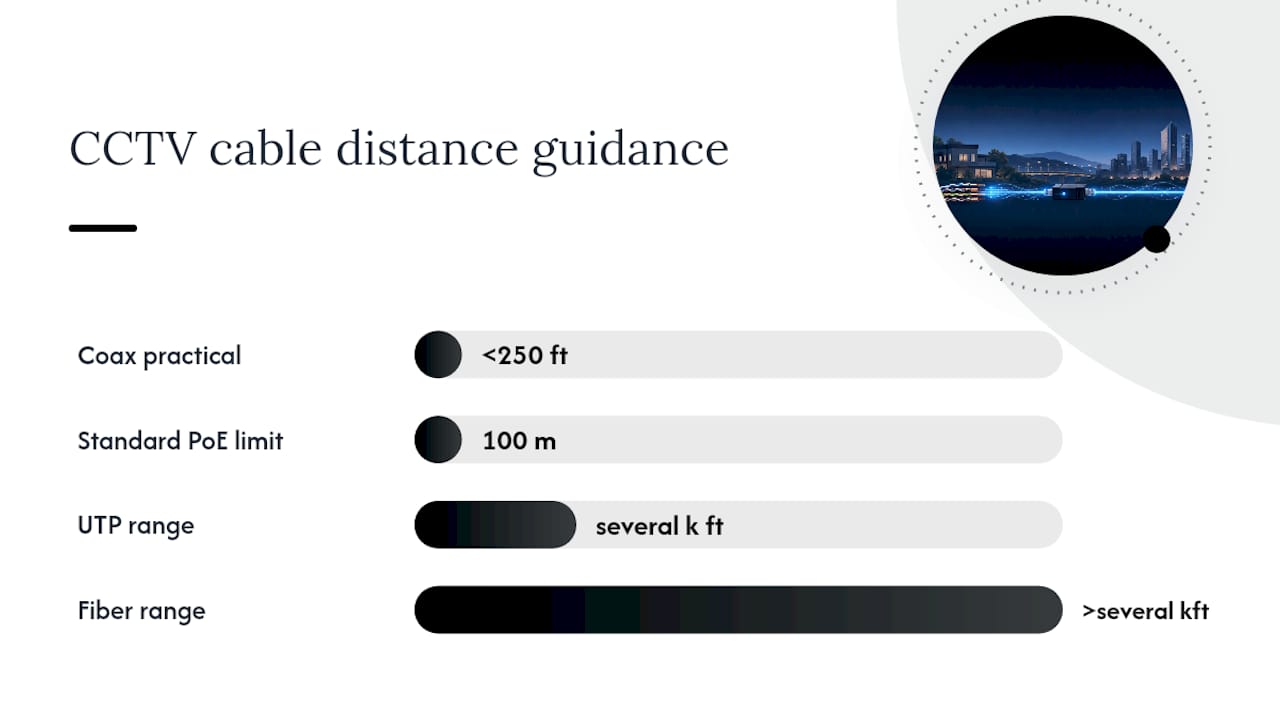
Standard PoE tops out at 100 meters regardless of Ethernet category, so distance beyond that requires an extender, a midspan injector, or a switch to fiber. As a rough planning rule, coax works reasonably under about 250 feet, UTP is the better call from roughly 250 feet out to several thousand feet, and fiber takes over past that point.
Getting the Installation Environment Right
Plenum-rated cable, often jacketed in Teflon and labeled OFNP for fiber, is required in any space where air handles freely, like above a drop ceiling that doubles as an HVAC return. The rating exists because standard PVC jacketing releases toxic smoke when it burns, and plenum-rated jacketing is formulated to resist that. Skipping this in a plenum space isn’t just a performance risk, it’s a code violation that can hold up an inspection.
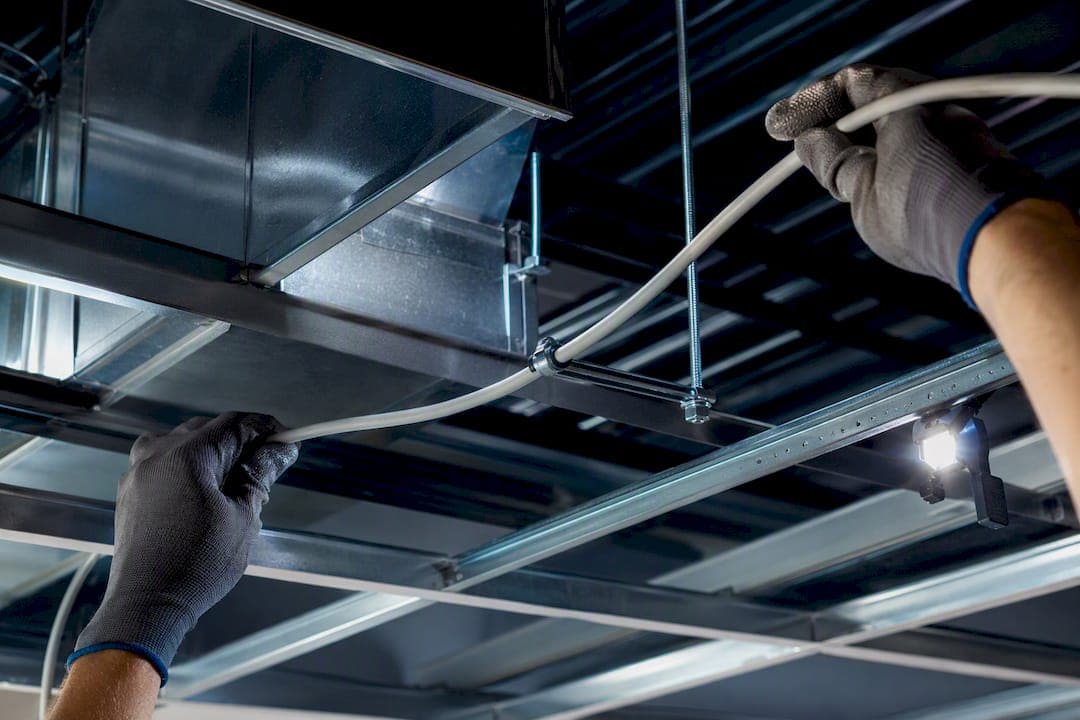
Direct-burial cable needs gel-filled cores and polyethylene jacketing to resist ground moisture over years underground. Aerial cable strung between poles or building faces needs UV-rated jacketing to avoid cracking in sunlight, and armored cable adds a corrugated steel layer where rodents or physical abrasion are a real concern, like in older basements or crawl spaces.
A few installation habits matter more than most people realize:
- Respect minimum bend radius, tight bends degrade both copper and fiber signal integrity
- Don’t overfill cable trays past manufacturer fill ratios, it traps heat and invites crosstalk
- Install surge protection at every point where cable transitions from outdoor to indoor
- Bond grounds consistently across a mixed coax-and-Ethernet system to avoid ground loops
Our CCTV cabling plan guide for secure facilities goes deeper into grounding and code compliance for commercial-grade installs.
How to Choose the Right CCTV Cable: A 6-Step Checklist
- Identify your camera type. Analog and HD-over-coax need coax or siamese; IP cameras need Ethernet or fiber.
- Measure every run length, including vertical runs through walls and ceiling cavities, not just straight-line distance.
- Audit existing cabling if you’re retrofitting. Confirm whether it’s RG59 or RG6, and check for damage or improper termination.
- Assess interference sources along the path, like fluorescent ballasts, motors, or heavy electrical conduit runs.
- Choose your cable and termination approach based on the first four steps: Cat6 for new IP installs, RG6 for continued analog use or the longest coax runs, fiber for anything crossing buildings or beyond copper limits.
- Budget for surge protection and testing upfront rather than treating them as optional add-ons.
| If your situation is… | Recommended cable |
|---|---|
| New IP/PoE camera install | Cat6 |
| Continuing legacy analog system | RG6 (or RG59 for short runs) |
| Building-to-building or campus link | Fiber optic |
| High interference environment | Shielded Cat6/6a or fiber |
Complex fiber splicing, long campus runs, and any work in a plenum-rated space are all situations where hiring a licensed low-voltage contractor pays for itself in avoided rework and passed inspections.
Why Trust This Guide
Cables and Chips has spent more than 40 years installing structured cabling, fiber infrastructure, and CCTV wiring for commercial clients across New York City, from server rooms to secure facilities. Based at 20 Vesey Street in Lower Manhattan, the company handles CCTV and access control cabling, Cat6/Cat6a structured cabling, fiber optic infrastructure, cable testing and certification, and network closet cleanup for offices, building management teams, and IT departments throughout the city.
This guide was compiled by Ken, drawing on structured cabling standards and field-tested installation practices rather than manufacturer marketing claims. When a project involves plenum-rated spaces, long campus fiber runs, or code-driven grounding requirements, that’s the point where DIY installation risks turning into a failed inspection, and where bringing in a licensed low-voltage contractor is worth the cost.
What Actually Matters When You’re Wiring a Camera System
Most guides on this topic treat cable choice as a distance chart problem: pick the cable that reaches, done. That’s backwards. The real decision point is lifecycle cost, and copper structured cabling wins that argument far more often than the upfront price tag suggests.
A coax system saves you maybe a few dollars per foot today. Ten years from now, when the DVR dies and you want to move to IP cameras, that coax is scrap, and you’re pulling new cable anyway. A properly documented Cat6 plant, tested and certified at install, survives that camera upgrade without touching a single wall.
Where conventional advice falls short is treating Cat6 versus Cat6a versus fiber as a technical spec comparison. It’s really a question about what the building will need in five years, not what the current camera requires today. If there’s any chance this site adds cameras, adds resolution, or extends to another building, oversize the cable plant now. The labor cost of pulling cable is the expensive part, not the cable itself, so pulling the wrong gauge to save a few cents per foot is the costliest mistake in this entire category.
— Ken
Get Your CCTV Cabling Done Right the First Time
A licensed low-voltage contractor that has been installing structured cabling, Cat6/Cat6a, and fiber infrastructure across New York City for more than 40 years, with the testing and documentation to prove the work holds up.
Whether you’re replacing legacy coax with a structured Cat6 backbone, planning a fiber link between buildings, or just need an existing CCTV cable plant tested and certified, a licensed contractor designs and installs the cabling to match your camera system, your building’s code requirements, and your budget. The company’s structured Cat6 cabling installation service covers everything from planning to termination to certification, backed by decades of commercial low-voltage work in offices, server rooms, and secure facilities throughout the city.
If your building needs new camera wiring or a professional assessment of what’s already in the walls, request a site visit through Cables and Chips and get a plan built around your actual run lengths and camera count.
Sources
- CCTV Camera Pros — CCTV camera video max cable length / distance
- Security Info Watch — CCTV—Which wire should you use?
- CCTVInfo — CCTV cabling guide (Cat5e vs Cat6 vs Cat6a, Fibre, Coax) 2026
- OPELINK — Fiber optic for CCTV & security surveillance guide (2026)
FAQ
What Are the Main Types of CCTV Cable?
The four main CCTV cable types are coaxial (RG59/RG6) for analog systems, siamese cable for combined video and power, Ethernet (Cat5e/Cat6/Cat6a) for IP and PoE cameras, and fiber optic for long-distance or high-bandwidth links.
What Type of Cable Is Best for CCTV Cameras?
For new installs running IP cameras with PoE, Cat6 is the best all-around choice thanks to its bandwidth headroom and reliable 100-meter run length. Legacy analog systems still perform well on RG6 coax.
Is Cat6 Cable Used for CCTV?
Yes, Cat6 is widely used for CCTV, especially for new IP camera installations that use Power over Ethernet, since it carries both data and power over a single 100-meter run.
Which Type of Cable Is Better for CCTV, Cat5 or Cat6?
Cat6 is better for most CCTV installs. It matches Cat5e’s 100-meter range at 1 Gbps but adds tighter crosstalk control and future headroom for higher-resolution cameras that Cat5e can’t comfortably support long-term.
How Far Can You Run CCTV Cable Before It Needs a Boost?
Standard PoE over Ethernet is limited to 100 meters (328 feet); beyond that, you need a PoE extender, a midspan injector, or a switch to fiber optic with a local PoE switch at the camera end.