
Stop Callbacks: 48 inch Limit for ADA Card Reader Height, US Installers
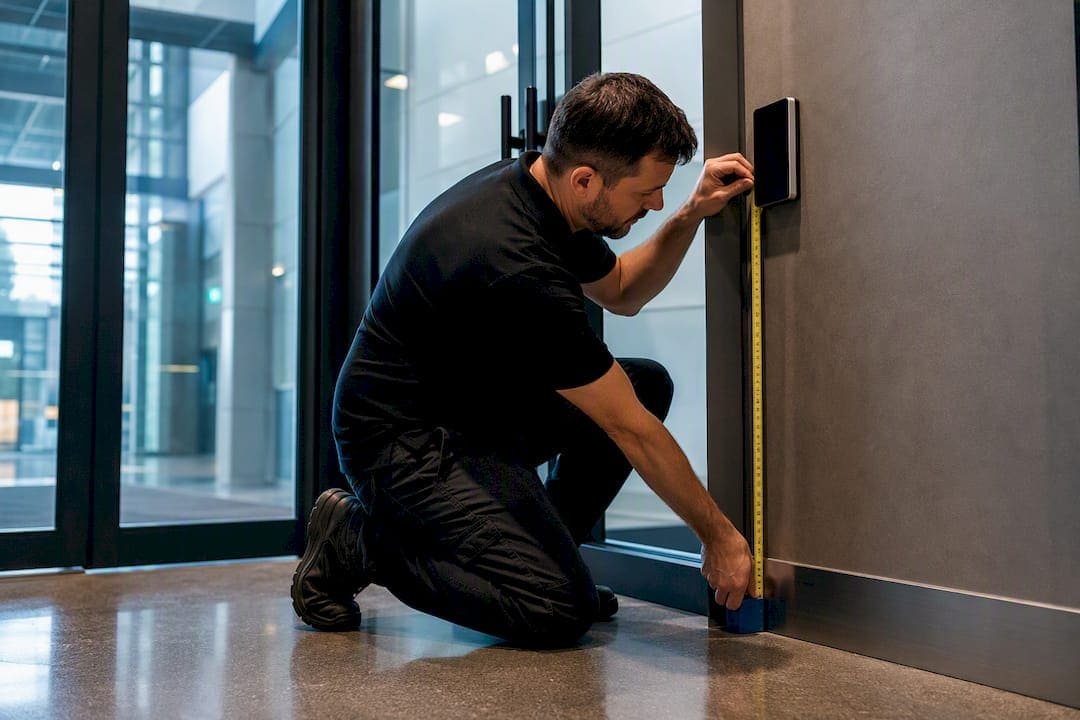
The maximum mounting height for an operable card reader is 48 inches above finished floor, per U.S. Access Board reach range standards. That number drops to 46 or 44 inches when the reader sits behind a counter, ledge, or other obstruction, and side-approach obstructions cap out at 34 inches. The rule applies only to the “operable part,” the actual keypad, swipe slot, or tap zone, not necessarily the whole housing.
TL;DR:
- The maximum height for an operable card reader is 48 inches from finished floor, but drops to 46 or 44 inches behind counters or obstructions depending on depth.
- Reach ranges must be between 15 and 48 inches, with lower limits for obstructions exceeding 10 inches, and side obstructions reducing height to 34 inches.
- Measuring from finished floor and documenting the operable part with photos and diagrams is crucial to proving ADA compliance during inspections or disputes.
- Common installation errors include measuring from subfloor, ignoring new obstructions, and not verifying approach clearances, which often lead to violations.
- Target mounting height of around 42 inches offers a practical balance, but precise calculations based on layout and obstructions are essential for full compliance.
What Are the ADA Height and Reach Requirements for Card Readers?
The Access Board’s Chapter 3 guidance on operable parts sets the baseline: any operable portion of a card reader must fall within an unobstructed reach range of 15 inches minimum to 48 inches maximum, measured from finished floor. That range covers both forward and side approaches when nothing blocks the wheelchair user’s path to the device.
Obstructions change the math fast. If a reader sits beyond a counter, planter, or other obstacle with a reach depth greater than 10 inches (up to 24 inches), the maximum allowable height drops to 46 inches. Deeper or more restrictive layouts can push that ceiling down to 44 inches, depending on which Access Board figure applies to the specific geometry. Side obstructions carry their own limit: 34 inches maximum height when a user has to reach across an object from the side rather than straight ahead.
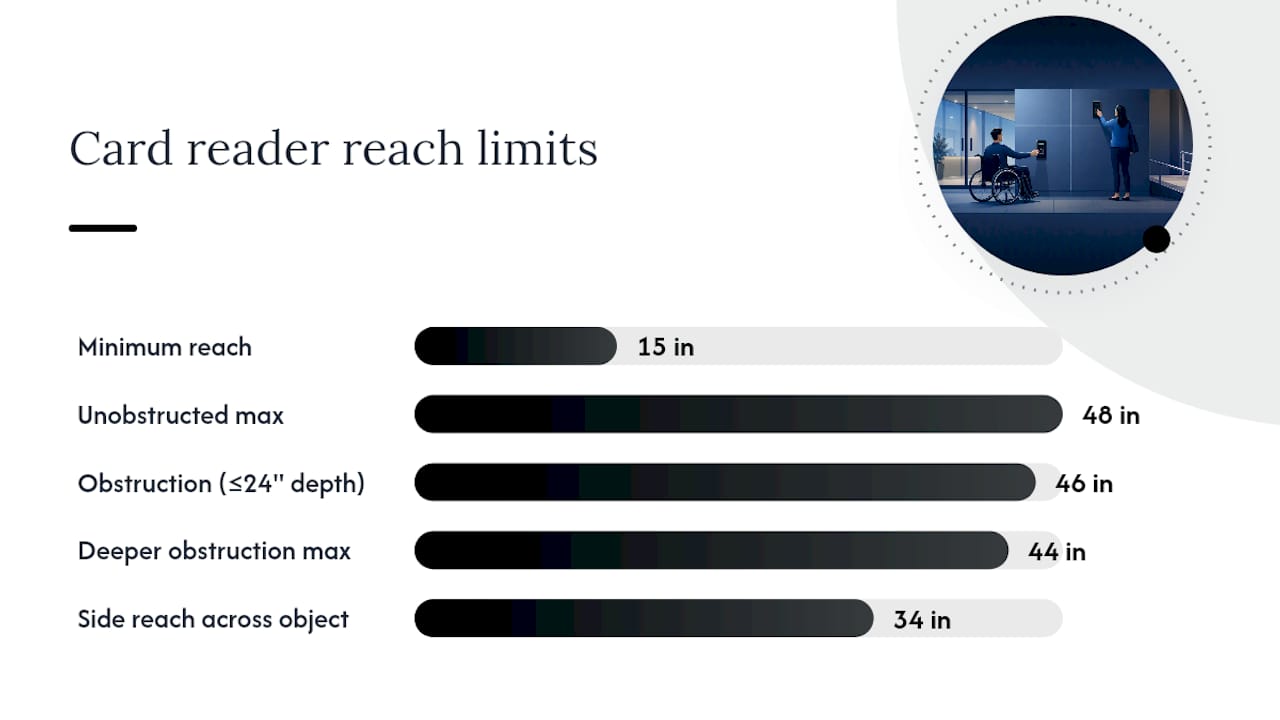
These figures are not abstract. Ada map out exactly how forward and side reach interact with obstruction depth, and installers should keep those diagrams on hand during layout, not just during a post-installation audit.
In practice, the rule plays out differently depending on where the reader lives:
- Wall-mounted reader with clear approach: Full 15 to 48 inch range applies. No adjustment needed.
- Reader mounted behind a security desk or counter: Obstruction rules kick in. Measure counter depth first.
- Bollard or pylon-mounted reader at a vehicle gate: Treat as an obstructed reach if the base or housing extends the reach depth beyond 10 inches.
- Reader recessed into an elevator jamb: Usually unobstructed, but verify the jamb doesn’t create a side obstruction.
What Counts as an “Operable Part” and What Clearance Does It Need?
The operable part is the piece of the device a person actually has to touch, press, or swipe to get access. A card reader’s enclosure might be eight inches tall, but if only the top two inches contain the tap zone, that is the section the reach range governs. The Access Board treats housings that extend outside the reach range as acceptable, as long as the operable portion itself sits within bounds and the installer can document which part was measured.
Getting the height right means nothing if the approach is wrong. Confirm these before mounting anything:
- Verify 30 inches by 48 inches of clear floor space exists directly in front of or beside the reader, positioned for the approach the layout actually allows.
- Determine whether the approach is forward (wheelchair facing the device head on) or parallel/side (wheelchair alongside a wall-mounted unit), since each has different obstruction math.
- Check for knee and toe clearance under any counter or ledge near the reader. A technically correct height with no room to roll a wheelchair into position still fails.
Pro Tip: When a housing straddles the reach range boundary, or the visible tap target is ambiguous, treat the entire front face of the device as the operable part. It’s a small design concession that eliminates the argument during inspection.
How Do You Measure and Install a Compliant Card Reader?
Start at the floor, not the device. Identify finished floor level first, because “finished floor” means the completed surface, tile, carpet pad, or sealed concrete, not the subfloor a rough-in crew worked from. Measuring from an unfinished slab is one of the most common ways an installation ends up half an inch too high after flooring goes in.
Once you have that reference point, locate the highest point of the actual operable part (not the top of the housing), measure straight up from finished floor, and record the number before you drive a single screw.
A checklist worth running on every job:
- Confirm obstruction depth if the reader sits behind or near a counter, ledge, or wing wall.
- Test reach from both a seated position and a standing position to catch usability issues height alone won’t reveal.
- Verify operating force and audio or visual feedback. The Access Board treats excessive force or unclear feedback as a compliance issue even when height is perfect.
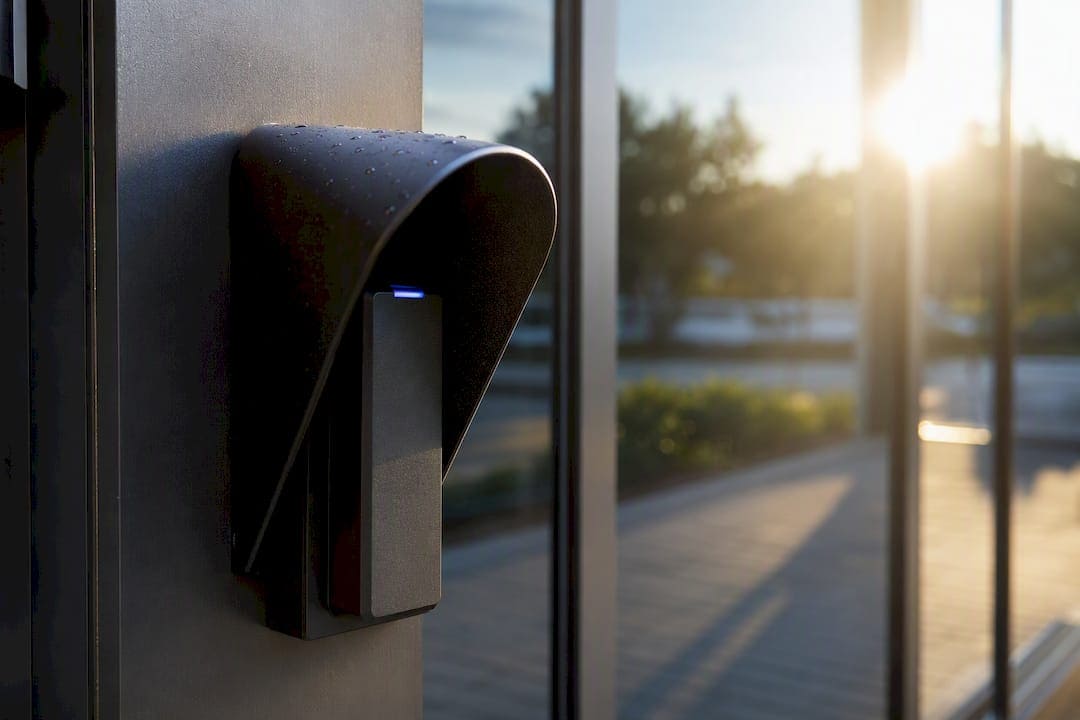
- Check protrusion limits on any weather hood or sunshade, since hoods that extend too far forward can create their own obstruction problem.
Many installers target roughly 42 inches as a practical mounting height, a figure that industry guidance frames as a field-tested sweet spot rather than a code minimum. It sits comfortably within the unobstructed range for both seated and standing users, which reduces the odds of a callback if a later renovation adds a counter or barrier near the device.
What Documentation Proves a Card Reader Installation Is Compliant?
Inspectors and clients both want evidence, not assurances. Build a file for every installation that includes:
- Photos of the mounted reader with a tape measure or scale visible in frame, showing the measured height of the operable part.
- A simple diagram marking the 30 inch by 48 inch clear floor space and which approach (forward or side) it was designed for.
- Notes on any obstruction depth encountered and which Access Board figure or height reduction was applied as a result.
- Functional test results: seated and standing reach checks, the force required to operate the device, and confirmation of audio or visual feedback.
That as-built documentation becomes the handoff package for both the client and the inspector, and it’s the difference between a five-minute walkthrough and a dispute that drags on for weeks.
What Cables and Chips Has Learned Installing Access Control in NYC Buildings
The company has run low voltage cabling and access control infrastructure throughout New York City for many years, and card reader placement is one of the few details where a half-inch mistake becomes a real liability. Installation teams document mounting height, obstruction depth, and clear floor space on every access control cabling job, not just the ones flagged for accessibility review.
A few lessons show up on repeat:
- A mid-height target near 42 inches avoids most rework when architects later add a counter or turnstile near the reader.
- Coordinating with architects before conduit goes into the wall prevents the “reader is two inches too high” conversation after drywall is closed.
- Photographing the operable part with a measuring tape, every time, settles disputes before they start.
On one Lower Manhattan lobby retrofit, a planned reader location put the device behind a new security desk that hadn’t existed in the original drawings. Measuring the desk’s depth first, before mounting, showed the obstruction pushed the allowable height down to 46 inches. Adjusting the mount before installation, instead of after a failed inspection, saved the client a second site visit entirely.
A half-inch error caught on paper costs nothing. The same error caught by an inspector costs a return trip, a change order, and a client who now questions everything else on the punch list.
— Ken
Do Wheelchair Users and Standing Users Need Different Reader Heights?
ADA reach ranges are written around wheelchair users specifically, which makes the 15 to 48 inch window a floor-to-ceiling accommodation rather than a standing-user convenience. A standing adult can comfortably reach a device mounted well above 48 inches, but a seated user cannot, so the code defaults to the more restrictive requirement rather than splitting the difference.
That’s why there’s no separate “standing height” spec in the standards. The reach range already assumes the hardest case: someone reaching from a wheelchair, possibly across an obstruction, with limited ability to lean or stretch. Meet that requirement and standing users are automatically served, since 15 to 48 inches sits within comfortable reach for most adults regardless of posture.
Where this gets tricky is dual-use environments, loading docks, parking structures, or building entrances where both pedestrians and vehicle occupants use the same reader. In those cases, mounting height has to satisfy the pedestrian wheelchair reach range even if a secondary reader or extended arm exists for vehicle access. Installers sometimes assume a taller “convenience” reader for standing staff satisfies the requirement on its own. It doesn’t, unless every user population has an accessible option within reach range.
Do Different Card Reader Types Change the Height Rules?
The reach range and obstruction math apply the same way regardless of reader technology, because the Access Board defines the requirement around the fixed operable part, not the underlying tech. A magnetic stripe reader, a contactless proximity reader, and a biometric scanner all need their operable surface within the same 15 to 48 inch window.
Where technology does matter is force and feedback. A mag stripe reader requires a physical swipe motion, which the standards flag as a potential compliance issue if the motion demands too much dexterity or force. Contactless and proximity readers usually clear that bar more easily since a tap or wave requires minimal fine motor control. Biometric readers, fingerprint or palm scanners in particular, introduce a different wrinkle: the scan surface itself must sit within reach range, and any required hand or finger positioning can’t demand a grip strength or motion that excludes users with limited mobility.
One more distinction worth flagging: the standards specifically address fixed card, key, or code entry systems as operable parts requiring reach-range compliance. A physical key card itself isn’t required to meet any accessibility standard since it’s not fixed to the building. The fixed reader that accepts it is.
Where Should a Card Reader Sit on the Wall or Frame?
Height gets most of the attention, but lateral placement and mounting depth decide whether that height even matters. A reader mounted at a perfect 48 inches but tucked six inches behind a door jamb, or set back inside a deep recessed niche, can still fail if the recess itself functions as an obstruction that changes the effective reach depth.
The general placement target for door-mounted readers is the latch side of the door, far enough from the door swing that a wheelchair user isn’t forced to hold the door open with one hand while reaching for the reader with the other. Most guidance points toward roughly 18 inches of clearance from the reader to the door’s leading edge, though the exact figure depends on door width and swing direction.
Mounting depth matters just as much as lateral position. A reader recessed more than a few inches into a wall or column changes the effective reach geometry the same way a counter does, forcing the obstructed-reach calculation instead of the standard 15 to 48 inch range. If a design calls for a recessed or flush-mounted housing, run the obstruction math before finalizing the box location, not after the rough-in electrician has already run conduit.
How Do Lighting and Weather Affect Reader Height Decisions?
Environmental factors rarely change the required height itself, but they change how installers meet it without creating a secondary obstruction. Weather hoods and sunshades protect outdoor readers from rain and glare, and both are common in New York City entrances exposed to wind-driven weather off the rivers. The problem comes when a hood or overhang projects far enough forward to function as an obstruction, effectively reducing the allowable mounting height the same way a counter would.
Installer guidance on access control mounting flags hood and housing protrusion as a recurring source of obstructed-reach miscalculation, since teams often account for the reader’s height but forget to measure how far the weather protection extends outward. A hood added after the initial accessibility review has been signed off is a common way a compliant installation quietly becomes noncompliant.
Lighting matters for a different reason: visibility and glare affect a user’s ability to locate the tap zone or read an indicator light, particularly for low-vision users. Exterior readers facing east or west can suffer from direct sun glare at certain times of day, washing out LED feedback lights that are supposed to confirm a successful read. Positioning the reader out of direct glare, or specifying a unit with a shielded or angled indicator, solves a usability problem that height alone never addresses.
Do Card Readers Need Braille or High-Contrast Markings?
Tactile and visual features matter most on the surrounding signage and controls, not necessarily the reader unit itself, though both play a role in a fully accessible installation. Where a reader is paired with a keypad for PIN entry, tactile markings on key numbers, and a raised or high-contrast indicator for the “5” key, help users with low vision or blindness orient themselves without looking.
High contrast between the reader housing and the surrounding wall surface helps low-vision users locate the device visually, which matters more than people expect in dim lobby lighting or reflective metal storefronts common in Manhattan commercial buildings. A dark gray reader mounted on a dark gray wall might meet every height requirement and still be nearly impossible to find without touching the wall first.
Audio and visual feedback on the reader itself, a beep, a light change, a screen prompt, isn’t a decorative feature. The Access Board’s operable parts guidance treats clear feedback as part of functional accessibility, since a user who can’t tell whether a swipe or tap registered has effectively been denied access even if the mounting height is textbook correct.
What Installation Mistakes Most Often Cause ADA Violations?
Most violations trace back to a handful of repeat mistakes, and nearly all of them are avoidable with a five-minute check before mounting.
Measuring from subfloor instead of finished floor tops the list. A rough-in crew working before tile or carpet goes down can measure a perfect 48 inches, only to discover the finished floor height adds enough thickness to push the reader over the limit.
Ignoring obstructions added after design is close behind. A reader specified at 48 inches during design review can become noncompliant the moment a facilities team adds a security desk, planter, or turnstile in front of it. Depth needs re-checking any time the surrounding layout changes, even years after initial installation.
Mounting the entire housing without identifying the operable part causes confusion during inspection, since inspectors measure the functional tap or swipe zone, not the top edge of a decorative faceplate. Failing to document which portion was treated as operable leaves installers arguing a technicality they could have settled with one photo.
Finally, treating 42 inches or any other “sweet spot” figure as code, rather than the practical guideline it actually is, causes problems when a specific obstruction genuinely requires a different calculation. The 42 inch target works as a default. It doesn’t override the math when a counter or recess is actually present.
The Real Gap in Most ADA Card Reader Guidance
Most guidance on this topic stops at reciting the 48 inch rule and calling it done. That’s the easy part. The harder, more consequential work is the obstruction math, the approach geometry, and the documentation trail that proves compliance when an inspector or a tenant’s attorney asks for it two years after installation.
Conventional advice also underweights how often the compliance picture changes after handoff. A reader that passed inspection can become noncompliant the moment a building adds a security desk, a planter, or a turnstile in front of it. Nobody re-checks reach depth when facilities teams rearrange lobby furniture, and that’s exactly the gap that turns a compliant installation into a liability.
If there’s one thing worth prioritizing above the height number itself, it’s the habit of measuring from finished floor, documenting the operable part with a photo and a scale, and recording obstruction depth at the moment of installation, not reconstructing it later from memory. Height gets the attention. Documentation is what actually holds up in a dispute. Installers who treat the 42 inch industry target as a starting point, then verify it against the actual obstruction geometry on site, end up with far fewer callbacks than those who mount first and measure later.
Card Reader Placement Support From Cables and Chips
Getting card reader height right on paper is one thing. Getting the cabling, conduit, and device placement coordinated across an entire building’s entrances, elevators, and secure doors is where most projects actually run into trouble. Experienced contractors have spent many years pulling low voltage infrastructure through New York City commercial buildings, and access control cabling that respects reach-range geometry from day one saves clients from tearing open walls after a failed inspection.

Some firms handle access control and CCTV cabling for offices, secure facilities, and building management teams in the New York City area and nearby states, including placement coordination, conduit runs, and the as-built documentation inspectors expect to see. Before requesting a quote, have door type, existing photos of the intended mounting location, and the reader model on hand. That lets the team flag obstruction issues before conduit goes into a wall instead of after.
For projects that also need a deeper technical reference on cabling specs tied to access control systems, the access control cabling requirements guide covers the infrastructure side in more detail. Consider reaching out to experienced installers to schedule a site visit and get a placement plan built around your actual floor plan, not a generic template.
Primary Sources for ADA Card Reader Height Rules
For the official figures and diagrams behind every measurement in this guide, consult the Access Board’s Chapter 3 on operable parts and ADA.gov’s 1991 Design Standards. When a layout doesn’t match a common example, check the primary figures directly.
Sources
- Guide to the ADA Accessibility Standards — Chapter 3: Operable Parts
- ADA Guidelines for Access Control (installer-focused guidance)
- ADA Compliance For Access Control Systems | Go Safer
FAQ
What Is the ADA-Compliant Height for a Card Reader?
The operable part of a card reader must sit at or below 48 inches above finished floor, per the Access Board’s reach range standards, dropping to 46 or 44 inches when an obstruction is present.
What Is the Standard Mounting Height for a Card Reader?
Many installers, including Cables and Chips, target around 42 inches as a practical default that works within the accessible range for both seated and standing users, though this is industry practice rather than a code minimum.
What Are the General ADA Height Requirements for Operable Devices?
Any fixed operable part, card readers, switches, or door hardware, must fall within a reach range of 15 to 48 inches for an unobstructed forward or side approach, per the Access Board’s Chapter 3 guidance.
Are ADA Accessibility Requirements Changing in 2026?
The core reach range and obstruction figures referenced in this guide come from the existing 1991 ADA Design Standards, and installers should always verify current figures directly with the Access Board before finalizing a design.
Does the ADA Height Rule Apply to the Whole Card Reader Housing?
No. The rule applies specifically to the operable part, the tap, swipe, or keypad surface a user must touch, not necessarily the full enclosure or decorative faceplate around it.