
TIA Cable Color Coding Field Reference for Technicians

Cable color coding is a standards-backed visual system for identifying cable function, pathway, and termination point in a network installation. Technicians should follow three governing documents: ANSI/TIA-606-C for administrative color assignments, ANSI/TIA-598-D for fiber, and ANSI/TIA-568 for copper pinouts. Pick a scheme from those standards, print a legend for the telecom room, and document it before the first cable gets terminated.
TL;DR:
- Using consistent wiring standards like T568A or T568B is crucial, as mixing them can cause link failures and service disruptions that are easy to troubleshoot with a tester.
- Jacket colors for fiber and copper communicate only the cable type or function, not performance, so documentation and test records are necessary for accurate identification.
- Fiber jacket colors indicate fiber type, but actual optical performance depends on the internal core, making proper documentation even more important than jacket color.
- A laminated reference card or printed legend posted in telecom rooms greatly reduces troubleshooting time and prevents misidentification during installations or upgrades.
- International standards vary, so always verify project specifications and manufacturer color sheets before installation to avoid mismatched wiring or termination errors.
Cable Color Coding Chart: Ethernet, Fiber, and Telco at a Glance
Every technician on a jobsite needs the same reference in front of them, whether they’re punching down a patch panel or splicing a fiber trunk. The chart below covers the four systems you’ll encounter most on a commercial structured cabling project.
| System | Sequence / Pairing | Notes |
|---|---|---|
| T568A | White/Green, Green, White/Orange, Blue, White/Blue, Orange, White/Brown, Brown | Federal contracts often require this pattern |
| T568B | White/Orange, Orange, White/Green, Blue, White/Blue, Green, White/Brown, Brown | Matches legacy AT&T wiring; most common in commercial installs |
| Fiber (12-color) | Blue, Orange, Green, Brown, Slate, White, Red, Black, Yellow, Violet, Rose, Aqua | TIA-598-D governs sequence and repeats past fiber 12 |
| Fiber jackets | Yellow (single-mode), Aqua (OM3/OM4), Lime (OM5), Orange (legacy multimode), Black (outside plant) | Jacket color signals fiber type, not performance |
| 25-pair telco | White/Blue, White/Orange, White/Green, White/Brown, White/Slate (repeating with Red, Black, Yellow, Violet secondaries) | See the 25-pair color code for full pair numbering |
TIA-606 layers administrative color on top of this: orange for demarcation points, green for network connections, purple for common equipment, and blue for horizontal cabling, each tied to a Pantone reference for consistency. None of this is mandatory by code, but skipping it is how telecom rooms turn into guesswork exercises two years after the original installer leaves.
T568A vs T568B: Which Ethernet Wiring Order Should You Use?
The two patterns swap the orange and green pairs on pins 1, 2, 3, and 6. That’s the entire difference. Both meet ANSI/TIA-568 requirements and deliver identical electrical performance, so neither pattern makes a faster or more reliable connection.
Choosing between them comes down to context, not capability:
- T568A is often specified on federal contracts and offers cleaner backward compatibility with older USOC telephone wiring.
- T568B dominates commercial installations because it matches the color coding printed on most legacy AT&T equipment still in service, and most working technicians default to it for that reason.
- A crossover cable wires one end T568A and the other T568B; a straight-through cable uses the same standard on both ends, which is what virtually every modern network needs.
- Continuity testing should confirm both pair order and pair integrity, not just that all eight pins carry a signal.
Whichever pattern you pick, lock it in across the entire building. Mixing T568A and T568B terminations on the same network is one of the fastest ways to create link failures that take hours to trace back to a single mispunched jack.
What Is the Standard Color Order for Fiber Optic Cable?
TIA-598-D sets the 12-color sequence every fiber technician memorizes early: Blue, Orange, Green, Brown, Slate, White, Red, Black, Yellow, Violet, Rose, Aqua. Cables with more than 12 fibers repeat that sequence and add a colored tracer stripe to mark each additional group of 12.
Jacket color tells you fiber type at a glance, within limits:
- Yellow jackets indicate single-mode fiber.
- Aqua indicates OM3/OM4 laser-optimized multimode.
- Lime signals the newer OM5 wideband multimode.
- Orange marks legacy OM1/OM2 multimode, and black is standard for outside-plant runs.
Statistic Callout: High-density MPO/MTP builds push past the base 12-color set entirely. Fibers 13 through 16 in a 16-fiber MPO cassette use olive, magenta, tan, and lime, colors that don’t appear anywhere in the original TIA-598 sequence.
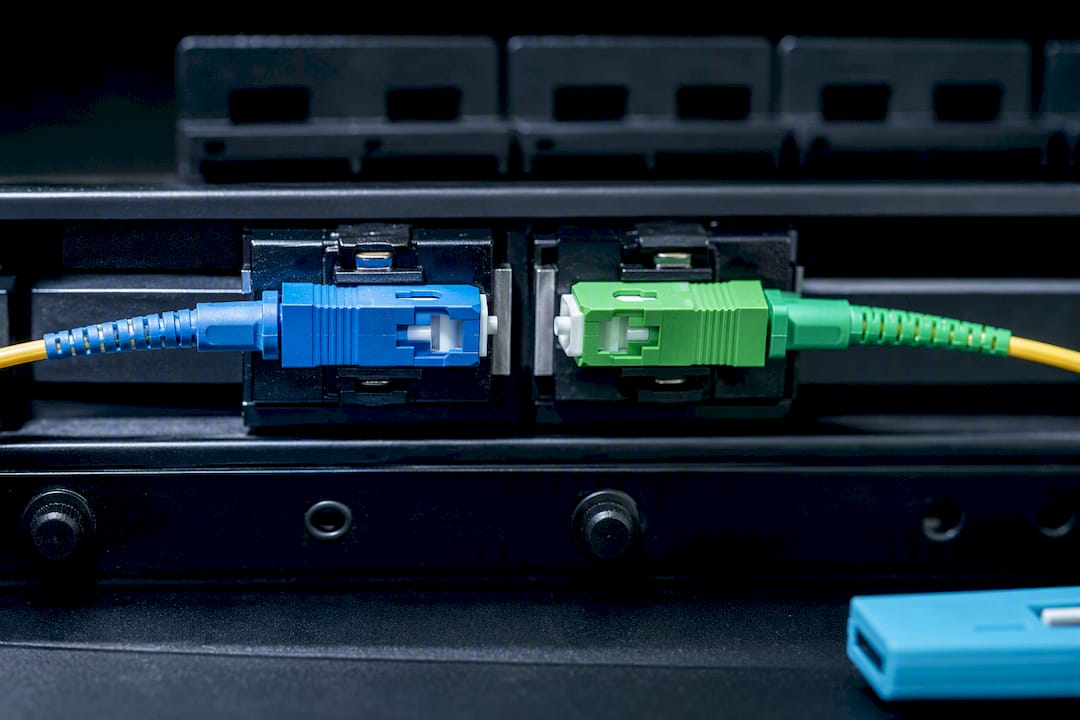
Connector color follows a separate convention tied to polish type: blue means UPC, green means APC. Mating a green APC connector to a blue UPC connector causes measurable insertion loss and should never happen on a live link. In MPO/MTP environments, don’t trust color alone to confirm polarity. A documented polarity plan and verification testing catch errors that a quick visual check will miss.
How Do You Read a 25-Pair Telco Color Code?
The 25-pair scheme pairs a primary color (White, Red, Black, Yellow, Violet) with a secondary color (Blue, Orange, Green, Brown, Slate) to generate 25 unique conductor pairs, and it’s still the backbone of premises telco wiring decades after Bell introduced it.
- Pair 1 is always White/Blue, pair 2 is White/Orange, and the sequence cycles through all five secondaries before rotating to the next primary color.
- A cable carrying more than 25 pairs adds a colored binder tracer around each group of 25, so pair 26 starts a new White/Blue combination inside a differently marked bundle.
- For conductor counts beyond what the 25-pair chart covers, consult the ICEA and NEMA color charts built for larger multi-conductor cables.
Once you know the pattern, reading any telco punch block becomes a matter of counting color pairs in sequence rather than guessing.
How Do You Implement a Color Coding System On-Site?
Standards give you the palette. Turning that palette into something a technician can actually use on a Tuesday morning requires a documented process.
- Choose your scheme first. Decide which TIA-606 administrative colors apply to demarcation, network, horizontal, and common equipment before ordering a single patch cord.
- Order matching patch cords and jacks in bulk. Sourcing color-matched components after the fact almost always means mismatched dye lots or discontinued colors.
- Update your cable administration system. Whether that’s a spreadsheet or a dedicated platform, the color assignments need to live somewhere searchable, not just in someone’s memory.
- Print a legend and post it in every telecom room. A laminated sheet at eye level in the MDF and each IDF saves more troubleshooting time than almost any other single document.
Color alone is fragile; it should be combined with proper routing and bonding following established cable routing and bonding rules to ensure safety and system integrity. The most durable identification systems layer jacket color with patch cord color and printed port labels, so a single obscured or faded indicator can’t cause a misidentification down the line. Update the as-built drawing and change log every time the scheme touches new cable, and keep a copy of the legend with the documentation package for that floor.
Pro Tip: Before ordering custom-colored jacks or patch cords for a large rollout, verify the scope of work against the manufacturer’s actual color sheet. Catalog colors vary by vendor, and TIA-598 itself continues to evolve through ongoing TR-42 committee revisions, so what shipped last year isn’t guaranteed to match this year’s order.
What Are the Most Common Cable Color Coding Mistakes?
Most color-coding failures trace back to inconsistency, not ignorance of the standards.
- Mixed T568A/T568B wiring shows up as intermittent link drops or devices that negotiate at the wrong speed; a cable tester checking pin order catches it in seconds.
- Ambiguous fiber jacket color needs a legend check first, then a physical inspection with a fiber identifier or microscope if the paperwork is missing or outdated.
- A fast field checklist covers three things every time: continuity end to end, correct pair or fiber order, and the right connector type for the port it’s landing in.
- If a run fails one of those checks, decide quickly: relabel and retrace if the wiring is sound but documentation is wrong, or replace the cable if the fault is physical.
Does Cable Jacket Color Affect Performance?
No. Jacket color carries zero electrical or optical performance information. A blue CAT6A cable and a gray CAT6A cable from the same manufacturer perform identically, because jacket color is purely an administrative aid layered on top of the actual cable construction.
This trips up newer technicians more often than any other part of the color-coding conversation. Category rating, shielding, and fire rating come from the cable’s internal construction and jacket material composition, not its dye. A plenum-rated CAT6A cable in yellow performs exactly like a plenum-rated CAT6A cable in blue, provided both meet the same TIA/EIA electrical specifications. The color exists so a technician tracing cable in a crowded rack or ceiling space can identify function at a glance, nothing more.
The same logic applies on the fiber side. A yellow jacket signals single-mode fiber by convention, but the glass core inside determines actual optical performance, attenuation, and bandwidth. Two cables with different jacket colors from different manufacturers can share identical core specifications, and two cables with the same jacket color can have different core types if someone breaks from the standard.
This is exactly why documentation matters more than color memory. A facilities manager walking into a building with an inherited network can’t assume every yellow cable is single-mode fiber unless the prior installer actually followed TIA-598-D conventions and left a legend behind. Treat jacket color as a fast visual sort, and treat the printed cable jacket markings, test records, and as-built documentation as the actual source of truth for performance specifications.
How Does Color Coding Work for Coax and Serial Cables?
Coaxial and serial cables follow a looser convention than structured Ethernet or fiber, largely because they serve narrower, more specialized applications.
Coax jacket color varies by application rather than a single unified standard. RG6 used for CATV and satellite drops commonly ships in white or black; RG59 used in older CCTV analog runs often shows up in black or occasionally yellow for identification against bundled Ethernet. In a facility running both coax-based analog cameras and IP cameras over CAT6, color separation between the two systems becomes a practical necessity rather than a formal requirement. Technicians typically assign one jacket color to legacy coax runs and a different one to structured copper, purely to keep the two systems visually distinct during moves and troubleshooting.
Serial cables (RS-232, RS-485) rarely follow any industry color standard at all. Individual conductor colors inside a serial cable jacket depend entirely on the manufacturer, and the same function (transmit, receive, ground) can appear on a different colored wire from one cable batch to the next. This is a case where a printed pinout diagram matters far more than color memory. Never assume a serial wiring color scheme carries over from one project to the next; verify against the device’s actual pinout documentation every time.
Building automation and alarm cabling sit in a similar gray area. Many installers adopt informal local conventions (red for power, black for ground, a specific color for supervisory loops), but none of that is codified the way TIA-568 or TIA-598 are. Document it locally if you set a convention, because the next technician has no standard to fall back on otherwise.
Do Cable Color Coding Standards Vary by Region?
TIA-598-D and TIA-568 govern North American structured cabling, but they aren’t the only standards in circulation globally. European installations frequently reference ISO/IEC 11801 for structured cabling, which shares much of the same underlying logic as TIA-568 but doesn’t always mandate identical wire colors for copper pairs.
The practical risk shows up on international projects or with equipment sourced from overseas manufacturers. A patch panel or pre-terminated cable assembly built to a European or Asian regional standard can carry a wire color sequence that looks similar to T568A or T568B at a glance but isn’t identical pin for pin. That’s a real problem on multinational corporate rollouts where NYC-based IT teams are coordinating with an overseas facilities team using different source documentation.
Fiber color coding sees less regional divergence than copper, since TIA-598-D’s 12-color sequence has become something close to a de facto global convention for premises fiber, largely because so much fiber optic cable manufacturing supplies a global market. Still, project specifications sometimes override the default sequence entirely, particularly on legacy telecom infrastructure or government contracts with their own historical color conventions.
The rule that protects you on any project, domestic or international: never assume a color sequence based on the standard you know best. Pull the actual project specification, confirm which standard governs the installation, and verify against the manufacturer’s color sheet before terminating anything. A five-minute check beats a half-day of retracing conductors after a mismatch surfaces during testing.
How Can You Visually Reference Color Codes in the Field?
The fastest troubleshooting happens when the reference material lives where the work happens, not buried in a project folder three floors away.
A laminated pinout card showing both T568A and T568B side by side, taped inside a patch panel door, eliminates the single most common source of confusion on a mixed-crew job. The same principle applies to fiber: a printed 12-color sequence card with jacket color meanings, posted next to the fiber distribution panel, turns a “what color is this supposed to be” moment into a five-second glance.

For 25-pair telco work, a printed pair-count chart showing primary and secondary color combinations in sequence saves considerably more time than mentally reconstructing the pattern on a 66 block with 50 or 100 pairs terminated. Larger installations benefit from color-coded port labels on the patch panel itself, cross-referenced to the same colors used in the cable administration software, so a technician can visually confirm a connection without pulling up documentation on a laptop first.
None of this requires elaborate signage. A single reference sheet, printed and posted in each telecom room per the TIA-606 administrative recommendations, does more for long-term serviceability than any amount of memorized color knowledge. The technician who inherits that room in three years will thank whoever posted it.
A Contractor’s Take on Why Color Discipline Pays Off
On a recent closet cleanup, a mislabeled patch panel cost a client nearly two hours of tracing before anyone found the single crossed pair. A posted legend and consistent color scheme would have cut that to minutes. Disciplined color coding isn’t paperwork. It’s the difference between a five-minute fix and a half-day outage.
— Ken
Get Your Color Coding and Documentation Done Right
Reading a color chart correctly is one thing. Having every patch cord, jack, and fiber strand in your building actually installed and labeled to that standard is another. A structured cabling contractor is the professional choice when a facilities team wants a telecom room that a new technician can walk into and understand quickly.

Our crews install and label CAT6 and CAT6A structured cabling and fiber optic backbones with TIA-compliant color schemes built in from day one, not added as an afterthought. Every project includes a printed legend for the telecom room and an as-built documentation package so your color coding stays accurate as the network grows. If your current infrastructure is a patchwork of undocumented colors and guesswork, request a quote through our structured cabling components guide and get a plan for cleaning it up.
Sources
- TIA-606-C standard requirements for cable plant administration — Cabling Installation & Maintenance
- Fiber Optic Cable Color Codes — The Fiber Optic Association (FOA)
- Differences between wiring codes T568A vs T568B — Fluke Networks
- 25-pair color code — Wikipedia
FAQ
What Is Cable Color Coding?
Cable color coding is a system that uses standardized wire, jacket, or connector colors to identify a cable’s pair, function, or administrative role, governed by standards like TIA-568, TIA-598, and TIA-606.
What Color Wire Goes to L and N?
In structured cabling color codes like T568A and T568B, wires aren’t labeled L (line) and N (neutral). That labeling belongs to AC power wiring, which follows entirely separate electrical codes, not TIA telecom standards.
What Is the Correct Color Order for Network Cable?
T568B, the most common Ethernet wiring pattern, orders pins as White/Orange, Orange, White/Green, Blue, White/Blue, Green, White/Brown, Brown. T568A swaps the orange and green pairs but is equally valid under ANSI/TIA-568.
How Do You Identify Cables by Color?
Check the jacket color against the governing standard (TIA-598 for fiber, TIA-606 for administrative function), then verify against the printed legend or as-built documentation for that specific installation, since jacket color alone can be ambiguous without records.
Is T568A or T568B Better for a New Installation?
Neither performs better electrically. T568B fits most commercial buildings because it matches existing equipment, while T568A suits federal contracts or sites needing legacy USOC compatibility.