
How to test Cat6 cable after installation: the NYC guide
You pulled the cable, terminated the runs, and patched everything in. Now comes the step that separates a reliable network from one that fails at the worst possible time. Knowing how to test Cat6 cable after installation is not optional in NYC commercial buildings. It is the difference between a documented, compliant infrastructure and one that causes intermittent outages, failed audits, and expensive troubleshooting calls six months after the contractor has left the building.
Table of Contents
- What you need before testing your Cat6 cable
- Step-by-step process to test Cat6 cable after installation
- Common issues to watch for and troubleshooting tips
- Understanding and managing Cat6 test documentation and reports
- Why full certification testing beats basic continuity for NYC buildings
- Get expert Cat6 cable installation and testing services in NYC
- Frequently asked questions
Key Takeaways
| Point | Details |
|---|---|
| Test beyond continuity | Basic wiremapping confirms wiring but full certification ensures performance for reliable high-speed networks. |
| Use certified tools | Enterprise testers like Fluke DSX-5000 provide quick, accurate CAT6 certification adhering to TIA standards. |
| Label and document | Proper cable IDs and detailed test reports prevent costly disputes and retesting during NYC inspections. |
| Watch installation quality | Minimize pair untwist and follow bend radius to avoid common failures detected in certification tests. |
| Consider professional services | Partnering with certified installers and testers simplifies compliance and ensures network longevity in NYC. |
What you need before testing your Cat6 cable
Having clarified why testing is crucial, let’s explore the essential tools and preparations involved.
Not all testing is equal. A basic RJ45 continuity tester tells you whether the wires are connected. A professional cable certifier tells you whether those wires will actually perform. For any NYC commercial building, you need the latter.
TIA-568.2-D standards require Cat6 certification testing to measure NEXT (near-end crosstalk), insertion loss, return loss, delay skew, and cable length up to 250 MHz bandwidth. A continuity tester measures none of those. If your contractor hands you a continuity report and calls it a certification, that is a red flag.
Essential tools and preparations before you begin:
- Cable certifier: The Fluke DSX-5000 CableAnalyzer is the industry standard for cable testing certification in commercial environments. It requires a main unit and a remote unit, one at each end of the cable run.
- Test adapters: Use the correct channel or permanent link adapters for Cat6. Mixing adapter types invalidates results.
- Cable labels and IDs: Every run must be labeled before testing begins. Labels tie test results to physical locations, which is critical for building documentation.
- Termination inspection: Visually inspect all keystone jacks and patch panel terminations before connecting the certifier. Loose or improperly seated terminations will fail tests and waste time.
- Standards reference: Know whether you are testing to the permanent link or channel model. Most post-installation tests use the permanent link model, which excludes patch cords.
| Tool type | What it measures | Sufficient for certification? |
|---|---|---|
| Basic continuity tester | Wire map, opens, shorts | No |
| Cable qualifier | Wire map, length, basic signal | No |
| Professional certifier (e.g., Fluke DSX-5000) | NEXT, insertion loss, return loss, delay skew, length | Yes |
Pro Tip: Before testing any run, calibrate your certifier with the adapters you plan to use. Calibration drift from worn adapters is one of the most common causes of borderline failures on otherwise good cable. Replace adapters every 500 to 1,000 test cycles.
For structured Cat6 installation projects in NYC, we also recommend documenting the testing environment. Note the ambient temperature, the building floor, and any known sources of electromagnetic interference (EMI) nearby. This context matters if a result is challenged later.
Step-by-step process to test Cat6 cable after installation
With tools ready, here is the detailed procedure to execute accurate Cat6 cable testing.
Rushing through this process is where most teams lose time. A systematic approach catches problems before they become network incidents.
-
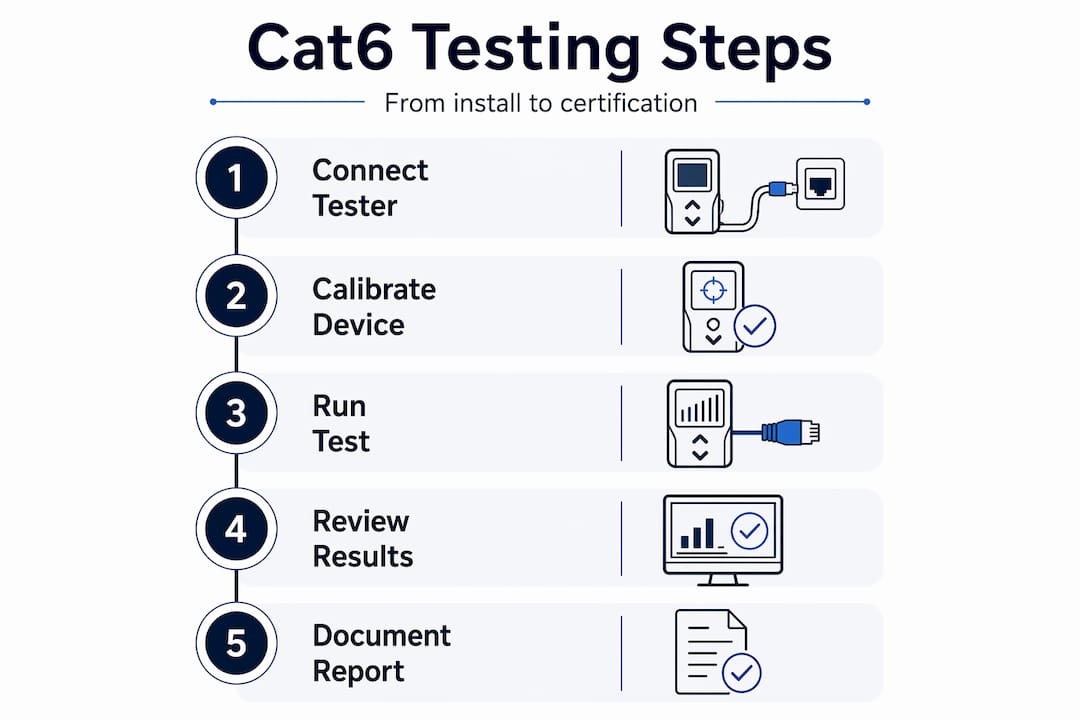
Connect the certifier units. Attach the main unit at the patch panel or MDF/IDF end and the remote unit at the wall plate or far end. Use permanent link adapters for post-installation testing.
-
Run the wiremap test first. This confirms correct pin-to-pin termination and detects opens, shorts, reversed pairs, and split pairs. A wiremap failure means a termination error. Fix it before proceeding.
-
Execute the full certification sweep. The certifier will automatically measure NEXT, insertion loss, return loss, and delay skew across the full 250 MHz bandwidth. The Fluke DSX-5000 CableAnalyzer completes this in approximately 10 to 12 seconds per link up to 100 meters, storing up to 12,000 test plots for documentation.
-
Review the automated pass/fail result. Do not skip this step on-site. If a run fails, note the specific parameter that failed. NEXT failures usually point to termination issues. Insertion loss failures often indicate cable damage or excessive length.
-
Assign a unique cable ID to each result. Match the ID on the certifier to the physical label on the cable. This is non-negotiable for post-installation cable tests that will be reviewed during building audits.
-
Export reports immediately after testing. Save results in both PDF and CSV formats. PDF reports are used for building inspections. CSV files allow you to sort, filter, and cross-reference results in a spreadsheet.
-
Repeat for every cable run without exception. Skipping even one run creates a documentation gap. NYC commercial building audits are thorough, and a missing test result is treated the same as a failed one.
Pro Tip: Certification reports with pass/fail results for each run are standard requirements for commercial building documentation in NYC. Generate them on the day of testing while the job is fresh. Recreating reports weeks later from memory is a liability.
Common issues to watch for and troubleshooting tips
Next, we will address how to identify and fix common problems that cause test failures and network issues.
Even experienced installers encounter failures. Knowing what causes them saves hours of rework.
The most frequent Cat6 cable troubleshooting issues:
- NEXT failures from excessive untwisting. Untwisting pairs no more than 0.5 inches at terminations is critical. Excess untwist is the cause of NEXT failures in roughly 70% of initial field tests. It is the single most preventable error in Cat6 installation.
- Insertion loss from kinked or over-bent cable. Cat6 has a minimum bend radius of four times the cable diameter. Bends tighter than that compress the internal pairs and degrade signal. Inspect every cable run for tight bends around corners, especially in conduit.
- Intermittent failures from EMI. In NYC commercial buildings, Cat6 runs often share pathways with electrical conduit. Static certification tests may pass, but active validation with continuous ping and load testing reveals interference that only appears under traffic. Run active tests for 30 or more minutes on any link over 50 meters.
- Missing or incorrect cable labels. A cable labeled “Port 14” that actually connects to Port 22 creates documentation disputes that can hold up a building inspection. Verify every label physically before testing.
- Improper grounding. In shielded Cat6 installations, ungrounded or improperly grounded shields can actually increase noise rather than reduce it. Confirm ground continuity at both ends.
“Your network is only as strong as the infrastructure behind it. A cable that passes a static test but fails under real traffic load is not a certified cable. It is a problem waiting to happen.”
Pro Tip: After full certification, run a 30-minute active load test on any link longer than 50 meters or any run that passes by a narrow margin. Use a laptop and a continuous ping command to monitor packet loss and round-trip time under realistic conditions. This catches EMI and intermittent contact issues that a 12-second static test cannot detect.
Understanding and managing Cat6 test documentation and reports
After troubleshooting, let’s discuss how to manage the critical documentation that proves your cables meet NYC standards.
Test results without proper documentation are nearly worthless in a commercial building context. NYC building managers and IT directors deal with audits, tenant requirements, and infrastructure handoffs. A clean, organized test report package protects everyone.
What every Cat6 certification report must include:
- Unique cable ID matching the physical label on the cable
- Test limit reference (e.g., TIA Cat6 Permanent Link)
- Pass/fail result for each measured parameter: NEXT, insertion loss, return loss, delay skew, and length
- Graphical frequency plots for NEXT and insertion loss
- Technician name and test date with timestamp
- Certifier model and calibration date
Skipping detailed PDF/CSV exports leads to disputes during building audits and often requires retesting at two to three times the original time cost. That is an avoidable expense.
| Report element | Why it matters |
|---|---|
| Cable ID | Ties result to physical location |
| Test limit reference | Confirms correct standard was applied |
| Per-parameter pass/fail | Identifies exactly what failed and why |
| Frequency plots | Required for formal certification review |
| Timestamp and technician | Establishes accountability and traceability |
For structured Cat6 documentation in multi-tenant or multi-floor NYC buildings, maintain both a digital archive and a physical binder organized by floor and IDF/MDF location. Digital files get lost. Physical binders stay with the building.
Certification reports should also be handed to the building manager, not just retained by the IT team. Building managers need these records for future renovations, tenant buildouts, and insurance documentation.
Why full certification testing beats basic continuity for NYC buildings
We see this scenario regularly. A building manager signs off on a Cat6 installation because the contractor ran a continuity test and everything showed green. Six months later, the 10-gigabit switches are underperforming, VoIP calls are dropping, and nobody can explain why.
A basic continuity test confirms electrical paths but does not validate high-speed performance. Reaching 10GBASE-T speeds requires TIA-568.2-D certification. Frequency-domain issues like NEXT degradation are invisible to a continuity tester.
The argument against full certification is usually cost. A professional certifier like the Fluke DSX-5000 is expensive to own, and renting it adds to project cost. We understand that calculation. But consider the alternative: a single day of network downtime in a Manhattan office building costs far more than the certification fee. Intermittent failures that require a technician to return, re-pull, and re-terminate cables cost even more.
Full certification testing also creates a legally recognized record. When a tenant disputes network performance or a building inspection requires proof of compliance, a TIA-568.2-D certification report is documentation that holds up. A continuity printout does not.
There is also a practical benefit that gets overlooked: certified test reports make future troubleshooting faster. When a link fails two years from now, you have a baseline. You know what the cable measured at installation. That comparison tells you immediately whether the problem is physical damage, a new interference source, or equipment failure. Without that baseline, you are starting from zero every time.
Get expert Cat6 cable installation and testing services in NYC
To ensure your Cat6 cabling performs at its best and meets all standards, consider professional services that handle installation and full certification testing in NYC.
Cables & Chips has been building and certifying network infrastructure in New York City for more than 40 years. We handle everything from structured Cat6 installation through full TIA-568.2-D certification testing, delivering detailed reports accepted in NYC commercial building audits. Our technicians are experienced in the specific demands of Manhattan office buildings, secure facilities, and enterprise server rooms.
When you work with us, you get one contractor responsible for both installation quality and test documentation. No handoffs. No gaps. We provide PDF and CSV certification reports for every cable run, organized by floor and IDF location. Whether you are managing a new buildout, a floor renovation, or a full network infrastructure upgrade, we bring the tools, the standards knowledge, and the documentation discipline that NYC buildings require. We also carry a full inventory of bulk cable supplies to keep your project moving without delays. Contact us at 20 Vesey Street, Lower Manhattan, to schedule a site survey.
Frequently asked questions
What is the difference between basic continuity testing and full Cat6 certification?
Basic continuity tests verify correct wire mapping and detect open or short circuits but do not measure performance parameters like NEXT or return loss. Full certification requires enterprise tools like the Fluke DSX-5000 to validate the frequency-domain performance essential for high-speed network reliability.
Why is labeling cables important in Cat6 certification testing?
Proper cable labeling ensures each test result matches the correct physical run, preventing disputes during building audits. Skipping proper labels and detailed report exports can require retesting that costs significantly more time and money.
How long does a typical Cat6 cable certification test take?
Using modern tools, the Fluke DSX-5000 certifies each Cat6 link in approximately 10 to 12 seconds up to 100 meters, making site acceptance testing fast and practical even on large commercial floors.
Can interference affect a passed Cat6 certification test?
Yes. Some intermittent EMI from nearby power lines may not appear during a static certification sweep. Active load testing with continuous traffic for 30 or more minutes is recommended after certification to catch interference that only surfaces under real network conditions.
What documentation is required to prove Cat6 cable compliance in NYC commercial buildings?
Certification reports must include cable IDs, pass/fail results per parameter, test limit references, and frequency plots, exported in PDF or CSV format. These are the records required for official NYC building inspections and tenant compliance reviews.
Recommended
- Structured CAT6 Cabling Installation NYC | CAT6 & CAT6a – Cables & Chips | Low Voltage Contractor NYC
- Cable Testing & Certification NYC | Network Cabling Testing – Cables & Chips | Low Voltage Contractor NYC
- Fiber Installation NYC | Fiber Optic Termination & Testing – Cables & Chips | Low Voltage Contractor NYC
- Ethernet Patch Cords Archives – Cables & Chips | Low Voltage Contractor NYC