
110 vs 66 Block: Which Punch-Down to Specify
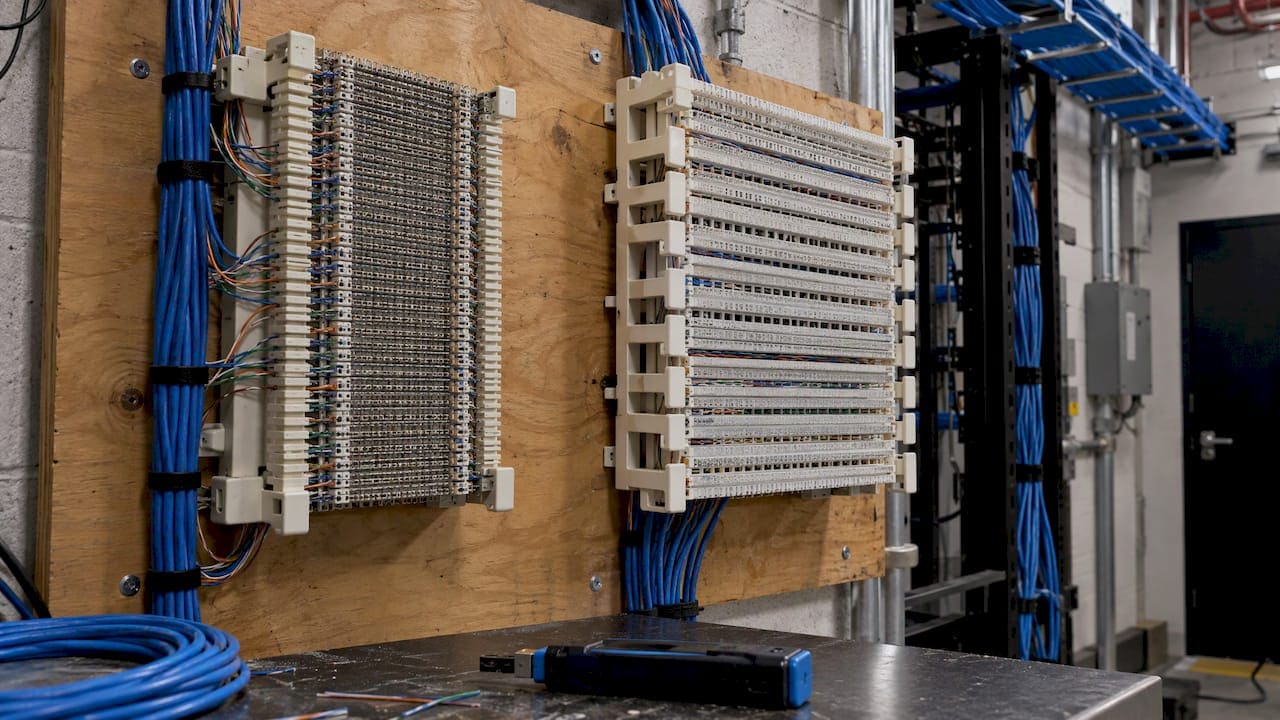
For any new data or VoIP work in a commercial office, specify 110 blocks, or better, a 110-style patch panel. The 66 block is a telephone-era termination. It belongs only where you are maintaining existing analog voice circuits, and it should not carry data. The rest of this guide explains why, how each block is terminated, what to do with the 66 blocks already hanging in your telecom room, and how the 2.5GbE versus 10GbE question changes what you put behind the blocks.
TL;DR
- 110 block: the structured-cabling standard for data and VoIP horizontal cabling, backbone pairs and patch panels. Choose it for all new work.
- 66 block: a legacy termination for Category 3 telephone wiring, analog PBX stations, and similar low-speed circuits. It is not intended for LAN use.
- Tools: one impact punch-down tool with interchangeable 110 and 66 blades handles both. Terminate with the cut side of the blade facing the wire end.
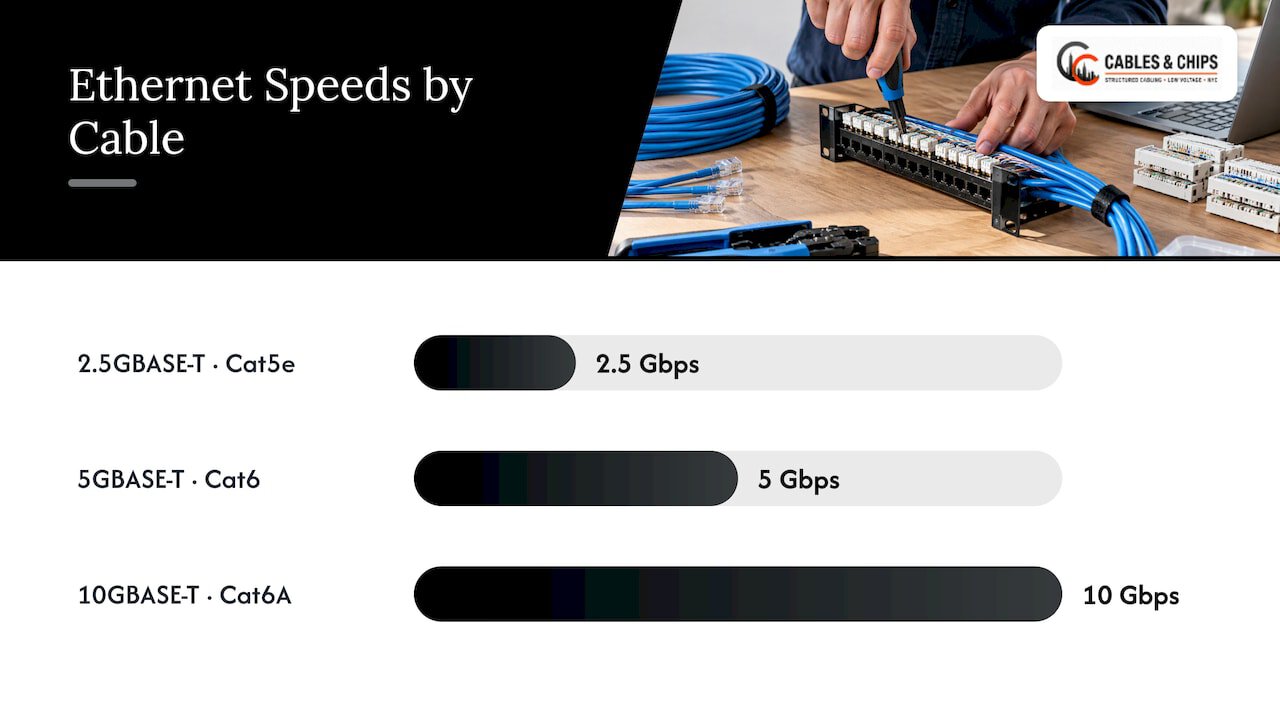
- Speed: 2.5GBASE-T runs 100 m on Cat5e, while 10GBASE-T needs Cat6A for the full 100 m. Termination hardware has to match the cable category you are targeting.
- Next step: have the closet surveyed before you decide what stays, what is removed and what is re-terminated.
What a 66 block and a 110 block actually are
A punch-down block is a termination point. Cable pairs are pressed into metal contacts with an impact tool, and the contacts strip the insulation and grip the copper. This is called insulation displacement. No screws, no soldering. Everything in a telecom room that is not a patch panel or a switch port is usually one of these blocks.
The two types come from different eras and different jobs.
The 66 block was built for telephone systems. Its rows of four punch-down positions are wired so that each side is a permanently connected pair: the outside positions terminate the cable pairs, the inside positions terminate the cross-connect wires, and a bridging clip can connect across the row. That is how the FOA lab manual describes it, and the same manual uses 66 blocks for Category 3 telephone wiring and 110 blocks for LAN wiring. It also says the 66 block is never intended for LAN usage.
The 110 block was designed for higher-frequency signals. The wires sit in slots, and the block is built to preserve the pair twist close to the point of connection. You will find it as the rear termination of most patch panels, behind keystone jacks in wall plates, and as multi-pair cross-connect fields in the closet. It is the termination type the structured cabling standards assume for data.
Side by side
| 66 block | 110 block | |
|---|---|---|
| Designed for | Telephone (voice) circuits | Voice and data in structured cabling |
| Cable category it suits | Category 3 and below | Category 5e, 6 and 6A (match the hardware’s rating) |
| Layout | Rows of four positions, pairs bridged across the row | Slot-based contacts in a compact field |
| Typical use today | Legacy analog PBX and POTS lines, alarm and building-entry pairs | Horizontal data and VoIP runs, patch panels, keystone jacks, backbone pairs |
| Punch-down blade | 66 blade | 110 blade |
| Right choice for new data work | No | Yes |
The practical rule is simple. If a circuit carries Ethernet, it terminates on 110-style hardware. If it carries a plain analog line that has always lived on a 66 block, it can stay there until it is retired.
Why 66 blocks fail data runs
Twisted pairs work because the twist cancels interference. Every inch of untwisted wire at a termination weakens that cancellation, and the effect gets worse as signal frequency rises. Telephone-grade Category 3 tolerates a lot of sloppiness. Gigabit Ethernet does not.
Fluke Networks’ termination guidance puts numbers on it: for Category 5e and higher, pair twists should be maintained to within 13 mm (0.5 in) of the termination, compared with 75 mm (3 in) for Category 3. The FOA manual repeats the half-inch limit and adds that for Category 6 you should untwist as little as possible to avoid crosstalk and return-loss failures. A 66 block’s geometry, with its row layout and the way wires are dressed to it, does not hold pairs to that standard. A 110 block does.
The FOA manual also cites trade-press reports that as many as 80% of UTP installations fail to reach rated performance because of poor workmanship. That figure is a reminder that termination quality, not just cable quality, decides whether a link certifies.
The symptoms of a 66 block in a data path are familiar to IT teams:
- A run that passes a basic continuity check but fails certification on near-end crosstalk or return loss.
- Links that negotiate down to 100 Mbps or drop packets under load.
- Intermittent VoIP quality problems that nobody can reproduce on demand.
If you are chasing any of these, our guides on cable certification failures and intermittent cabling faults walk through the causes and fixes.
Where each block still earns its place
Where 110 is the answer
Use 110 hardware for:
- Horizontal cabling from the telecom room to workstation outlets, terminated on a 110-style patch panel at the closet end and a keystone jack at the work area.
- VoIP phones, which are Ethernet devices and ride the same Cat6 or Cat6A horizontal cabling as computers and access points.
- Wireless access point drops, cameras and access control controllers on the structured cabling plant.
- Multi-pair backbone feeders between floors, where a 110 cross-connect field makes the distribution organized and serviceable.
The Jim Hayes VDV Works training page describes 110-style blocks as the transfer point that joins cables in telecom closets and terminates cables on jacks and patch panels. That is exactly the role they play in a modern office.
Where 66 still appears
In older New York buildings, 66 blocks are common. They typically serve:
- Plain old telephone service (POTS) lines, including analog lines for elevators, alarms and emergency phones.
- Analog PBX station-side wiring from before the move to IP telephony.
- Building-entry cross-connects where carrier pairs arrive.
- Some fire-alarm and building-automation control circuits.
Those are legitimate uses. The mistake is not that a 66 block exists, but that it ends up in a path someone later assumes is data-capable. A tenant inherits a space, sees a plywood backboard full of blocks, and reuses pairs for new phones or access points without knowing what sits behind them.
Many larger buildings run a hybrid: 110 for data, 66 for the analog circuits that remain. That is fine, provided the two are labeled and documented so nobody confuses them.
How to terminate a 110 block correctly
Termination is where the block choice turns into a result you can certify. The steps below follow the manufacturer’s tool instructions and the FOA and Fluke guidance cited above.
- Prepare the cable. Remove only as much jacket as the hardware requires. Fluke advises following the connecting-hardware manufacturer’s strip-back instructions. Strip too much and you will be tempted to leave pairs untwisted.
- Keep the twist. Hold each pair twisted right up to the termination. For Category 5e and above, the limit is 13 mm (0.5 in). Do not untwist pairs to fan them out neatly.
- Seat the wires. Lay each conductor in its slot following the T568A or T568B color pattern for your site. Pick one scheme and use it everywhere.
- Set the tool. Use an impact punch-down tool with a 110 blade. The Klein Tools manual for its VDV427 tool says to use the LO force setting for all 110-type connections.
- Punch with the cut side facing the excess. The blade has a cutting side and a non-cutting side. For a new termination, the cutting knife must face the wire end so the excess is trimmed as the conductor seats. Use the non-cutting side only when adding a cross-connect that should not be trimmed.
- Verify seating. After punching, confirm that the wire is at the bottom of the slot between the contact blades.
- Certify the link. Test the finished channel or permanent link with a certification-grade tester, not just a wire-map tester.
A word on tools. A single impact tool with interchangeable blades can punch both 66 and 110 blocks, which is why you will see 110/66 combination tools. For 66 work, the procedure is similar, except the blade slides over a post rather than into a slot. Cheap tools sold for other block styles, such as Krone, are not interchangeable, so match the blade to the block.
The small errors that cause most callbacks are the same ones every time: too much jacket removed, twists opened past half an inch, a dull blade that fails to cut cleanly, and mixed T568A and T568B on the two ends of one run. They are quick to make and slow to find after the ceiling is closed.
Block or patch panel?
The search results for this topic mix up two related things, so it helps to separate them. A punch-down block terminates cable and lets you connect circuits by punching cross-connect wire. A patch panel terminates the same permanent cable at its rear, usually with 110-style contacts, and presents jacks at the front so you connect with a patch cord instead.
Cabling Installation & Maintenance has long made the operational case for patch panels: they make moves, adds and changes simpler because technicians reconfigure with plugs instead of removing and re-punching wires, while wall-mounted blocks can suit rooms with wall space but little floor space.
For a commercial office the choice usually follows the use:
- Data and VoIP horizontal runs: patch panel in a rack, so every change is a patch cord move and the permanent cable is never disturbed.
- Analog voice and legacy pairs: wall-mounted 66 or 110 field, kept small and labeled.
- Backbone multi-pair cabling: 110 cross-connect field, documented pair by pair.
Panel design, labeling and port counts have their own best practices. See our guides to patch panels in networks, patch panel design for office networks, enterprise patch panel options and how to label patch panels.
What to do with the 66 blocks already in your closet
Most office moves and renovations in older buildings start with a closet that has decades of layers. Here is a sensible order of work.
- Identify what is live. Trace each 66 field to the circuits it serves. Analog lines for alarms, elevators and fax or emergency phones often hide on old blocks.
- Separate voice from data. Any data circuit found on a 66 block is a candidate for re-termination on 110 hardware with certified cable behind it.
- Retire what is abandoned. Unused blocks and dead cable add clutter and make troubleshooting harder. Abandoned cable removal is part of the closet cleanup.
- Leave what must stay. Active analog circuits can remain on a 66 field until the service is retired. Label the field clearly.
- Document. Record each block, each pair count, each destination. A closet that cannot be read by the next technician will be rebuilt later at higher cost.
- Test and certify the new work and keep the results with the as-built documents.
The low voltage punch list for project managers covers the closeout checks, and why cable testing matters before use explains why certification results belong in the handover package.
2.5GbE vs 10GbE: what it means for your blocks and cable
Once you commit to 110 termination, the next question is usually the speed of the link behind it. Access points and workstations increasingly offer multi-gigabit ports, so many teams ask whether to plan for 2.5GbE or 10GbE.
The cable category sets the answer. A campus cabling reference from the Network Startup Resource Center tabulates the IEEE 802.3 twisted-pair standards:
| Speed | Standard | Minimum cable | Notes |
|---|---|---|---|
| 2.5 Gbps | 2.5GBASE-T | Category 5e | Full 100 m |
| 5 Gbps | 5GBASE-T | Category 6 | Full 100 m |
| 10 Gbps | 10GBASE-T | Category 6A | Cat6 reaches 10 Gbps only to about 55 m |
The NBASE-T specification was written so that 2.5 and 5 Gbps run up to 100 m over installed Cat5e, Cat6, Cat6A and Cat7 cabling, which is why multi-gig is attractive for offices that already have a good copper plant. Zyxel’s multi-gigabit overview makes the same point: multi-gig ports auto-detect speeds from 100 Mbps to 10 Gbps, and existing Cat5e or Cat6 can be reused rather than re-cabled.
What this means in practice:
- 2.5GbE is the practical upgrade for most office floors. Wireless access points and desktop connections gain headroom over 1 Gbps without a new cable pull, as long as the existing cable is sound and certified.
- 10GbE is the right design target for new horizontal runs that must last, for servers, storage, and dense wireless deployments. Specify Cat6A so the full 100 m channel is covered. Our guide to Cat6A versus Cat7 covers the specification, and Cat6A versus fiber helps when distances or backbone needs go beyond copper.
- The block or panel is part of the channel. A 110 panel or jack rated below the cable is the weak link. Match the termination hardware to the category you plan to run.
- The switch matters too. A switch without multi-gig ports holds the link at 1 Gbps, and downstream switches in the path need the same capability.
The 100 m figure is a channel budget, not a cable length: under ANSI/TIA-568 it covers up to 90 m of permanent horizontal cable plus patch cords. Long runs in large floor plates can use up that margin quickly, so pull and test accordingly.
One point for anyone retrofitting: if a link will be asked to carry 2.5 or 5 Gbps on older Cat5e, a basic wire-map check does not prove that it can. Certification-grade testing against the target standard does. See our page on cable testing and certification.
Choosing in six questions
Use this short decision list when you are speccing a closet or reviewing a contractor’s scope.
- Does the circuit carry Ethernet, VoIP, PoE or video? Use 110 hardware, in a patch panel or jack.
- Is it an analog line that already lives on a 66 block? Leave it, label it, and plan its retirement.
- What cable category is behind it? The termination hardware must be rated equal or higher.
- How often will it change? Frequent moves favor patch panels over punched cross-connects.
- Is there floor space for a rack? If not, a wall-mounted 110 field may fit better, with careful labeling.
- Who will inherit this? If documentation and test results are not part of the deliverable, the next owner will pay for them.
Our view from the closet
We build and repair telecom rooms across New York City, and our advice on this question is short: do not let the block type be an afterthought. In commercial work, 110 termination is the default for anything that touches the network, and the 66 block is something to manage and retire, not extend.
What separates a closet that lasts from one that gets redone is rarely the cable. It is the termination discipline: pairs kept twisted to the termination, a consistent color scheme, labeled ports, and a certification report at the end. We have spent more than 40 years in commercial environments in New York, and we design our installations to be clean, documented and organized so the next IT manager can read them without guesswork.
If your space has old 66 fields, abandoned cable, or an MDF or IDF nobody wants to open, treat that as a scoping item at the start of the project, not a surprise at the end. A site survey answers it in a visit.
Ken
Have the closet surveyed before you commit
If you are moving into a space, expanding, or replacing old cabling, we handle the full scope: structured CAT6 and CAT6A cabling, cable testing and certification, MDF and IDF cleanup, abandoned cable removal and server rack installation. We are licensed and insured, we are based at 20 Vesey Street in Lower Manhattan, and we offer a no-obligation site survey. See all of our low voltage services, or schedule a site survey to have the existing blocks traced and the new work scoped.
If your plan includes IP phones, our VoIP installation work covers the cabling behind them, and our guide to VoIP infrastructure cabling options helps IT managers compare approaches.
FAQ
Can I run Ethernet over a 66 block?
It is not recommended. The 66 block was designed for Category 3 telephone wiring, and the FOA manual says it is never intended for LAN usage. Pair geometry matters at Ethernet frequencies, and 66 hardware does not keep pairs twisted close to the termination. Use 110-style hardware and certify the link.
Do 110 and 66 blocks use the same punch-down tool?
One impact tool with interchangeable blades can punch both. You change the blade: a 110 blade for 110 blocks, a 66 blade for 66 blocks. The blade has a cutting side and a non-cutting side, so check that the cutting side faces the wire end when making a new termination.
Is a 110 block the same as a patch panel?
No. A 110 block is a termination field where pairs are cross-connected with punched wire. A patch panel terminates permanent cable at its rear, often with 110-style contacts, and gives you jacks at the front for patch cords. In a rack with frequent changes, a patch panel is easier to manage.
Do I need Cat6A to run 10GbE?
For a full 100 m channel, yes. Category 6A is the minimum cable for 10GBASE-T at that distance, while Category 6 reaches 10 Gbps only for roughly 55 m or less. 2.5GBASE-T, by contrast, runs on Category 5e. Termination hardware should be rated to match.
What should I do with old 66 blocks during an office renovation?
Trace what each block serves, move any data circuits to 110 termination, keep active analog lines labeled until they are retired, and remove abandoned cable. Document the result and test the new links. That sequence keeps the closet serviceable for the next team.
Sources
- Hands-on Lab Manual for FOA Certification Classes
- Terminating a Category 6, 5e and 5 connector, Fluke Networks
- Klein Tools VDV427-821 and VDV427-822 manual
- VDV Works Virtual Hands-On Training, UTP Termination
- Blocks and patch panels gear up for gigabit traffic, Cabling Installation & Maintenance
- Campus Network Cabling, Network Startup Resource Center
- NBASE-T Physical Layer Specification, Ethernet Alliance
- Multi-Gigabit, Zyxel Networks